# Connect to Deployment using React via MQTT.js SDK
This article mainly introduces how to use MQTT.js in a web application built on the React framework, and implement the connection, subscription, messaging, unsubscribing and other functions between the client and MQTT broker.
## Prerequisites
Before connecting your web application to the EMQX Cloud using the React client, ensure you have completed the following prerequisites:
- Deploy MQTT broker
- Create a React application
### Deploy MQTT Broker
### Creating a React Application
Reference link: [https://reactjs.org/docs/getting-started.html](https://reactjs.org/docs/getting-started.html)
- Creating new React applications with `Create React App`
```shell
npx create-react-app react-mqtt-test
```
If you need to use TypeScript, simply add the --template typescript parameter at the end of the command line
```shell
npx create-react-app react-mqtt-test --template typescript
```
Then add the TypeScript type library required in the React project
```shell
npm install --save typescript @types/node @types/react @types/react-dom @types/jest
# or
yarn add typescript @types/node @types/react @types/react-dom @types/jest
```
The use of TypeScript will not be the focus of the examples in this article, but if you wish to use it, you can add TypeScript features after referring to the creation example and the full code examples.
- Import via CDN
```html
```
## Install Dependencies
[MQTT.js](https://github.com/mqttjs/MQTT.js) is a fully open-source client-side library for the MQTT protocol, written in JavaScript and available for Node.js and browsers. For more information and usage of `MQTT.js`, please refer to the [MQTT.js GitHub](https://github.com/mqttjs/MQTT.js#table-of-contents).
MQTT.js can be installed via NPM or Yarn, or can be imported through CDN or relative path. This example will install MQTT.js through NPM command. Directly importing files is more suitable for projects that use React through CDN.
1. Installation via the command line, either using the npm or yarn command (one or the other)
```shell
npm install mqtt --save
# or
yarn add mqtt
```
2. Import via CDN
```html
```
3. Download to the local and then import using the relative path
```html
```
## Connect over WebSocket Port
You can set a client ID, username, and password with the following code. The client ID should be unique.
```js
const clientId = "emqx_react_" + Math.random().toString(16).substring(2, 8);
const username = "emqx_test";
const password = "emqx_test";
```
You can establish a connection between the client and the MQTT broker using the following code:
```js
const client = mqtt.connect("ws://broker.emqx.io:8083/mqtt", {
clientId,
username,
password,
// ...other options
});
```
## Connect over WebSocket Secure Port
If TLS/SSL encryption is enabled, the connection [parameter options](https://github.com/mqttjs/MQTT.js#mqttclientstreambuilder-options) are the same as for establishing a connection via the WebSocket port, you just need to be careful to change the protocol to `wss` and match the correct port number.
You can establish a connection between the client and the MQTT broker using the following code:
```js
const client = mqtt.connect("wss://broker.emqx.io:8084/mqtt", {
clientId,
username,
password,
// ...other options
});
```
## Subscribe and Publish
### Subscribe to Topics
Specify a topic and the corresponding [QoS level](https://www.emqx.com/zh/blog/introduction-to-mqtt-qos) to be subscribed.
```javascript
const mqttSub = (subscription) => {
if (client) {
const { topic, qos } = subscription
client.subscribe(topic, { qos }, (error) => {
if (error) {
console.log('Subscribe to topics error', error)
return
}
console.log(`Subscribe to topics: ${topic}`)
setIsSub(true)
})
}
}
```
### Unsubscribe to Topics
You can unsubscribe using the following code, specifying the topic and corresponding QoS level to be unsubscribed.
```javascript
const mqttUnSub = (subscription) => {
if (client) {
const { topic, qos } = subscription
client.unsubscribe(topic, { qos }, (error) => {
if (error) {
console.log('Unsubscribe error', error)
return
}
console.log(`unsubscribed topic: ${topic}`)
setIsSub(false)
})
}
}
```
### Publish Messages
When publishing a message, the MQTT broker must be provided with information about the target topic and message content.
```javascript
const mqttPublish = (context) => {
if (client) {
const { topic, qos, payload } = context;
client.publish(topic, payload, { qos }, (error) => {
if (error) {
console.log("Publish error: ", error);
}
});
}
};
```
### Receive Messages
The following code listens for message events and prints the received message and topic to the console when a message is received.
```js
client.on("message", (topic: string, message) => {
console.log(`received message: ${message} from topic: ${topic}`);
});
```
### Disconnect from MQTT Broker
To disconnect the client from the broker, use the following code:
```javascript
const mqttDisconnect = () => {
if (client.connected) {
try {
client.end(false, () => {
setConnectStatus('Connect')
console.log('disconnected successfully')
})
} catch (error) {
console.log('disconnect error:', error)
}
}
}
```
The above section only shows some key code snippets, for the full project code, please refer to [MQTT Client - React](https://github.com/emqx/MQTT-Client-Examples/tree/master/mqtt-client-React). You can download and try it out yourself.
## Test the Connection
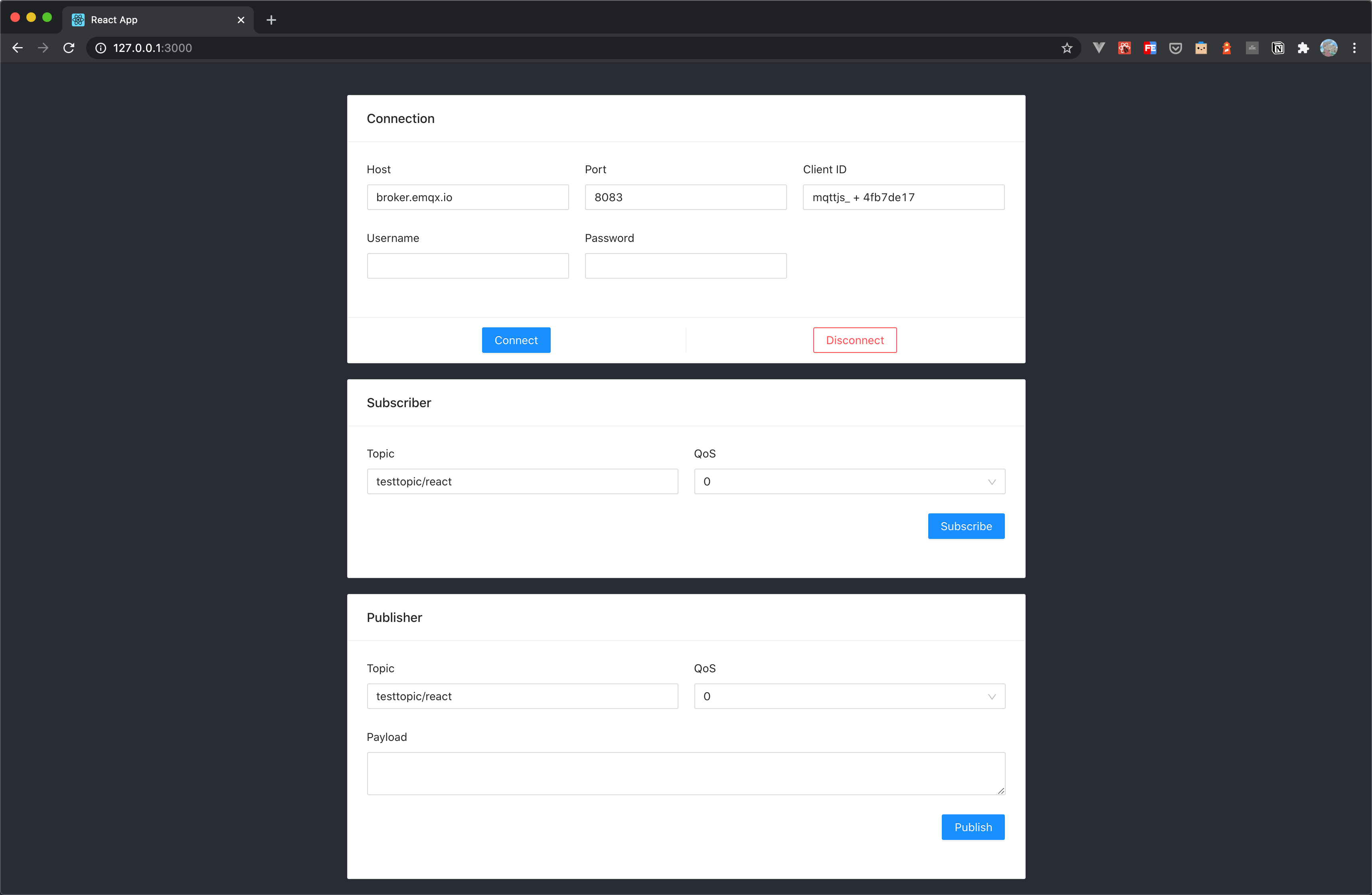
We have written the following simple browser application using React with the ability to create connections, subscribe to topics, send and receive messages, unsubscribe, and disconnect.
Use [MQTT 5.0 client tool - MQTTX](https://mqttx.app/) as another client to test sending and receiving messages.
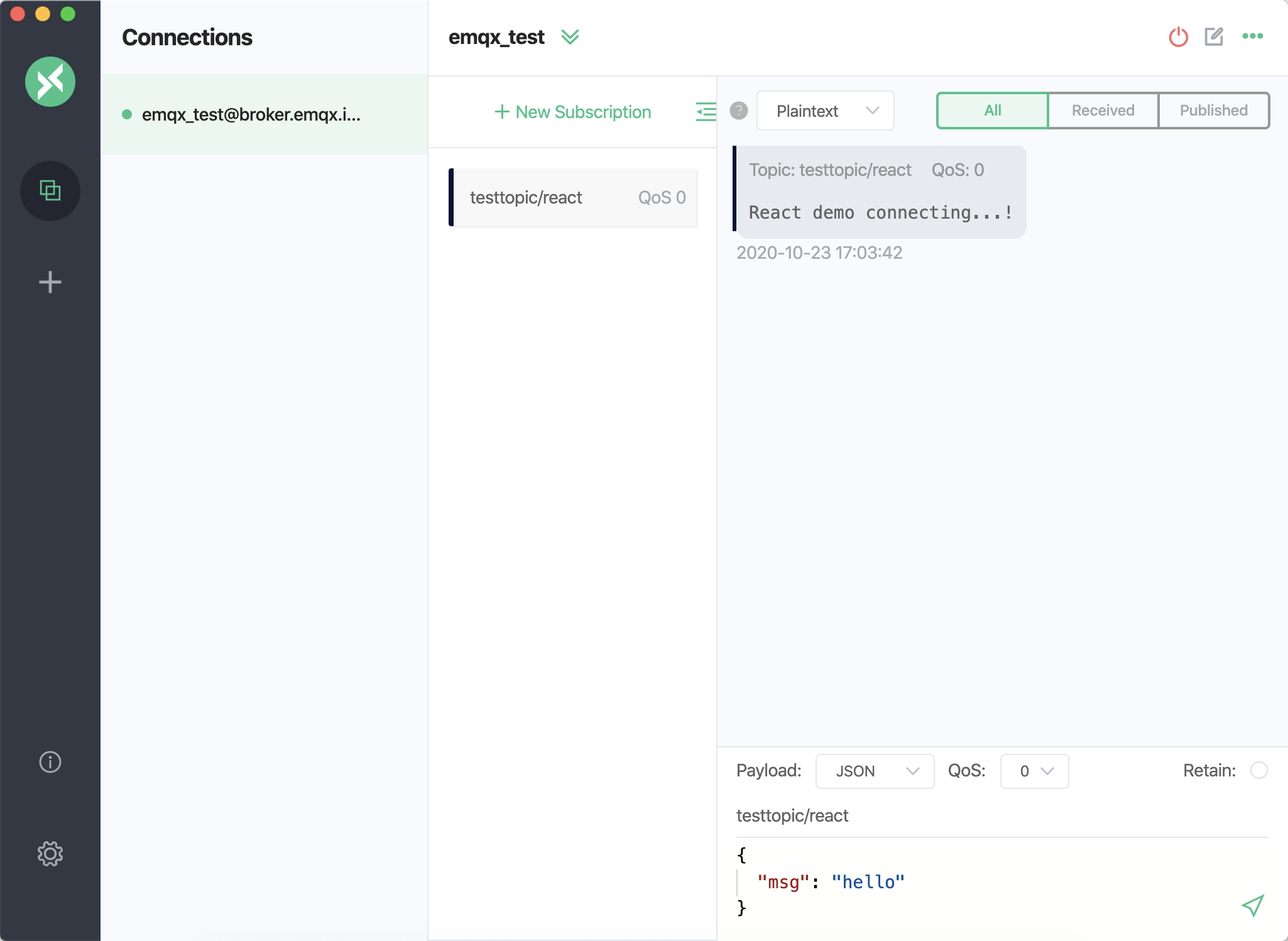
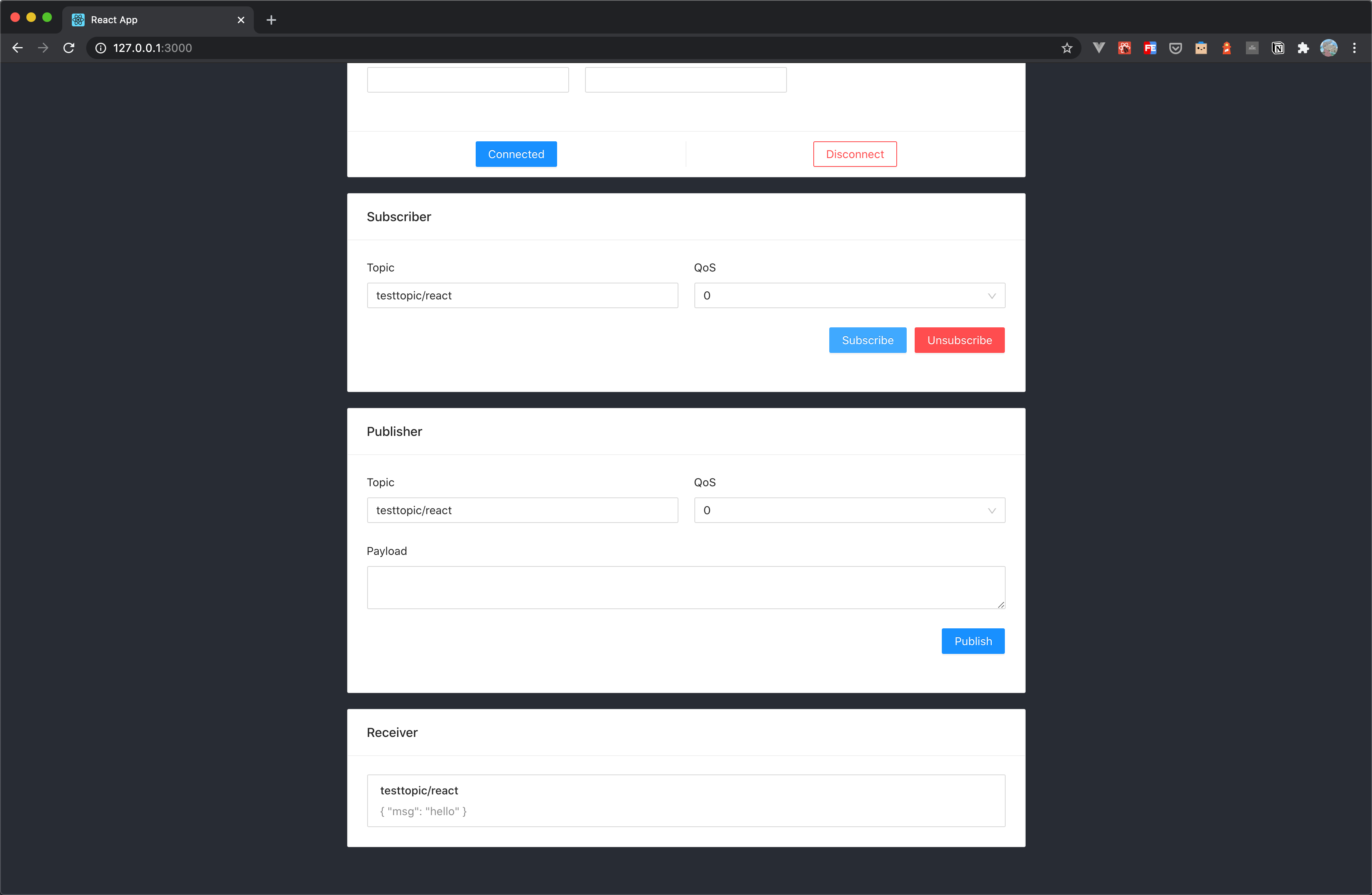
You can see that MQTTX can receive messages from the browser side normally, as can be seen when sending a message to the topic using MQTTX.
## FAQ
1. How to use self-signed certificates? How to use two-way TLS/SSL authentication?
Due to the browser limitations, it is not supported temporarily. For more details, please refer to the MQTT.js issue: [How to use TLS/SSL two-way authentication connections in browser?](https://github.com/mqttjs/MQTT.js/issues/1515) and [Two-way authentication is available in Node.js, but not supported in browsers](https://github.com/mqttjs/mqtt.js/issues/741).
## More
In conclusion, we have implemented creating MQTT connections in a React project and simulated scenarios of subscribing, publishing messages, unsubscribing, and disconnecting between clients and MQTT servers.
In this article, we use React v18.2.0, so the Hook Component feature will be used as example code to demonstrate, or if required, you can refer to the `ClassMqtt` component in the full example code to use the Class Component feature for project building.
You can download the complete example source code on the [MQTT Client - React page](https://github.com/emqx/MQTT-Client-Examples/tree/master/mqtt-client-React), and we also welcome you to explore more demo examples in other languages on the [MQTT Client example page](https://github.com/emqx/MQTT-Client-Examples).