启用 Core-Replicant 部署
目标
- 通过
coreTemplate字段配置 EMQX 集群的 Core 节点。 - 通过
replicantTemplate字段配置 EMQX 集群的 Replicant 节点。
Core 和 Replicant 节点
EMQX 集群中的节点可具有两种角色之一:Core 节点或 Replicant 节点。
Core 节点负责集群中的数据持久化。
Core 节点是共享集群状态的权威数据源,包括路由表、MQTT 客户端通道、保留消息、集群配置、告警和 Dashboard 用户凭据等。
Replicant 节点设计为无状态节点,不参与数据库操作。
添加或删除 Replicant 节点不会影响集群数据的冗余度。
典型 EMQX 集群中 Core 与 Replicant 节点之间的通信如下图所示:
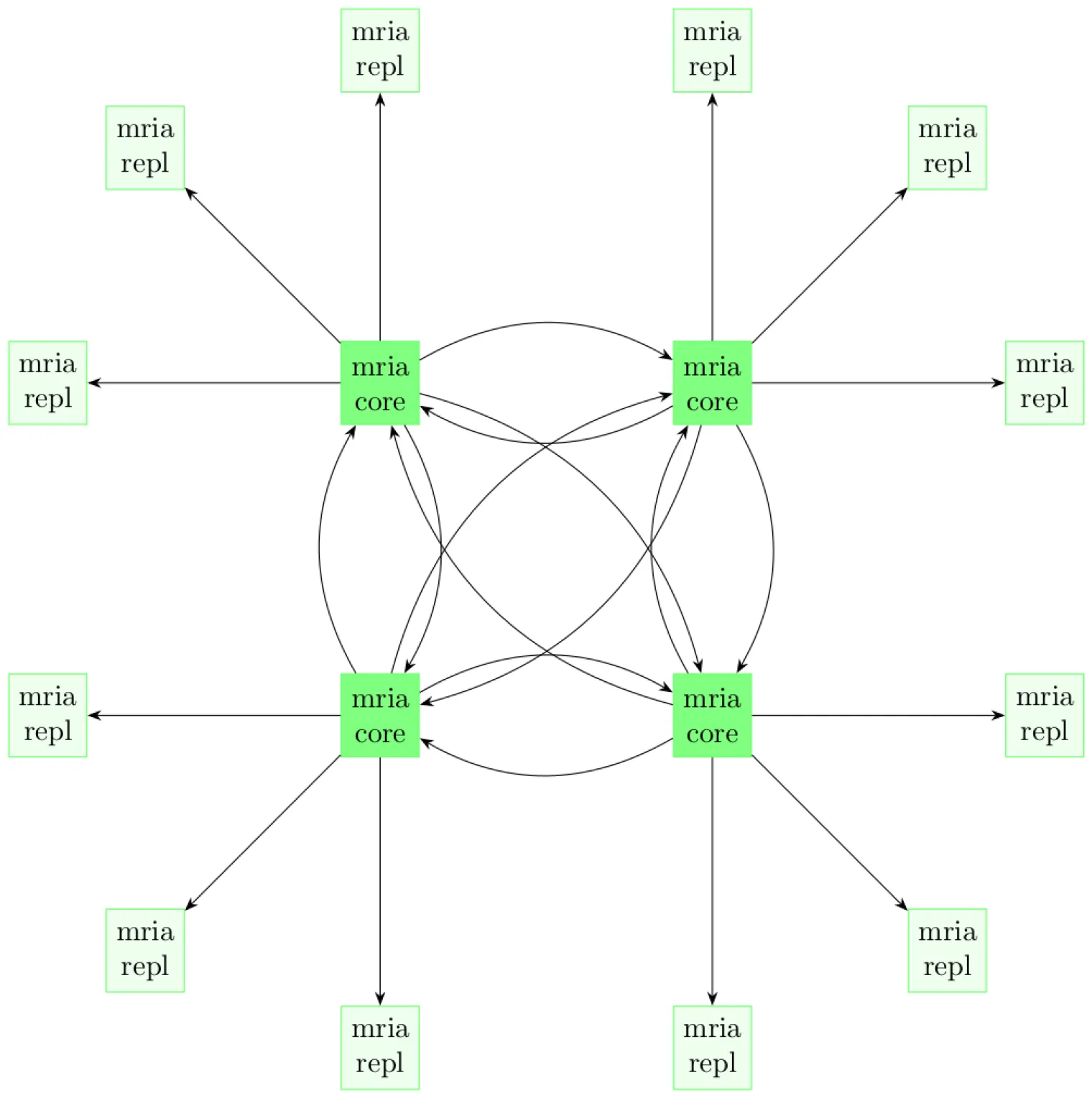
有关 EMQX Core-Replicant 架构的更多信息,请参阅集群架构。
TIP
- EMQX 集群中必须至少有一个 Core 节点。
- 启用 Replicant 节点时,EMQX Operator 3.0 要求至少有两个 Core 节点,以便执行滚动更新。
- 为实现高可用,建议运行至少三个 Core 节点。
配置 EMQX 集群
EMQX CRD apps.emqx.io/v3beta1 支持通过 .spec.coreTemplate 配置 EMQX 集群的 Core 节点,并通过 .spec.replicantTemplate 配置 Replicant 节点。
将以下内容保存为 YAML 文件,并使用
kubectl apply部署。yamlapiVersion: apps.emqx.io/v3beta1 kind: EMQX metadata: name: emqx spec: image: emqx/emqx:6.3.2 config: roots: license: key: "..." coreTemplate: spec: replicas: 2 resources: requests: cpu: 250m memory: 512Mi replicantTemplate: spec: replicas: 3 resources: requests: cpu: 250m memory: 1Gi dashboardServiceTemplate: spec: type: LoadBalancer在上述示例中,EMQX CR 定义了一个由两个 Core 节点和三个 Replicant 节点组成的 EMQX 集群。
Core 节点至少需要 512Mi 内存,Replicant 节点至少需要 1Gi 内存。可以根据实际业务负载调整这些限制。通常由 Replicant 节点接收所有客户端请求,因此 Replicant 节点可能需要更多资源,以承载大量并发连接。
EMQX Operator 通过 Kubernetes
scale子资源公开 Replicant 副本数,使 HorizontalPodAutoscaler 可以在 Core-Replicant 模式下管理 Replicant 节点集的伸缩。等待 EMQX 集群就绪。使用
kubectl get检查 EMQX 集群状态,并确保STATUS为Ready。此过程可能需要一些时间。bash$ kubectl get emqx emqx NAME STATUS AGE emqx Ready 10m
验证 EMQX 集群
可以通过 EMQX CR 的 .status 字段查看集群中所有节点的信息。
$ kubectl get emqx emqx -o json | jq .status.clusterNodes
[
  {
    "name": "emqx@emqx-core-0.emqx-headless.default.svc.cluster.local",
    "podName": "emqx-core-0",
    "status": "running",
    "otpRelease": "27.3.4.2-6/15.2.7.1",
    "role": "core",
    "version": "6.3.2",
    "sessions": 0,
    "connections": 0
  },
  {
    "name": "emqx@emqx-core-1.emqx-headless.default.svc.cluster.local",
    "podName": "emqx-core-1",
    "status": "running",
    "otpRelease": "27.3.4.2-6/15.2.7.1",
    "role": "core",
    "version": "6.3.2",
    "sessions": 0,
    "connections": 0
  },
  {
    "name": "emqx@10.244.4.56",
    "podName": "emqx-replicant-adcdef012-0",
    "status": "running",
    "otpRelease": "27.3.4.2-6/15.2.7.1",
    "role": "replicant",
    "version": "6.3.2",
    "sessions": 42,
    "connections": 42
  },
  {
    "name": "emqx@10.244.4.57",
    "podName": "emqx-replicant-adcdef012-1",
    "status": "running",
    "otpRelease": "27.3.4.2-6/15.2.7.1",
    "role": "replicant",
    "version": "6.3.2",
    "sessions": 11,
    "connections": 11
  },
  {
    "name": "emqx@10.244.4.58",
    "podName": "emqx-replicant-adcdef012-2",
    "status": "running",
    "otpRelease": "27.3.4.2-6/15.2.7.1",
    "role": "replicant",
    "version": "6.3.2",
    "sessions": 13,
    "connections": 13
  }
]