Authorization via HTTP Query
The HTTP authorization method delegates access-control decisions to an external HTTP service. When a client attempts to publish or subscribe, EMQX Edge sends an HTTP request to a configured URL. If the server responds with HTTP 200, the action is allowed; otherwise, it is denied.
This method supports dynamic, fine-grained access control without restarting EMQX Edge.
How It Works
EMQX Edge sends an HTTP request for each publish or subscribe attempt, using the method, URL, headers, and parameters you configure. The authorization server evaluates the request and returns a 200 response to allow the action, or any other status code to deny it.
Example: A client with ID sensor-01 and username sensor-user attempts to publish to topic home/temp. With the following parameter configuration:
| Key | Value |
|---|---|
clientid | %c |
username | %u |
topic | %t |
access | %A |
EMQX Edge fills in the placeholders and sends:
POST http://127.0.0.1:8991/mqtt/acl
Content-Type: application/x-www-form-urlencoded

clientid=sensor-01&username=sensor-user&topic=home%2Ftemp&access=2
The authorization server checks its rules and responds with HTTP 200 to allow the publish, or any other status code to deny it.
ACL Cache TTL
To reduce the number of HTTP requests sent to the authorization server, EMQX Edge supports caching authorization results. When ACL Cache TTL is set to a non-zero value, the result of an authorization request is cached for the specified duration. Any subsequent request with the same parameters within that window returns the cached result immediately, without sending a new HTTP request to the server.
For example, setting ACL Cache TTL to 30s means that once a client's subscribe or publish request is authorized, the same operation is allowed for 30 seconds without re-querying the server.
To configure ACL Cache TTL, click the Settings button on the Extended tab of the Authorization page.
Setting it to 0 (default) disables caching, so every authorization decision triggers a new HTTP request.
Configure via Dashboard
- In the EMQX Edge Dashboard, go to Authorization > Extended.
- Enable HTTP or HTTP Super User using the toggle in the Enable column.
- Click the edit icon in the Actions column to open the configuration form.
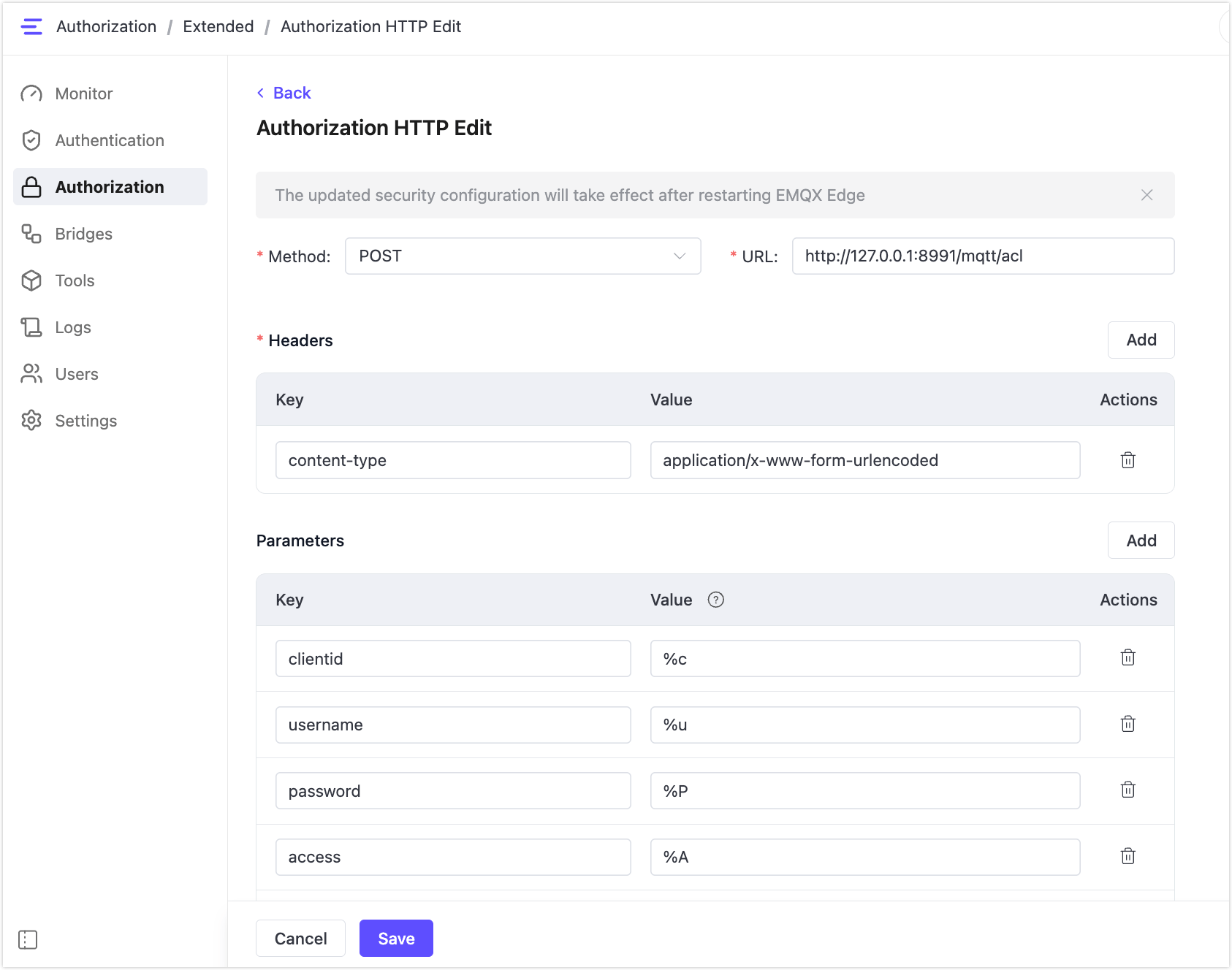
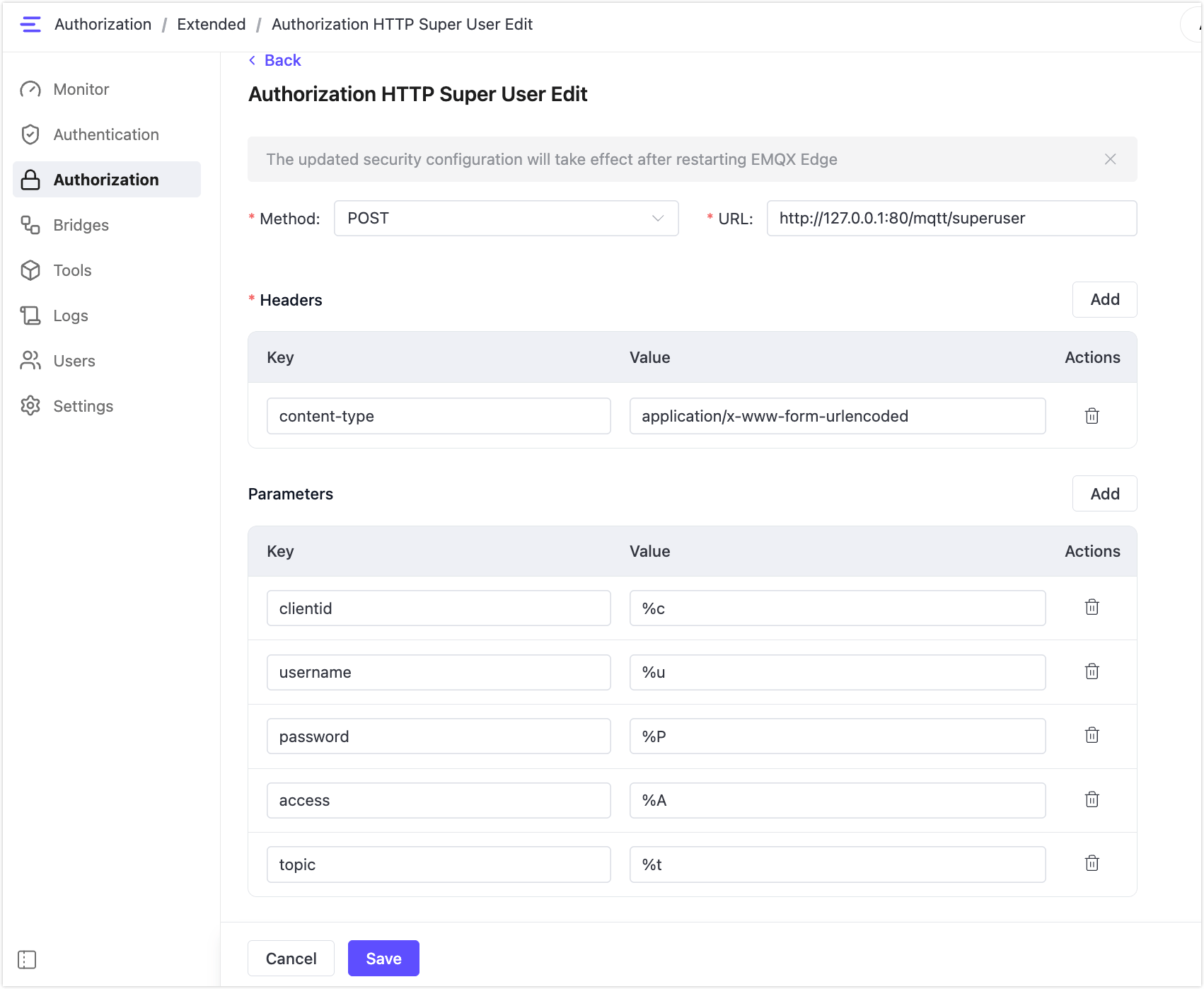
- Fill in the Method, URL, Headers, and Parameters fields.
- Click Save.
HTTP Authorization
Configure this to authorize publish and subscribe actions:
HTTP Super User
Configure this to grant superuser privileges via HTTP. A super user bypasses topic-level ACL checks.
Configuration Reference
Method
The HTTP request method. Accepted values: POST or GET. Default: POST.
URL
The URL of your authorization server endpoint. Example: http://127.0.0.1:8991/mqtt/acl.
Headers
HTTP request headers to include with each authorization request.
| Key | Description |
|---|---|
content-type | Media type of the request body. Use application/x-www-form-urlencoded or application/json. |
accept | Optional. You can also include headers such as cookie or date. |
Parameters
Parameters used to construct the request body (for POST) or query string (for GET).
HTTP Authorization
| Key | Placeholder | Description |
|---|---|---|
clientid | %c | MQTT Client ID |
username | %u | Username |
password | %P | Password |
access | %A | Permission to be verified: 1 for subscribe, 2 for publish |
topic | %t | The topic the client is attempting to publish to or subscribe to. |
ipaddr | %a | Client's network IP address |
mountpoint | %m | Mount point |
common | %C | Common Name in client TLS certificate. Supported since EMQX Edge 1.4.0. |
subject | %d | Subject in client TLS certificate. Supported since EMQX Edge 1.4.0. |
Note
The following keys are defined in the interface but are not yet supported in this version: sockport, protocol.
HTTP Super User
| Key | Placeholder | Description |
|---|---|---|
clientid | %c | MQTT Client ID |
username | %u | Username |
password | %P | Password |
access | %A | Permission to be verified: 1 for subscribe, 2 for publish |
topic | %t | The topic the client is attempting to publish to or subscribe to. |