Authentication via HTTP Query
EMQX Edge supports HTTP-based authentication, which allows you to delegate client identity verification to an external HTTP server. When a client connects, EMQX Edge sends a request to your authentication server. If the server responds with HTTP 200, the client is allowed to connect; any other status code rejects the connection.
How It Works
When a client sends a CONNECT packet, EMQX Edge constructs an HTTP request using the configured method, headers, and parameters, then sends it to the configured URL.
Example: A client with ID sensor-01 and username sensor-user attempts to connect. With the following parameter configuration:
| Key | Value |
|---|---|
clientid | %c |
username | %u |
password | %P |
EMQX Edge fills in the placeholders and sends:
POST http://127.0.0.1:80/mqtt/auth
Content-Type: application/x-www-form-urlencoded

clientid=sensor-01&username=sensor-user&password=secret
The authentication server checks the credentials and responds with HTTP 200 to allow the connection, or any other status code to reject it.
Note
Changes to HTTP authentication configuration take effect after restarting EMQX Edge.
Configure via Dashboard
HTTP authentication is available under the Extended tab in Authentication. It is automatically enabled when you navigate to that tab.
- In the EMQX Edge Dashboard, go to Authentication > Extended.
- Click the edit icon in the Actions column.
- Configure the Method, URL, Headers, and Parameters.
- Click Save.
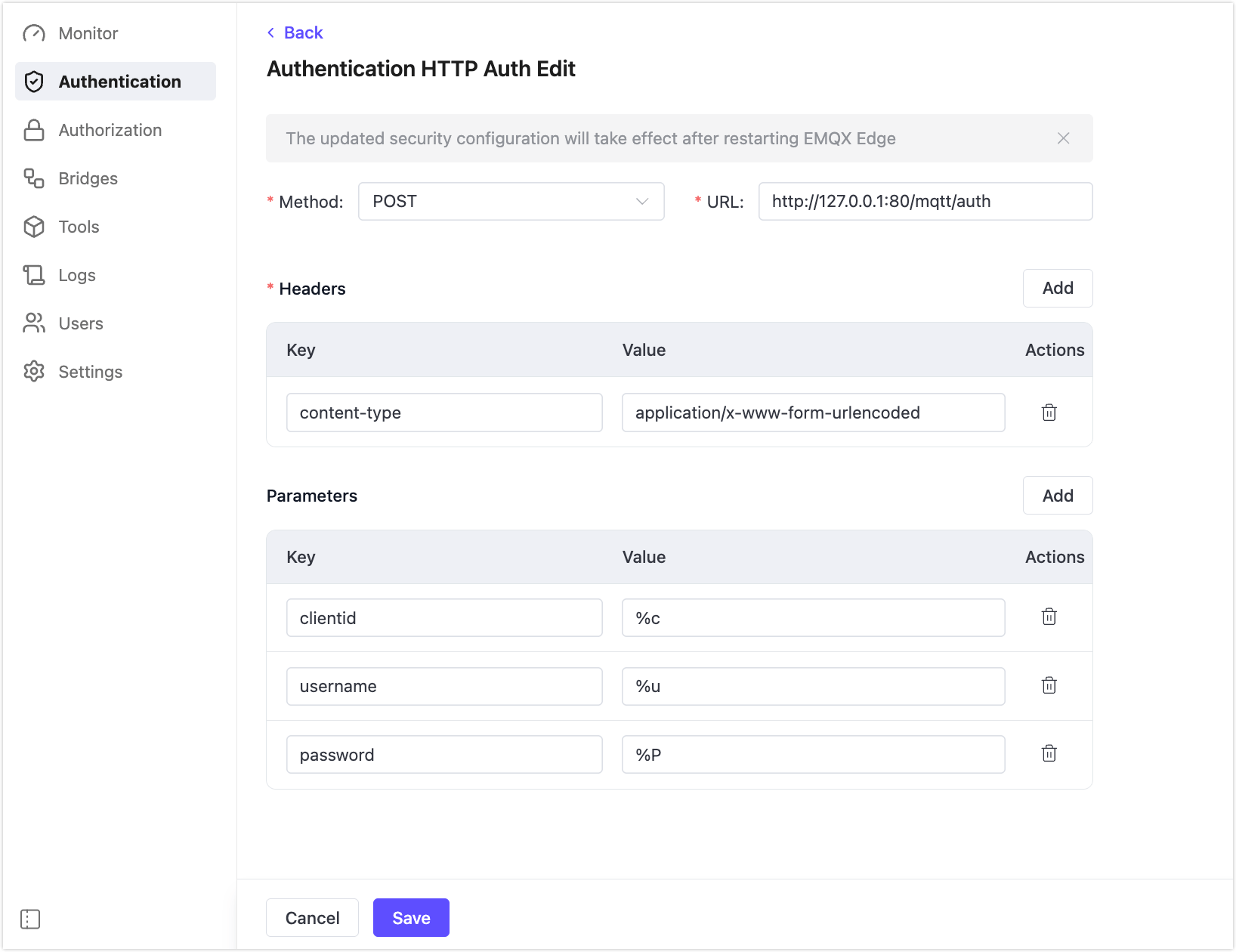
Method
Specifies the HTTP request method. Accepted values: POST or GET. Default: POST.
URL
Specifies the URL of your HTTP authentication server. Example: http://127.0.0.1:80/mqtt/auth.
Headers
Specifies key-value pairs to include in the HTTP request header.
| Key | Description |
|---|---|
content-type | Media type of the request body. Use application/x-www-form-urlencoded or application/json. |
accept | Optional. You may also add other headers such as cookie or date. |
Parameters
Specifies the parameters used to construct the request body (POST) or query string (GET). Each parameter is a key-value pair where the value is a placeholder that EMQX Edge replaces at runtime.
| Key | Placeholder | Description |
|---|---|---|
clientid | %c | MQTT Client ID |
username | %u | Username |
password | %P | Password |