Built-in File Authentication
EMQX Edge supports built-in file-based authentication, which enables clients to log in using a simple username and password pair. This method complies with the MQTT protocol specification for authentication, allowing brokers to authenticate clients based on their login credentials provided in the CONNECT packet.
How It Works
When a client sends a CONNECT request with a username and password, EMQX Edge verifies the credentials against a local authentication source. If a matching username and password pair is found, the client is successfully authenticated and allowed to connect.
This approach is simple, lightweight, and ideal for scenarios where authentication through an external authentication service is not required.
Authentication Configuration Methods
You can define built-in authentication credentials in one of two ways:
Use a Separate Password File
Create a local password file (e.g., nanomq_pwd.conf) using the following format:
admin: public
client: test123
This example defines two username/password pairs: admin/public and client/test123.
Then, include the password file in your EMQX Edge configuration (nanomq.conf) using the include directive:
auth {
  allow_anonymous = false
  password = {include "/etc/nanomq_pwd.conf"}
}
This setup instructs EMQX Edge to load authentication credentials from the specified password file.
Define Credentials Inline
Alternatively, you can configure the credentials directly in the nanomq.conf file using the auth.passwd block:
auth {
  allow_anonymous = false
  password = {}

  acl = {}
}

auth.passwd {
  "admin": "public"
  "client": "test123"
}
This is useful for environments where central file management is not necessary, and you want to keep the authentication logic self-contained.
Password Requirements and Security Tips
- Usernames must be UTF-8 encoded strings, as required by the MQTT specification.
- Plain-text passwords are supported, but EMQX Edge also offers password encryption to improve security. Enabling encryption requires additional tooling. Contact EMQX for setup assistance.
- If
allow_anonymous = false, only clients with valid credentials will be permitted to connect unless overridden by authorization rules.
Configure Built-in File Authentication via Dashboard
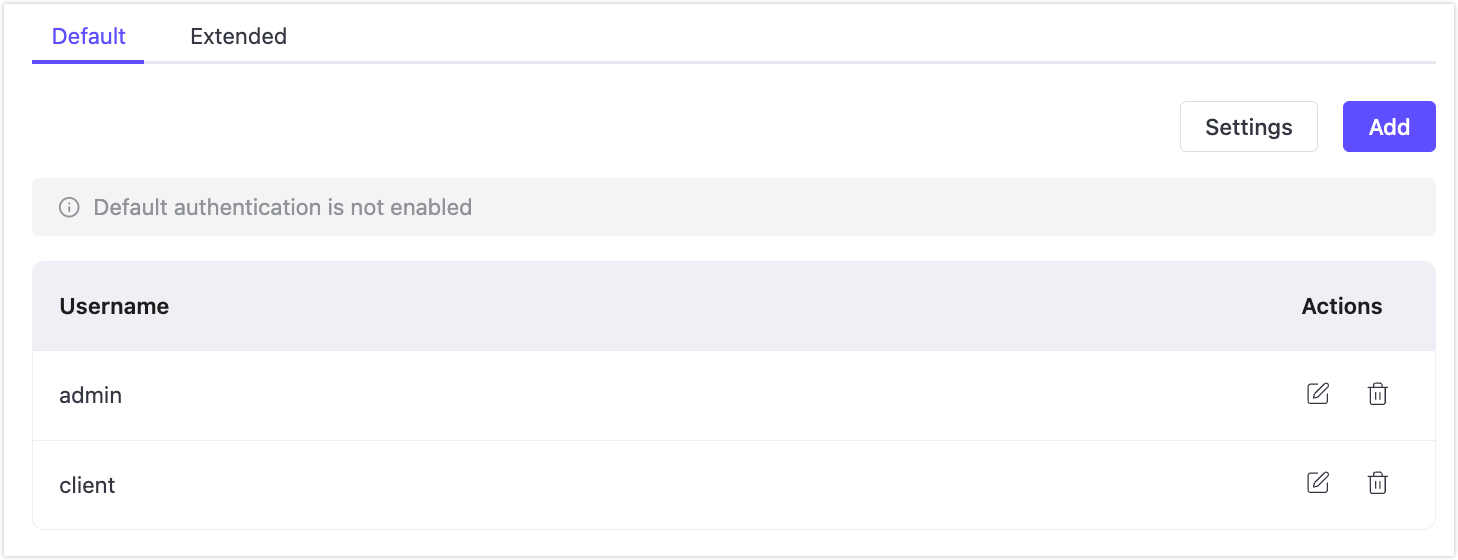
- In the EMQX Edge Dashboard, go to Authentication > Default.
- Click Settings and enable Enable Default Authentication. This is disabled by default.
- Click Add, and enter a username and password pair.
- Click Confirm.
The newly added credentials will appear in the list. You can remove a user by clicking the delete icon in the Actions column.
Configure Built-in File Authentication via Configuration File
You can configure built-in file authentication either by editing the nanomq.conf file directly or by navigating to Settings > All Configurations in the Dashboard. For full details on configuration items, see Basic Authentication Configuration Example.