Console Settings
Open Settings from the left navigation of the Device Agent console. The page contains six tabs: MQTT, Models, Voice, Channels, Permissions, and Webhook.
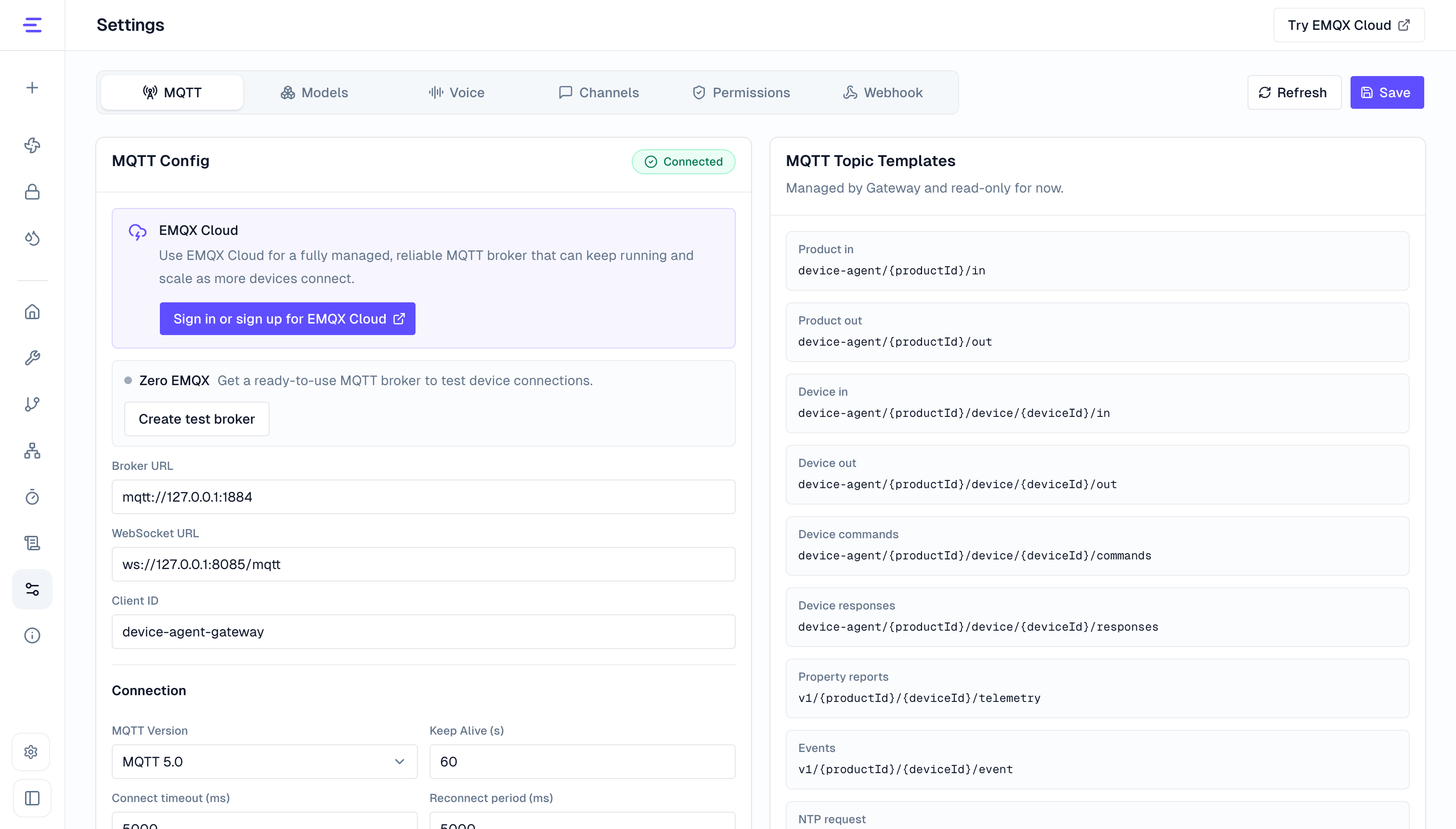
MQTT
The MQTT tab configures how Device Agent connects to the MQTT broker. It also shows the current gateway MQTT connection status.
| Area | Settings | Notes |
|---|---|---|
| Endpoints | Broker URL, WebSocket URL, Client ID | brokerUrl is used by the gateway and device-side clients; wsUrl is used by the browser for MQTT over WebSocket. |
| Connection | MQTT version, Keep Alive, connect timeout, auto reconnect, reconnect period, Clean Start, session expiry | Session expiry is shown for MQTT 5. |
| Auth | Username, password | Matches the MQTT broker authentication settings. |
| TLS | TLS switch, certificate verification, CA, client certificate, client key, key passphrase, Server Name | Uploaded certificate files are stored under certificates in the runtime home. |
| Topic templates | Text requests, device commands, command responses, telemetry, events, NTP | Read-only in the current UI. Use .env or the config file to change topic templates. |
After saving MQTT settings in the console, the Gateway reconnects with the new configuration. Restart after changing .env or the config file directly. For broker options and Zero EMQX setup, see MQTT Broker.
Models
The Models tab contains the primary agent model and the vision model.
| Area | Settings | Notes |
|---|---|---|
| Agent model | Provider, model, API key, max iterations, Base URL | Used for device modeling, chat, tool calls, and device control. Model options reflect the current runtime environment. |
| Codex auth | Access token or ~/.codex/auth.json | Shown when the provider is openai-codex. |
| Vision model | Enabled state, provider, model, API key, timeout | Used for camera images, screenshots, and multimodal input analysis. |
The vision provider can be auto or dashscope. auto reuses the primary agent model when it supports image input; dashscope requires a separate model and API key. For LLM providers, .env fields, Ollama, and Codex authentication, see LLM Configuration.
Voice
The Voice tab configures the voice channel and speech provider. Copy Voice connection URL for browser, mobile, or device clients.
| Setting | Notes |
|---|---|
| Voice enabled | Controls whether the voice channel is available. |
| Voice connection URL | Copy this value for browser, mobile, or device clients. |
| Bind host and port | Defaults to 127.0.0.1:3001; for remote access, set VOICE_HOST=0.0.0.0 in .env. |
| Speech provider | Supports Volcengine, Alibaba Cloud DashScope, AWS, and ElevenLabs. |
| Region | Limits eligible providers. Supported values are cn, us, eu, and global. |
| Speech recognition | ASR model, resource ID, or language settings, depending on provider. |
| Text-to-speech | TTS model, voice, and sample rate, depending on provider. |
| Provider credentials | API key, access key, AWS credentials, or equivalent provider secrets. |
Provider, model, voice, and credential changes can be saved from the page. Enable state, bind host, port, or TLS changes require a service restart; for remote access and .env examples, see Voice Configuration.
Channels
The Channels tab enables and configures common third-party chat platforms. The current console supports:
| Channel | Main Settings |
|---|---|
| Feishu | App ID, App Secret, Encrypt Key, Verification Token, allow list |
| DingTalk | Client ID, Client Secret, allow list |
| Discord | Bot Token, allow list |
| Telegram | Bot Token, allow list |
| Slack | Bot Token, App Token, Signing Secret, allow list |
allowFrom limits which users or conversation sources can access the device agent. Multiple values can be separated by commas or new lines. Channels are loaded at startup, so restart Device Agent after saving channel changes.
See IM Access for platform-specific setup.
Permissions
The Permissions tab controls local tool permissions for device agents.
| Permission | Notes |
|---|---|
tool_editor | Allows saving and deleting tool editor extensions. |
write_file | Allows agents to write local files. |
execute_command | Allows agents to run commands. |
allowedPrefixes | Restricts command execution to allowed prefixes such as pwd, ls, or rg. |
The page edits the saved permissions.tools configuration. If ENABLE_TOOL_EDITOR_MUTATIONS, ENABLE_FILE_WRITE_TOOL, ENABLE_EXECUTE_COMMAND_TOOL, or ALLOWED_EXEC_COMMAND_PREFIXES is set in .env, startup writes that value into config.json the same way as other configuration sections.
Webhook
The Webhook tab manages reusable outbound notification connections for Agent conversations and workflows.
| Area | Settings | Notes |
|---|---|---|
| Connection | Name, service, HTTPS Webhook URL | Presets are available for Lark, DingTalk, Slack, and Discord; use Custom Webhook for another service. |
| Authentication | Signing method, signing secret, optional headers | Used for destination signing or authentication. |
| Message format | JSON body template | The destination template supports the {{message}} variable. |
| Delivery result | Optional response path and expected value | Without a response condition, any 2xx response is successful. |
You can save, test, enable, disable, edit, and delete connections without restarting Device Agent. A test sends a real message. A connection cannot be deleted while a workflow refers to it. For setup steps, presets, and delivery limits, see Webhook.