启用 Core-Replicant 部署
目标
- 通过
coreTemplate字段配置 EMQX 集群 Core 节点。 - 通过
replicantTemplate字段配置 EMQX 集群 Replicant 节点。
Core 和 Replicant 节点
EMQX 集群中的节点可以具有两种角色之一:Core 节点和 Replicant 节点。
- Core 节点负责集群中的数据持久化,并作为共享集群状态的权威来源,例如路由表、MQTT 客户端通道、保留消息、集群配置、告警、Dashboard 用户凭据等。
- Replicant 节点被设计为无状态的,不参与数据库操作。添加或删除 Replicant 节点不会影响集群数据的冗余。
典型 EMQX 集群中 Core 和 Replicant 节点之间的通信如下图所示:
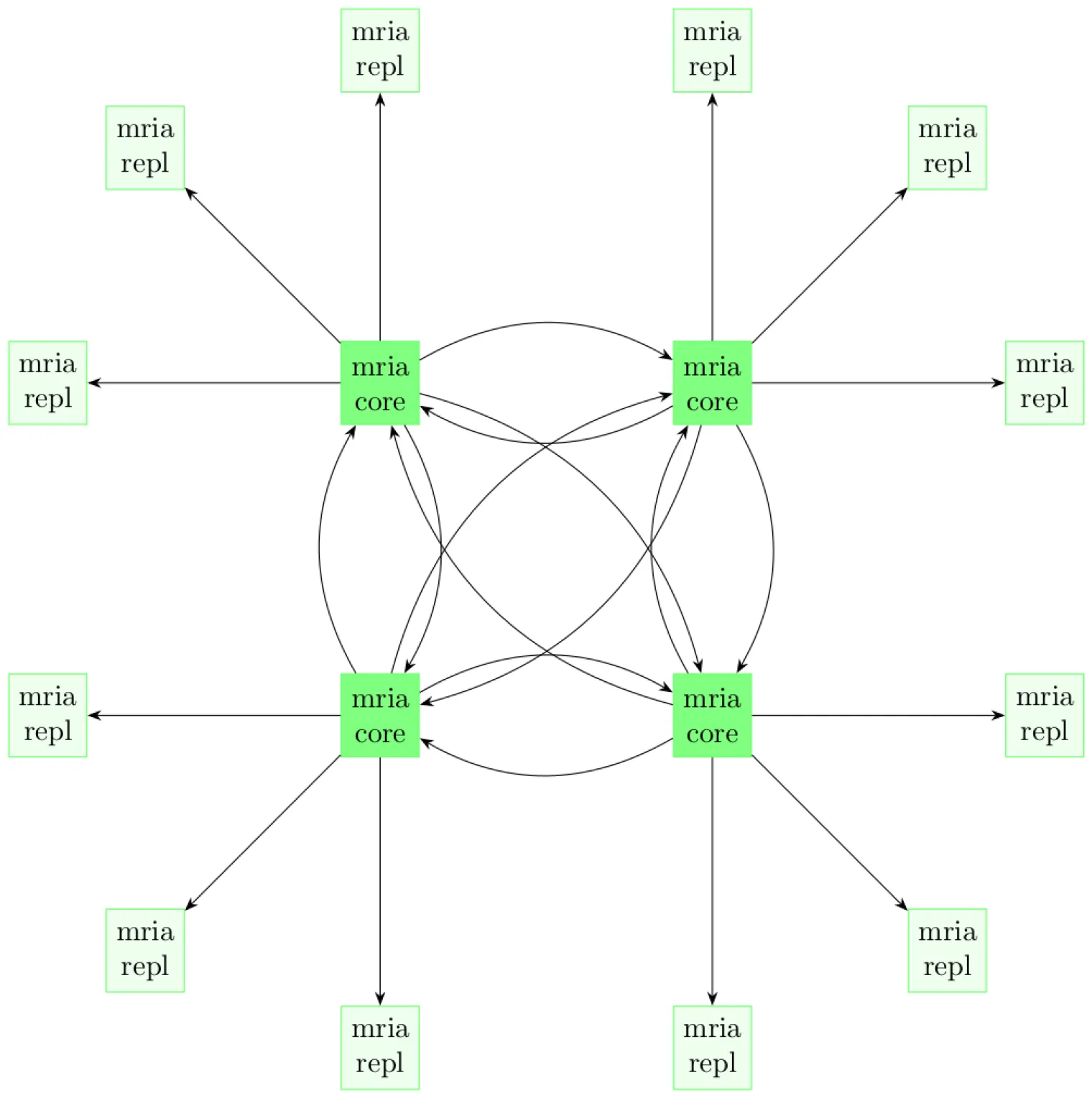
有关 EMQX Core-Replicant 架构的更多信息,请参阅集群架构文档。
TIP
EMQX 集群中必须至少有一个 Core 节点。为了高可用性,EMQX Operator 建议 EMQX 集群至少有三个 Core 节点。
配置 EMQX 集群
EMQX CRD apps.emqx.io/v2 支持通过 .spec.coreTemplate 字段配置 EMQX 集群的 Core 节点,并通过 .spec.replicantTemplate 字段配置 EMQX 集群的 Replicant 节点。
将以下内容保存为 YAML 文件,并使用
kubectl apply部署。yamlapiVersion: apps.emqx.io/v2 kind: EMQX metadata: name: emqx spec: image: emqx/emqx:6.3.0 config: data: | license { key = "..." } coreTemplate: spec: replicas: 2 resources: requests: cpu: 250m memory: 512Mi replicantTemplate: spec: replicas: 3 resources: requests: cpu: 250m memory: 1Gi dashboardServiceTemplate: spec: type: LoadBalancer在上面的示例中,EMQX CR 定义了一个由两个 Core 节点和三个 Replicant 节点组成的 EMQX 集群。
Core 节点至少需要 512Mi 内存,Replicant 节点至少需要 1Gi 内存。您可以根据实际业务负载调整这些约束。通常,Replicant 节点接受所有客户端请求,因此 Replicant 节点所需的资源可能更高,以适应许多并发连接。
等待 EMQX 集群就绪。使用
kubectl get检查 EMQX 集群的状态,并确保STATUS为Ready。这可能需要一些时间。bash$ kubectl get emqx emqx NAME STATUS AGE emqx Ready 10m
验证 EMQX 集群
您可以通过检查 EMQX CR 的 .status 字段查看集群中所有节点的信息。
bash
$ kubectl get emqx emqx -o json | jq .status.coreNodes
[
  {
    "name": "emqx@emqx-core-adcdef012-0.emqx-headless.default.svc.cluster.local",
    "podName": "emqx-core-adcdef012-0",
    "status": "running",
    "otpRelease": "27.3.4.2-6/15.2.7.1",
    "role": "core",
    "version": "6.3.0",
    "sessions": 0,
    "connections": 0
  },
  {
    "name": "emqx@emqx-core-adcdef012-1.emqx-headless.default.svc.cluster.local",
    "podName": "emqx-core-adcdef012-1",
    "status": "running",
    "otpRelease": "27.3.4.2-6/15.2.7.1",
    "role": "core",
    "version": "6.3.0",
    "sessions": 0,
    "connections": 0
  }
]
bash
$ kubectl get emqx emqx -o json | jq .status.replicantNodes
[
  {
    "name": "emqx@10.244.4.56",
    "podName": "emqx-replicant-adcdef012-0",
    "status": "running",
    "otpRelease": "27.3.4.2-6/15.2.7.1",
    "role": "replicant",
    "version": "6.3.0",
    "sessions": 42,
    "connections": 42
  },
  {
    "name": "emqx@10.244.4.57",
    "podName": "emqx-replicant-adcdef012-1",
    "status": "running",
    "otpRelease": "27.3.4.2-6/15.2.7.1",
    "role": "replicant",
    "version": "6.3.0",
    "sessions": 11,
    "connections": 11
  },
  {
    "name": "emqx@10.244.4.58",
    "podName": "emqx-replicant-adcdef012-2",
    "status": "running",
    "otpRelease": "27.3.4.2-6/15.2.7.1",
    "role": "replicant",
    "version": "6.3.0",
    "sessions": 13,
    "connections": 13
  }
]