コア+レプリカントクラスターの有効化
目的
coreTemplateフィールドを通じて EMQX クラスターのコアノードを構成する。replicantTemplateフィールドを通じて EMQX クラスターのレプリカントノードを構成する。
コアノードとレプリカントノード
EMQX クラスター内のノードは、コアノードまたはレプリカントノードのいずれかの役割を持ちます。
- コアノードはクラスター内のデータ永続化を担当し、ルーティングテーブル、MQTT クライアントチャネル、保持メッセージ、クラスター構成、アラーム、ダッシュボードのユーザー認証情報などの共有クラスター状態の権威あるソースとして機能します。
- レプリカントノードはステートレスとして設計されており、データベース操作には参加しません。レプリカントノードの追加や削除はクラスターのデータ冗長性に影響を与えません。
典型的な EMQX クラスターにおけるコアノードとレプリカントノード間の通信は、以下の図のように示されます。
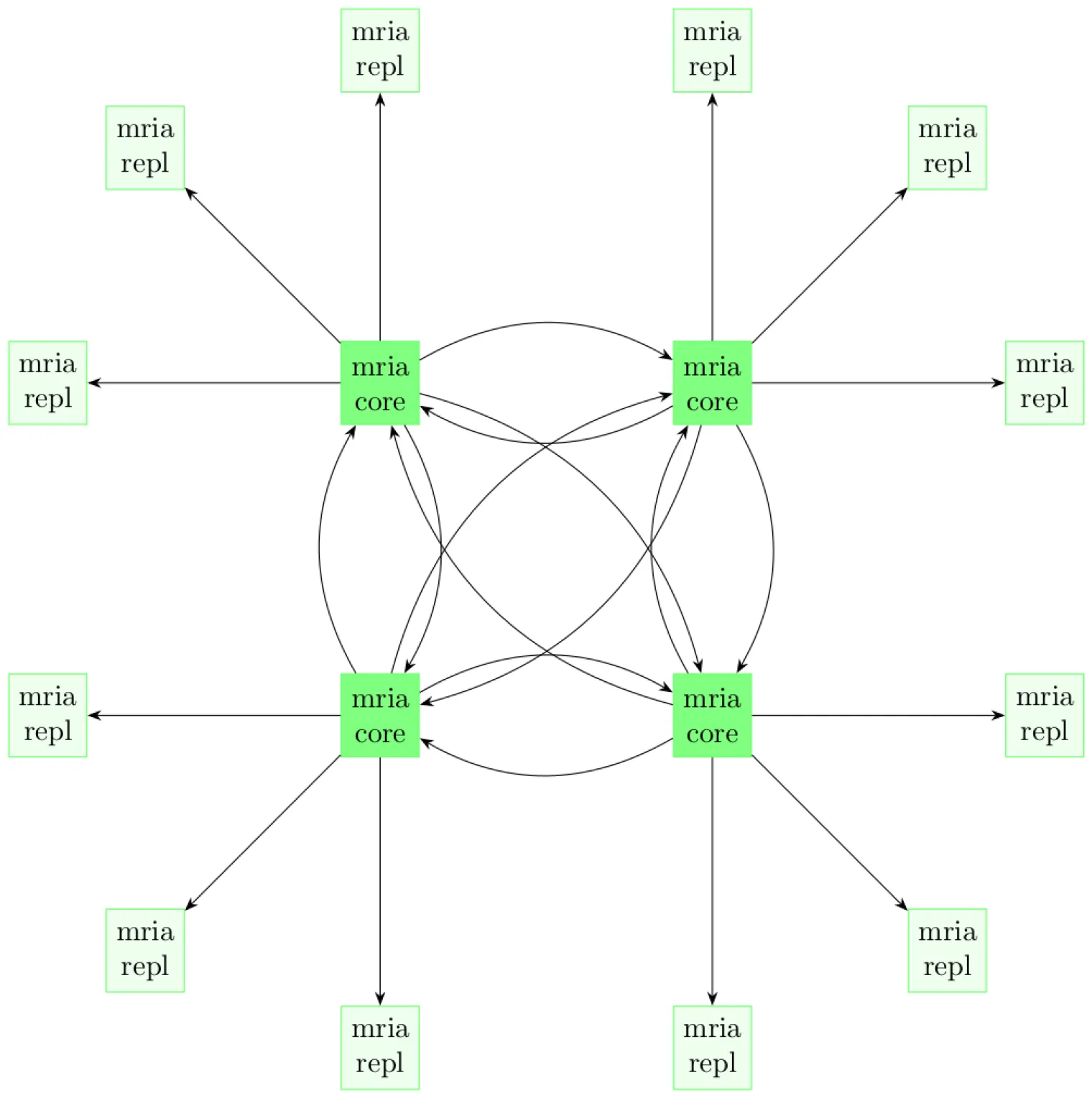
EMQX のコア・レプリカントアーキテクチャの詳細については、クラスターアーキテクチャドキュメントを参照してください。
TIP
EMQX クラスターには少なくとも1つのコアノードが必要です。高可用性を目的として、EMQX Operator は EMQX クラスターに少なくとも3つのコアノードを持つことを推奨しています。
EMQX クラスターの構成
EMQX CRD apps.emqx.io/v2 は、.spec.coreTemplate フィールドを通じて EMQX クラスターのコアノードを、.spec.replicantTemplate フィールドを通じてレプリカントノードを構成することをサポートしています。
以下の内容を YAML ファイルとして保存し、
kubectl applyでデプロイします。yamlapiVersion: apps.emqx.io/v2 kind: EMQX metadata: name: emqx spec: image: emqx/emqx:6.2.3 config: data: | license { key = "..." } coreTemplate: spec: replicas: 2 resources: requests: cpu: 250m memory: 512Mi replicantTemplate: spec: replicas: 3 resources: requests: cpu: 250m memory: 1Gi dashboardServiceTemplate: spec: type: LoadBalancer上記の例では、EMQX CR は2つのコアノードと3つのレプリカントノードからなる EMQX クラスターを定義しています。
コアノードは最低512Miのメモリが必要であり、レプリカントノードは最低1Giのメモリが必要です。これらの制約は実際のビジネス負荷に応じて調整可能です。一般的に、レプリカントノードはすべてのクライアントリクエストを受け入れるため、多数の同時接続に対応するためにレプリカントノードのリソースが多く必要になる場合があります。
EMQX クラスターが準備完了になるまで待ちます。
kubectl getコマンドで EMQX クラスターの状態を確認し、STATUSがReadyになっていることを確認してください。準備完了までに時間がかかる場合があります。bash$ kubectl get emqx emqx NAME STATUS AGE emqx Ready 10m
EMQX クラスターの確認
EMQX CR の .status フィールドを確認することで、クラスター内のすべてのノード情報を閲覧できます。
$ kubectl get emqx emqx -o json | jq .status.coreNodes
[
  {
    "name": "emqx@emqx-core-adcdef012-0.emqx-headless.default.svc.cluster.local",
    "podName": "emqx-core-adcdef012-0",
    "status": "running",
    "otpRelease": "27.3.4.2-6/15.2.7.1",
    "role": "core",
    "version": "6.2.3",
    "sessions": 0,
    "connections": 0
  },
  {
    "name": "emqx@emqx-core-adcdef012-1.emqx-headless.default.svc.cluster.local",
    "podName": "emqx-core-adcdef012-1",
    "status": "running",
    "otpRelease": "27.3.4.2-6/15.2.7.1",
    "role": "core",
    "version": "6.2.3",
    "sessions": 0,
    "connections": 0
  }
]$ kubectl get emqx emqx -o json | jq .status.replicantNodes
[
{
"name": "emqx@10.244.4.56",
"podName": "emqx-replicant-adcdef012-0",
"status": "running",
"otpRelease": "27.3.4.2-6/15.2.7.1",
"role": "replicant",
"version": "6.2.3",
"sessions": 42,
"connections": 42
},
{
"name": "emqx@10.244.4.57",
"podName": "emqx-replicant-adcdef012-1",
"status": "running",
"otpRelease": "27.3.4.2-6/15.2.7.1",
"role": "replicant",
"version": "6.2.3",
"sessions": 11,
"connections": 11
},
{
"name": "emqx@10.244.4.58",
"podName": "emqx-replicant-adcdef012-2",
"status": "running",
"otpRelease": "27.3.4.2-6/15.2.7.1",
"role": "replicant",
"version": "6.2.3",
"sessions": 13,
"connections": 13
}
]