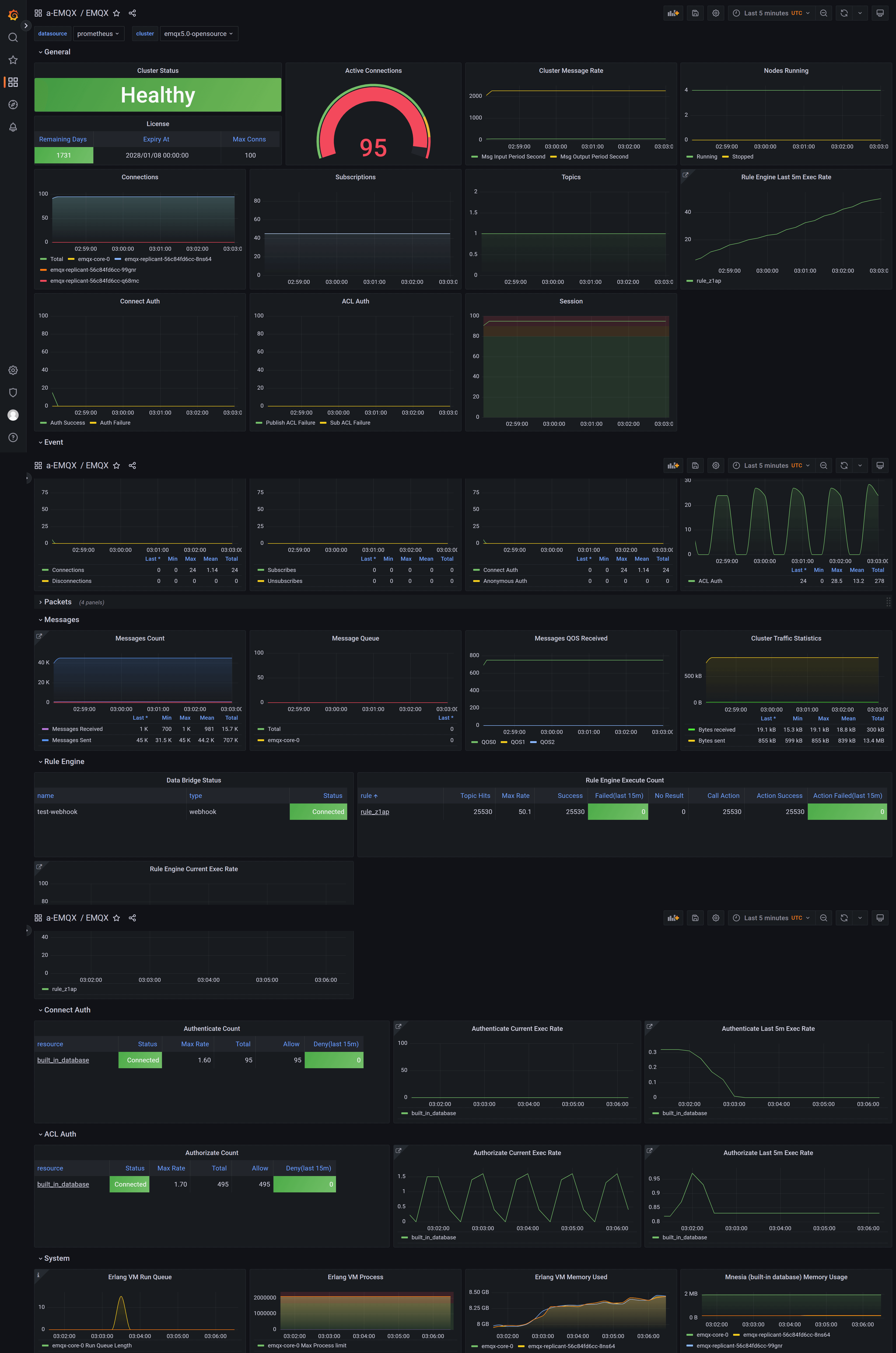
Prometheus と Grafana による EMQX クラスターの監視
目的
EMQX Exporter をデプロイし、Prometheus と Grafana を使って EMQX クラスターを監視します。
Prometheus と Grafana のデプロイ
- Prometheus のデプロイ方法については、Prometheus のドキュメントをご参照ください。
- Grafana のデプロイ方法については、Grafana のドキュメントをご参照ください。
EMQX クラスターのデプロイ
EMQX は Prometheus 互換の HTTP API を通じて様々なメトリクスを公開しています。
apiVersion: apps.emqx.io/v2
kind: EMQX
metadata:
  name: emqx
spec:
  image: emqx/emqx:6.2.3
  config:
    data: |
      license {
        key = "..."
      }
上記内容を emqx.yaml として保存し、以下のコマンドを実行して EMQX クラスターをデプロイします。
$ kubectl apply -f emqx.yaml
emqx.apps.emqx.io/emqx created
EMQX クラスターのステータスを確認し、STATUS が Ready になっていることを確認してください。完了までに時間がかかる場合があります。
$ kubectl get emqx emqx
NAME   STATUS   AGE
emqx   Ready    10m
API シークレットの作成
Prometheus は EMQX ダッシュボード API からメトリクスを取得するため、ダッシュボードにサインインして API シークレットを作成 してください。
EMQX Exporter のデプロイ
emqx-exporter は EMQX の Prometheus API で公開されていない一部のメトリクスを公開するために設計されています。
apiVersion: v1
kind: Service
metadata:
  labels:
    app: emqx-exporter
  name: emqx-exporter-service
spec:
  ports:
    - name: metrics
      port: 8085
      targetPort: metrics
  selector:
    app: emqx-exporter
---
apiVersion: apps/v1
kind: Deployment
metadata:
  name: emqx-exporter
  labels:
    app: emqx-exporter
spec:
  selector:
    matchLabels:
      app: emqx-exporter
  replicas: 1
  template:
    metadata:
      labels:
        app: emqx-exporter
    spec:
      securityContext:
        runAsUser: 1000
      containers:
        - name: exporter
          image: emqx-exporter:latest
          imagePullPolicy: IfNotPresent
          args:
            # "emqx-dashboard-service-name" はオペレーターが 18083 ポートを公開するために作成したサービス名です
            - --emqx.nodes=${emqx-dashboard-service-name}:18083
            - --emqx.auth-username=${paste_your_new_api_key_here}
            - --emqx.auth-password=${paste_your_new_secret_here}
          securityContext:
            allowPrivilegeEscalation: false
            runAsNonRoot: true
          ports:
            - containerPort: 8085
              name: metrics
              protocol: TCP
          resources:
            limits:
              cpu: 100m
              memory: 100Mi
            requests:
              cpu: 100m
              memory: 20Mi
引数 "--emqx.nodes" には、オペレーターが 18083 ポートを公開するために作成したサービス名を設定してください。サービス名は
kubectl get svcコマンドで確認できます。
上記内容を emqx-exporter.yaml として保存し、--emqx.auth-username と --emqx.auth-password を作成した API シークレットに置き換えてください。以下のコマンドで emqx-exporter をデプロイします。
kubectl apply -f emqx-exporter.yamlemqx-exporter Pod のステータスを確認します。
$ kubectl get po -l="app=emqx-exporter"
NAME                            STATUS   AGE
emqx-exporter-856564c95-j4q5v   Running  8m33s
Prometheus 監視の設定
Prometheus Operator は PodMonitor と ServiceMonitor CRD を使い、Pod やサービスの監視方法を動的に定義します。
apiVersion: monitoring.coreos.com/v1
kind: PodMonitor
metadata:
  name: emqx
  labels:
    app.kubernetes.io/name: emqx
spec:
  podMetricsEndpoints:
    - interval: 5s
      path: /api/v5/prometheus/stats
      # emqx ダッシュボードの containerPort 名
      port: dashboard
      relabelings:
        - action: replace
          # ユーザー定義のクラスター名、ユニークである必要があります
          replacement: emqx5
          targetLabel: cluster
        - action: replace
          # 固定値、変更しないでください
          replacement: emqx
          targetLabel: from
        - action: replace
          # 固定値、変更しないでください
          sourceLabels: ['pod']
          targetLabel: "instance"
  selector:
    matchLabels:
      # emqx Pod のラベルと同じです
      apps.emqx.io/instance: emqx
      apps.emqx.io/managed-by: emqx-operator
  namespaceSelector:
    matchNames:
      # EMQX クラスターが別のネームスペースにデプロイされている場合は修正してください
      #- default
---
apiVersion: monitoring.coreos.com/v1
kind: ServiceMonitor
metadata:
  name: emqx-exporter
  labels:
    app: emqx-exporter
spec:
  selector:
    matchLabels:
      # emqx-exporter サービスのラベルと同じです
      app: emqx-exporter
  endpoints:
    - port: metrics
      interval: 5s
      path: /metrics
      relabelings:
        - action: replace
          # ユーザー定義のクラスター名、ユニークである必要があります
          replacement: emqx5
          targetLabel: cluster
        - action: replace
          # 固定値、変更しないでください
          replacement: exporter
          targetLabel: from
        - action: replace
          # 固定値、変更しないでください
          sourceLabels: ['pod']
          regex: '(.*)-.*-.*'
          replacement: $1
          targetLabel: "instance"
        - action: labeldrop
          # 固定値、変更しないでください
          regex: 'pod'
  namespaceSelector:
    matchNames:
      # exporter が別のネームスペースにデプロイされている場合は修正してください
      #- default
path は指標収集インターフェースのパスを示します。EMQX 5 では /api/v5/prometheus/stats です。selector.matchLabels はマッチする Pod のラベルを示し、apps.emqx.io/instance: emqx となっています。
targetLabel の cluster の値は現在のクラスター名を表し、ユニークである必要があります。
上記内容を monitor.yaml として保存し、以下のコマンドを実行してください。
$ kubectl apply -f monitor.yamlPrometheus での EMQX 指標の確認
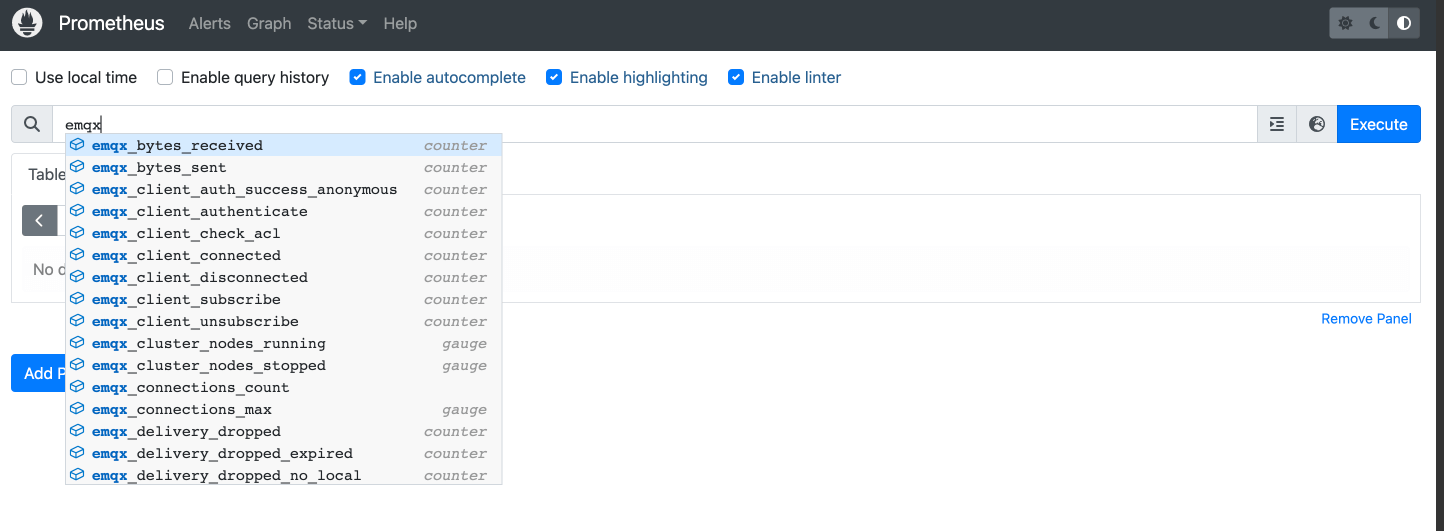
Prometheus インターフェースを開き、Graph ページに切り替えて emqx を入力すると、以下のように表示されます。
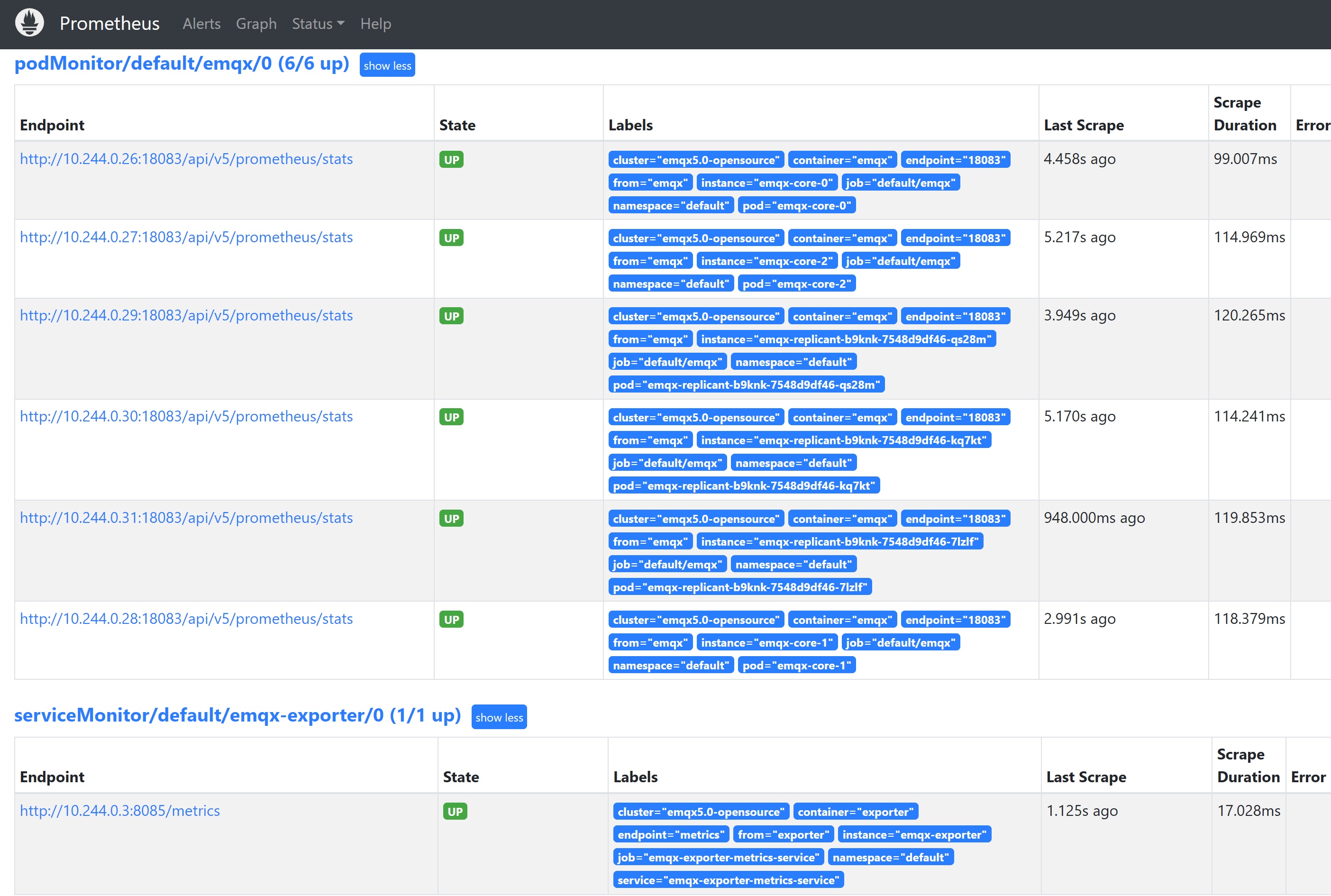
Status -> Targets ページに切り替えると、以下のようにクラスター内の監視対象 EMQX Pod 情報が表示されます。
Grafana テンプレートのインポート
すべてのダッシュボード テンプレート をインポートしてください。メインダッシュボード EMQX を開いてお楽しみください。