EMQXクラスターのブルーグリーンアップグレードの実施
目的
ブルーグリーンデプロイメントを通じて、EMQXクラスターのグレースフルなアップグレードを実施します。
背景
従来のEMQXクラスターのデプロイメントでは、StatefulSetのデフォルトのローリングアップグレード戦略がEMQX Podの更新に用いられます。しかし、この方法には以下の2つの問題があります。
- ローリングアップデート中、新旧両方のPodが対応するServiceにより選択されます。これにより、MQTTクライアントが終了処理中の古いPodに接続し、頻繁な切断と再接続が発生する可能性があります。
- ローリングアップデートの過程では、新しいPodが起動して準備完了になるまでに時間がかかるため、任意の時点でサービスを提供できるPodは_N - 1_個に制限されます。これによりサービスの可用性が低下する恐れがあります。
解決策
EMQX Operatorはデフォルトでブルーグリーンデプロイメントを実施します。EMQX CRを通じてEMQXクラスターを更新すると、EMQX Operatorがアップグレードを開始します。
アップグレード全体の流れは大まかに以下のステップに分かれます。
- 更新された仕様で新しいEMQXノード群を作成します。
- 新しいノード群が準備完了となったら、Serviceリソースを新しいノード群に切り替え、新規接続が古いノード群にルーティングされないようにします。
- 既存のMQTT接続を制御された速度で古いノード群から新しいノード群へ安全に移行し、再接続の嵐を防ぎます。
- 古いEMQXノード群を段階的にスケールダウンします。
- アップグレードを完了します。
手順
アップデート戦略の設定
apps.emqx.io/v2のEMQX CRを作成し、アップデート戦略を設定します。
apiVersion: apps.emqx.io/v2
kind: EMQX
metadata:
  name: emqx
spec:
  image: emqx/emqx:6.2.3
  config:
    data: |
      license {
        key = "..."
      }
  updateStrategy:
    evacuationStrategy:
      # MQTTクライアントの退避率(秒あたりの接続数):
      connEvictRate: 1000
      # MQTTセッションの退避率(秒あたりのセッション数):
      sessEvictRate: 1000
      # Pod削除前の待機時間(秒):
      waitTakeover: 10
    # 全ノードが準備完了後、アップグレード開始までの待機時間(秒):
    initialDelaySeconds: 10
type: Recreate- 上記内容を
emqx-update.yamlとして保存し、kubectl applyでデプロイします。
$ kubectl apply -f emqx-update.yaml
emqx.apps.emqx.io/emqx created- EMQXクラスターの状態を確認します。
STATUS が Ready となっていることを確認してください。準備完了までに時間がかかる場合があります。
$ kubectl get emqx
NAME      STATUS   AGE
emqx      Ready    8m33s
EMQXクラスターへの接続
MQTTX は自動再接続をサポートするMQTT 5.0対応のオープンソースコマンドラインクライアントツールで、MQTTサービスやアプリケーションの開発・デバッグに役立ちます。
MQTTXを使ってEMQXクラスターに接続します。
mqttx bench conn -h ${IP} -p ${PORT} -c 3000
[10:05:21 AM] › ℹ  Start the connect benchmarking, connections: 3000, req interval: 10ms
✔  success   [3000/3000] - Connected
[10:06:13 AM] › ℹ  Done, total time: 31.113s
アップグレードのトリガー
- Podテンプレートの任意の変更はEMQX Operatorのアップグレード戦略をトリガーします。
この例では、Podの ImagePullPolicy を変更してアップグレードをトリガーします。
$ kubectl patch emqx emqx --type=merge -p '{"spec": {"imagePullPolicy": "Never"}}'
emqx.apps.emqx.io/emqx patched- アップグレードの進行状況を確認します。
$ kubectl get emqx emqx -o json | jq ".status.nodeEvacuationsStatus"
[
  {
    "nodeName": "emqx@emqx-54fc496fb4-2.emqx-headless.default.svc.cluster.local",
    "initialConnections": 33,
    "initialSessions": 0,
    "connectionEvictionRate": 200,
    "sessionEvictionRate": 200,
    "state": "waiting_takeover",
    "sessionRecipients": [
      "emqx@emqx-5d87d4c6bd-2.emqx-headless.default.svc.cluster.local",
      "emqx@emqx-5d87d4c6bd-1.emqx-headless.default.svc.cluster.local",
      "emqx@emqx-5d87d4c6bd-0.emqx-headless.default.svc.cluster.local"
    ]
  }
]| フィールド名 | 説明 |
|---|---|
nodeName | 現在退避中のノード名。 |
state | ノードの退避フェーズ。 |
sessionRecipients | MQTTセッションの受け手ノード。 |
sessionEvictionRate | このノードのMQTTセッション退避率(秒あたりのセッション数)。 |
connectionEvictionRate | このノードのMQTT接続退避率(秒あたりの接続数)。 |
initialSessions | このノードの初期セッション数。 |
initialConnections | このノードの初期接続数。 |
ノード退避の進捗は、対応するEMQXノードのステータス内の connections と sessions カウンターを参照することで推測できます。
- アップグレード完了まで待機します。
$ kubectl get emqx
NAME      STATUS   AGE
emqx      Ready    8m33s
STATUS が Ready であることを確認してください。MQTTクライアント数やセッション数によっては、アップグレードに時間がかかる場合があります。
アップグレード完了後、kubectl get pods で古いEMQXノードが削除されていることを確認できます。
Grafanaによるモニタリング
以下のモニタリンググラフは、アップグレード中の接続数を10,000接続の例で示しています。
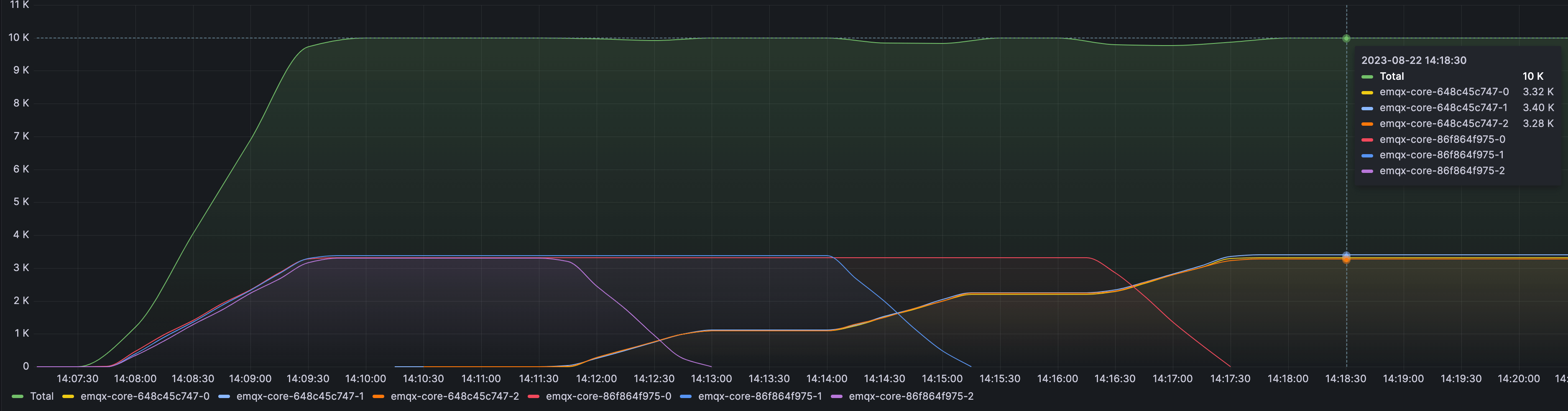
| ラベル/プレフィックス | 説明 |
|---|---|
| Total | 接続数の合計。グラフの最上位の線として表示されます。 |
emqx-86f864f975 | 3つの古いEMQXノード群の名前プレフィックス。 |
emqx-648c45c747 | 3つのアップグレード済みEMQXノード群の名前プレフィックス。 |
このタイムラインは、EMQX Operatorがスムーズにブルーグリーンアップグレードを実施する様子を示しています。プロセス全体を通じて、接続数は安定しており(移行速度、サーバー容量、クライアントの再接続戦略などの要因に依存します)、サービスの中断を最小限に抑え、サーバーの過負荷を防ぎ、全体的なサービスの安定性を向上させています。