管理 Agent
本文介绍如何启用 A2A Registry,以及如何通过 Dashboard、CLI 或 MQTT 注册、查看和删除 Agent。
前提条件
- EMQX 6.2.0 及以上版本。
- 具有 Dashboard 或 EMQX 节点的管理员访问权限。
启用 A2A Registry
A2A Registry 默认为禁用状态,请在注册 Agent 之前先将其启用。
通过 Dashboard
- 在左侧导航栏中点击 A2A 注册。
- 点击设置。
- 将启用 A2A Registry 开关打开。
- 验证 Schema 默认已启用。启用后,EMQX 将在注册时对 Agent Card 载荷进行 A2A Schema 校验,不合规的 Card 将被拒绝。仅在需要接受不符合 Schema 的 Card 时才建议关闭此选项。
- 点击保存更改。
通过配置文件
在 emqx.conf 中添加以下配置:
a2a_registry {
  enable = true
  validate_schema = true
}
完整配置参数说明:
| 参数 | 类型 | 默认值 | 说明 |
|---|---|---|---|
enable | Boolean | false | 启用 A2A Registry。 |
validate_schema | Boolean | true | 在注册时对 Agent Card 载荷进行 A2A Schema 校验,不合规的 Card 将被拒绝。 |
max_card_size | Integer | 65536 | Agent Card 载荷的最大字节数。 |
registration_rate_limit | Integer | 10 | 每个 Agent 每分钟允许的最大注册更新次数。 |
require_security_metadata | Boolean | false | 启用后,要求 Agent Card 在安全元数据扩展中包含 jwksUri。 |
trusted_jkus | Array | [] | 若非空,Agent Card 中的 jwksUri 必须匹配列表中的某个前缀。空列表表示关闭 JKU 校验(宽松模式)。 |
verify_jku_tls | Boolean | true | 在获取 JWKS 端点时校验 TLS 证书。 |
注册 Agent
Agent 通过将 Agent Card 发布至 A2A Registry 完成注册,注册后即可被其他 Agent 发现。支持通过 Dashboard、MQTT 或 CLI 三种方式注册 Agent。
通过 Dashboard
点击 A2A 注册 -> + 注册 Agent。
填写身份字段:
- 组织 ID:Agent 所属的组织或信任域,例如
com.example。建议使用反向域名格式以确保全局唯一性。 - 单元 ID:组织内的子部门,例如业务单元或部署环境,如
factory-a。 - Agent ID:该 Agent 在所属组织和部门内的唯一标识符,例如
iot-ops-agent-001。
三个字段的值只能包含字母、数字、连字符、下划线或英文句点(
^[A-Za-z0-9._-]+$),不能包含/、+、#或空白字符。三者共同构成 Agent 的完整地址:{org_id}/{unit_id}/{agent_id}。- 组织 ID:Agent 所属的组织或信任域,例如
在编辑器中粘贴 Agent Card JSON。点击帮助按钮可查看必填字段说明及模板。
点击注册 Agent。
通过 MQTTX
Agent 通过向发现主题发布带保留标志的消息完成注册。注册要求如下:
- MQTT 协议版本:5。
- Client ID 设置为
{org_id}/{unit_id}/{agent_id}。 - 启用保留标志,QoS 为 1。
- 载荷为 Agent Card JSON,至少包含
name、description、version、url和skills字段。
使用 MQTTX Desktop:
打开 MQTTX,点击新建连接。
填写连接信息:
- 名称:连接名称,例如
IoT Operations Agent。 - 服务器地址:EMQX Broker 地址。
- 端口:
1883(或实际使用的端口)。 - Client ID:设置为
com.example/factory-a/iot-ops-agent-001。 - MQTT 版本:
5.0。
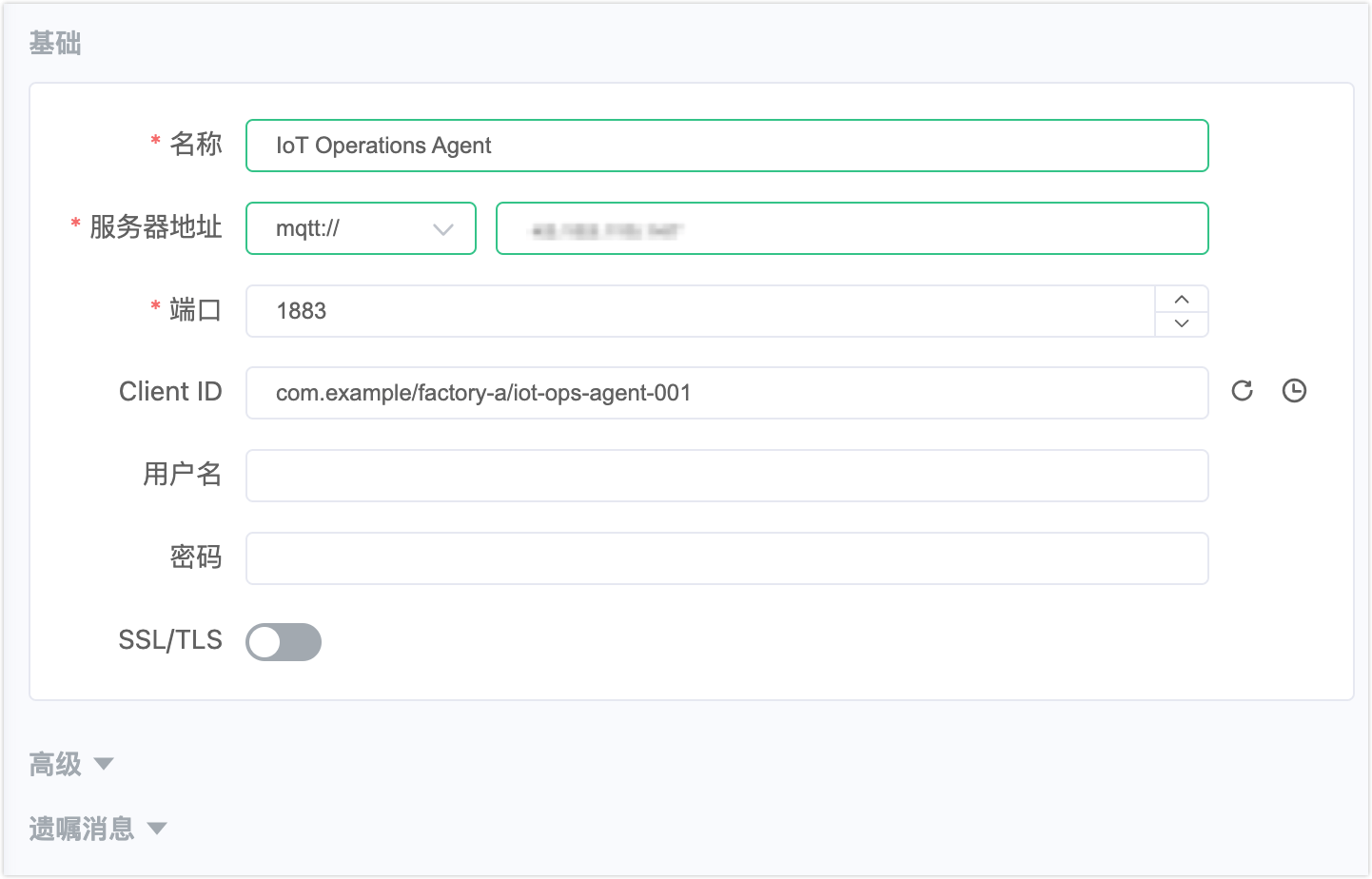
- 名称:连接名称,例如
点击连接。
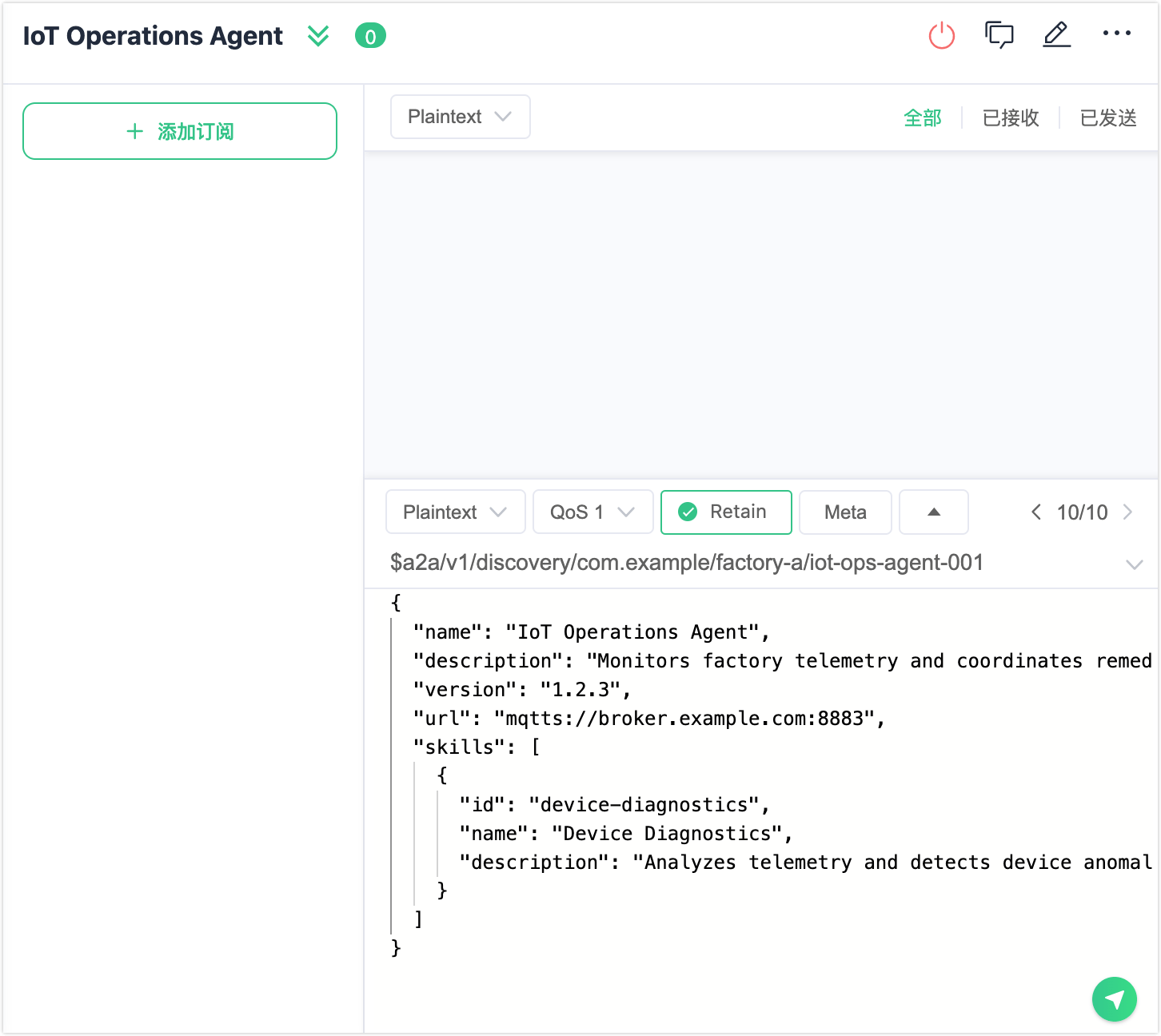
在底部消息编辑区填写:
- Topic:
$a2a/v1/discovery/com.example/factory-a/iot-ops-agent-001 - QoS:
1 - Retain:启用
- Payload:Agent Card JSON(见下方示例)。
- Topic:
点击发送按钮。
{
  "name": "IoT Operations Agent",
  "description": "Monitors factory telemetry and coordinates remediation actions.",
  "version": "1.2.3",
  "url": "mqtts://broker.example.com:8883",
  "skills": [
    {
      "id": "device-diagnostics",
      "name": "Device Diagnostics",
      "description": "Analyzes telemetry and detects device anomalies."
    }
  ]
}
使用 MQTTX CLI:
mqttx pub \
  -h localhost -p 1883 \
  -V 5 \
  -i "com.example/factory-a/iot-ops-agent-001" \
  -t '$a2a/v1/discovery/com.example/factory-a/iot-ops-agent-001' \
  -m '{"name":"IoT Operations Agent","description":"Monitors factory telemetry and coordinates remediation actions.","version":"1.2.3","url":"mqtts://broker.example.com:8883","skills":[{"id":"device-diagnostics","name":"Device Diagnostics","description":"Analyzes telemetry and detects device anomalies."}]}' \
-q 1 -r若已启用验证 Schema,EMQX 会在收录前对载荷进行校验。不合规的 Card 将以 PUBACK 原因码的形式被拒绝。
通过 CLI
emqx ctl a2a-registry register <agent-card.json 路径>JSON 文件须同时包含 Agent Card 字段和路由所需的身份字段:
{
  "org_id": "com.example",
  "unit_id": "factory-a",
  "agent_id": "iot-ops-agent-001",
  "name": "IoT Operations Agent",
  "description": "Monitors factory telemetry and coordinates remediation actions.",
  "version": "1.2.3",
  "url": "mqtts://broker.example.com:8883",
  "skills": [
    {
      "id": "device-diagnostics",
      "name": "Device Diagnostics",
      "description": "Analyzes telemetry and detects device anomalies."
    }
  ]
}
查看已注册的 Agent
可通过 Dashboard 浏览和查看已注册的 Agent,也可使用 CLI 进行查询。
通过 Dashboard
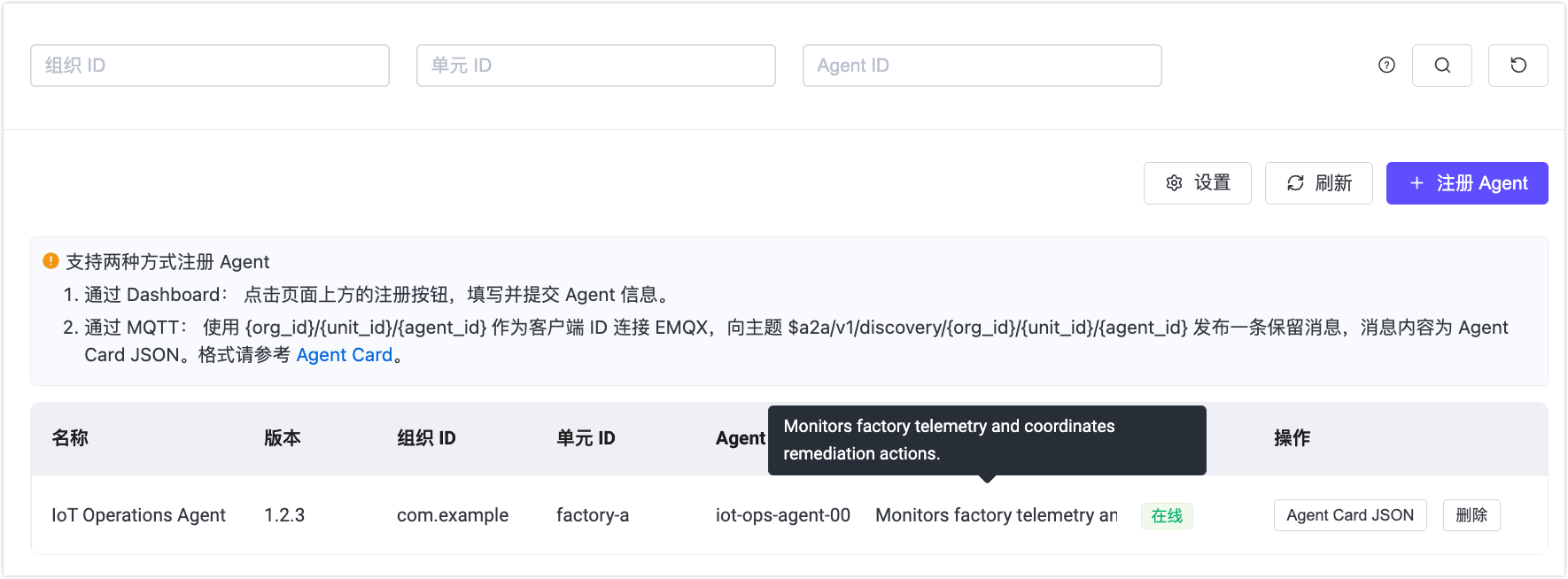
A2A 注册页面列出所有已注册的 Agent,包含以下列:名称、版本、组织 ID、单元 ID、Agent ID、描述和状态。每行提供两个操作按钮:Agent Card JSON 和删除。
使用页面顶部的组织 ID、单元 ID 和 Agent ID 筛选字段缩小列表范围。
点击任意行的 Agent Card JSON 按钮,可查看完整的 Agent Card 原始 JSON 及复制按钮。
通过 CLI
# 列出所有 Agent
emqx ctl a2a-registry list

# 按组织和状态筛选
emqx ctl a2a-registry list --org com.example --status online

# 查看指定 Agent 的完整 Card
emqx ctl a2a-registry get com.example factory-a iot-ops-agent-001

# 查看 Registry 统计信息
emqx ctl a2a-registry stats
删除 Agent
删除 Agent 会将其从 A2A Registry 中注销并清除其保留的 Agent Card,使其不再可被发现。
通过 Dashboard
在 Agent 列表中点击目标 Agent 的删除按钮。在确认对话框中输入完整的 {org_id}/{unit_id}/{agent_id} 后确认删除。
通过 MQTT
向 Agent 的发现主题发布一条空的保留消息,即可清除保留 Card 并将 Agent 从 Registry 中移除。
使用 MQTTX Desktop:
- 使用 Agent 的 Client ID(
com.example/factory-a/iot-ops-agent-001)连接至 EMQX。 - 将主题设置为
$a2a/v1/discovery/com.example/factory-a/iot-ops-agent-001,QoS 为1,启用 Retain,载荷留空。 - 点击发送按钮。
使用 MQTTX CLI:
mqttx pub \
  -h localhost -p 1883 \
  -V 5 \
  -i "com.example/factory-a/iot-ops-agent-001" \
  -t '$a2a/v1/discovery/com.example/factory-a/iot-ops-agent-001' \
  -m '' \
  -q 1 -r
通过 CLI
emqx ctl a2a-registry delete com.example factory-a iot-ops-agent-001通过 MQTT 发现 Agent
客户端 Agent 通过订阅带通配符的发现主题来查找可用 Agent。由于 Agent Card 为保留消息,订阅后将立即收到。
使用 MQTTX Desktop:
- 连接至 EMQX Broker。
- 点击 + 添加订阅,输入带通配符的主题,例如
$a2a/v1/discovery/com.example/+/+以发现某组织下的所有 Agent。 - 点击确认。保留的 Agent Card 将立即出现在消息面板中。
使用 MQTTX CLI:
# 某组织下的所有 Agent
mqttx sub -h localhost -p 1883 -V 5 -t '$a2a/v1/discovery/com.example/+/+' -v

# 某部门下的所有 Agent
mqttx sub -h localhost -p 1883 -V 5 -t '$a2a/v1/discovery/com.example/factory-a/+' -v

# 指定 Agent
mqttx sub -h localhost -p 1883 -V 5 -t '$a2a/v1/discovery/com.example/factory-a/iot-ops-agent-001' -v
-v 参数会在每条收到的载荷前打印主题名称。
每条收到的消息均以 Agent Card JSON 作为载荷。EMQX 会附加以下 MQTT v5 用户属性以表示在线状态:
| 用户属性 | 值 | 含义 |
|---|---|---|
a2a-status | online | Agent 当前处于连接状态。 |
a2a-status | offline | Agent 已断开连接。 |
a2a-status-source | broker | 状态由 EMQX 根据连接情况设置。 |
a2a-status-source | agent | 状态由 Agent 主动发布(例如正常下线)。 |
a2a-status-source | lwt | 状态反映通过遗嘱消息(LWT)检测到的异常断开。 |