エージェントの管理
このページでは、A2Aレジストリの有効化方法と、ダッシュボードUI、CLI、またはMQTTを使用してエージェントを登録、表示、削除する方法について説明します。
前提条件
- EMQX 6.2.0以降。
- ダッシュボードまたはEMQXノードへの管理者アクセス権。
A2Aレジストリの有効化
A2Aレジストリはデフォルトで無効になっています。エージェントを登録する前に有効化してください。
ダッシュボードから
- 左側のナビゲーションパネルで A2A Registry をクリックします。
- Settings をクリックします。
- Enable A2A Registry をオンに切り替えます。
- Validate Schema はデフォルトで有効です。有効時、EMQXは登録時にAgent CardのペイロードをA2Aスキーマに対して検証し、スキーマに準拠しないカードは拒否します。スキーマから逸脱したカードを受け入れる必要がある場合のみ無効にしてください。
- Save Changes をクリックします。
設定ファイルから
emqx.conf に以下を追加します。
a2a_registry {
  enable = true
  validate_schema = true
}
設定可能なオプション一覧:
| パラメーター | 型 | デフォルト | 説明 |
|---|---|---|---|
enable | Boolean | false | A2Aレジストリを有効にします。 |
validate_schema | Boolean | true | 登録時にAgent CardのペイロードをA2Aスキーマに対して検証します。不正なカードは拒否されます。 |
max_card_size | Integer | 65536 | Agent Cardペイロードの最大サイズ(バイト単位)。 |
registration_rate_limit | Integer | 10 | 1分あたりのエージェントごとの最大登録更新数。 |
require_security_metadata | Boolean | false | 有効にすると、Agent Cardのセキュリティメタデータ拡張にjwksUriを含めることを必須とします。 |
trusted_jkus | Array | [] | 空でない場合、Agent Card内のjwksUriはリスト内のいずれかのプレフィックスと一致する必要があります。空リストはJKU検証を無効にします(許容モード)。 |
verify_jku_tls | Boolean | true | JWKSエンドポイント取得時にTLS証明書を検証します。 |
エージェントの登録
エージェントは自身のAgent CardをA2Aレジストリにパブリッシュすることで登録され、他のエージェントから検出可能になります。登録はダッシュボード、MQTT、またはCLIを通じて行えます。
ダッシュボードから
A2A Registry -> + Register Agent をクリックします。
識別フィールドを入力します:
- Organization ID:エージェントが所属する組織またはトラストドメイン。例:
com.example。展開間の一意性のために逆DNS表記を使用します。 - Unit ID:組織内の区分(事業部門や展開環境など)。例:
factory-a。 - Agent ID:組織およびユニット内で一意のエージェント識別子。例:
iot-ops-agent-001。
これら3つの値は英数字、ハイフン、アンダースコア、ピリオドのみを含み(
^[A-Za-z0-9._-]+$)、/、+、#、空白は含められません。これらはエージェントの完全なアドレス{org_id}/{unit_id}/{agent_id}を構成します。- Organization ID:エージェントが所属する組織またはトラストドメイン。例:
エディターにAgent CardのJSONを貼り付けます。必要なフィールドやテンプレートは Help ボタンで確認できます。
Register Agent をクリックします。
MQTTXを使って
エージェントは自身のAgent Cardを保持メッセージとして発見用トピックにパブリッシュして登録します。要件は以下の通りです:
- MQTTプロトコルバージョン5。
- クライアントIDは
{org_id}/{unit_id}/{agent_id}に設定。 - Retainフラグ有効、QoS 1。
- ペイロードは少なくとも
name、description、version、url、skillsを含むAgent Card JSON。
MQTTX Desktopを使用:
MQTTXを開き、New Connection をクリックします。
接続情報を入力:
- Name:接続名(例:
IoT Operations Agent) - Host:EMQXブローカーのアドレス
- Port:
1883(または適切なポート) - Client ID:
com.example/factory-a/iot-ops-agent-001 - MQTT Version:
5.0
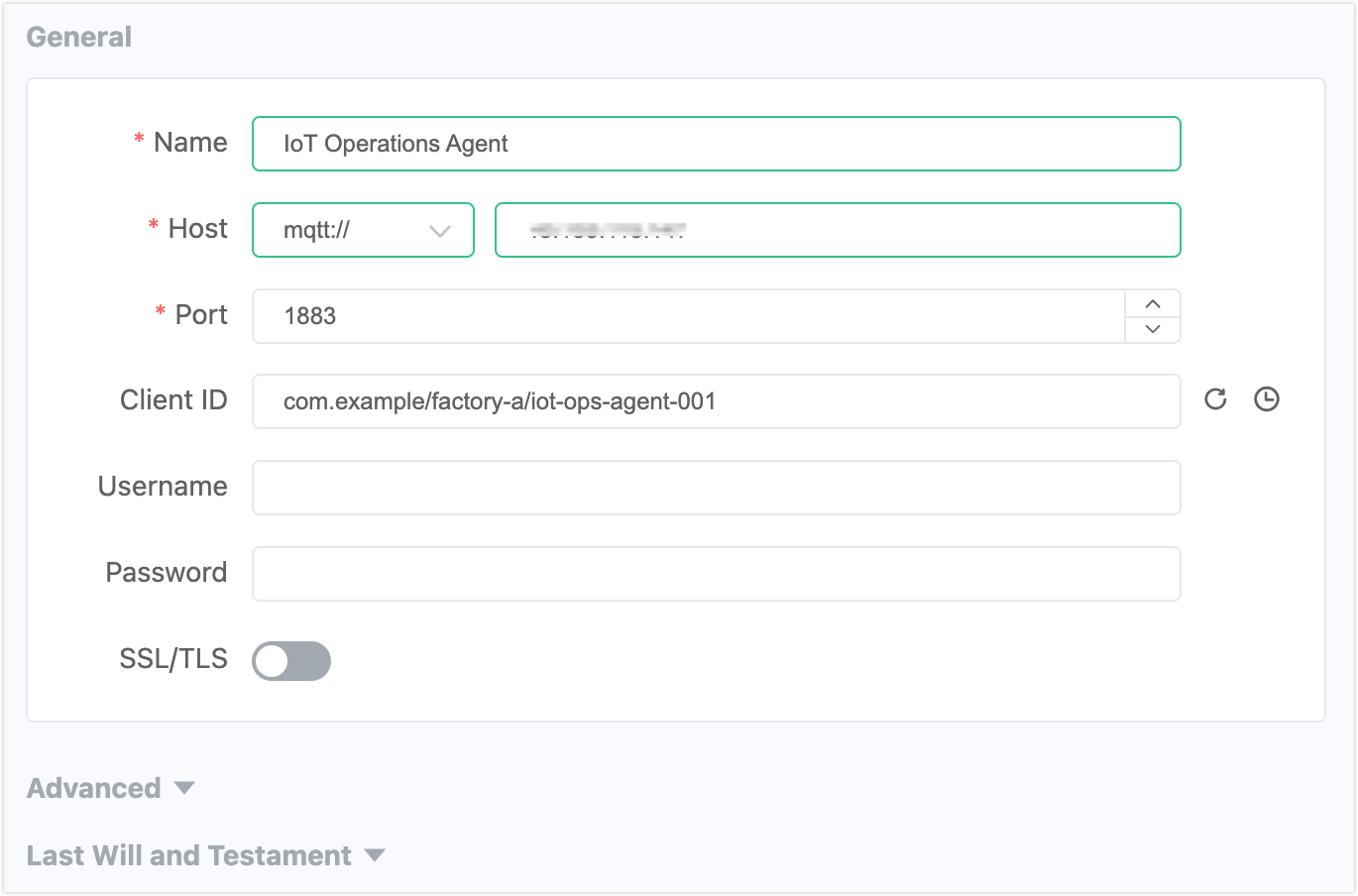
- Name:接続名(例:
Connect をクリック。
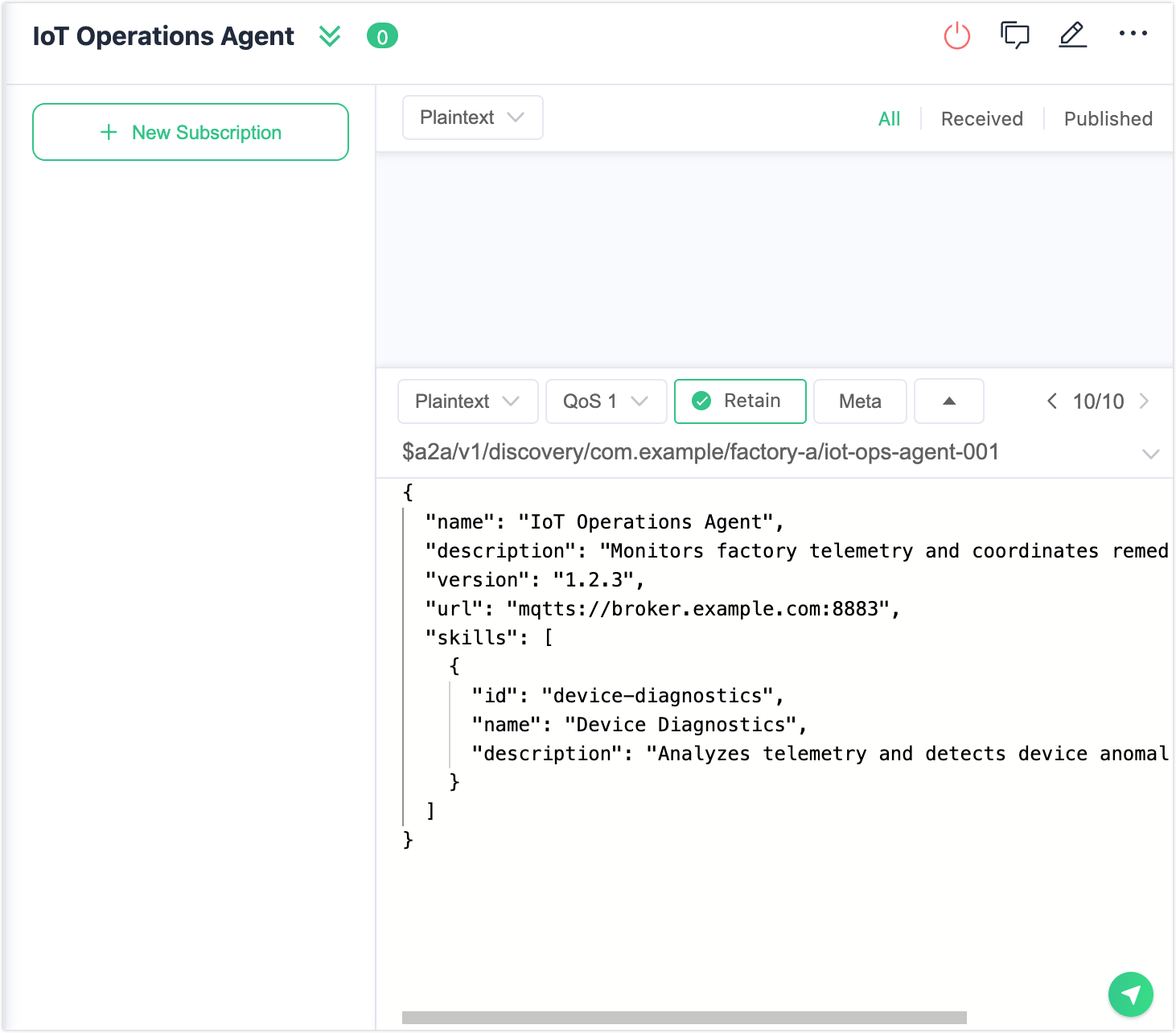
画面下部のメッセージ作成エリアに以下を入力:
- Topic:
$a2a/v1/discovery/com.example/factory-a/iot-ops-agent-001 - QoS:
1 - Retain:有効
- Payload:Agent Card JSON(以下の例を参照)
- Topic:
送信ボタンをクリック。
{
  "name": "IoT Operations Agent",
  "description": "Monitors factory telemetry and coordinates remediation actions.",
  "version": "1.2.3",
  "url": "mqtts://broker.example.com:8883",
  "skills": [
    {
      "id": "device-diagnostics",
      "name": "Device Diagnostics",
      "description": "Analyzes telemetry and detects device anomalies."
    }
  ]
}
MQTTX CLIを使用:
mqttx pub \
  -h localhost -p 1883 \
  -V 5 \
  -i "com.example/factory-a/iot-ops-agent-001" \
  -t '$a2a/v1/discovery/com.example/factory-a/iot-ops-agent-001' \
  -m '{"name":"IoT Operations Agent","description":"Monitors factory telemetry and coordinates remediation actions.","version":"1.2.3","url":"mqtts://broker.example.com:8883","skills":[{"id":"device-diagnostics","name":"Device Diagnostics","description":"Analyzes telemetry and detects device anomalies."}]}' \
  -q 1 -r
Validate Schema が有効な場合、EMQXはペイロードを登録前に検証します。不正なカードはPUBACKの理由コードとともに拒否されます。
CLIから
emqx ctl a2a-registry register <path-to-agent-card.json>JSONファイルにはAgent Cardのフィールドに加え、ルーティングに使用する識別フィールドを含める必要があります:
{
  "org_id": "com.example",
  "unit_id": "factory-a",
  "agent_id": "iot-ops-agent-001",
  "name": "IoT Operations Agent",
  "description": "Monitors factory telemetry and coordinates remediation actions.",
  "version": "1.2.3",
  "url": "mqtts://broker.example.com:8883",
  "skills": [
    {
      "id": "device-diagnostics",
      "name": "Device Diagnostics",
      "description": "Analyzes telemetry and detects device anomalies."
    }
  ]
}
登録済みエージェントの表示
登録済みエージェントはダッシュボードで閲覧・確認でき、CLIでクエリを実行することも可能です。
ダッシュボードから
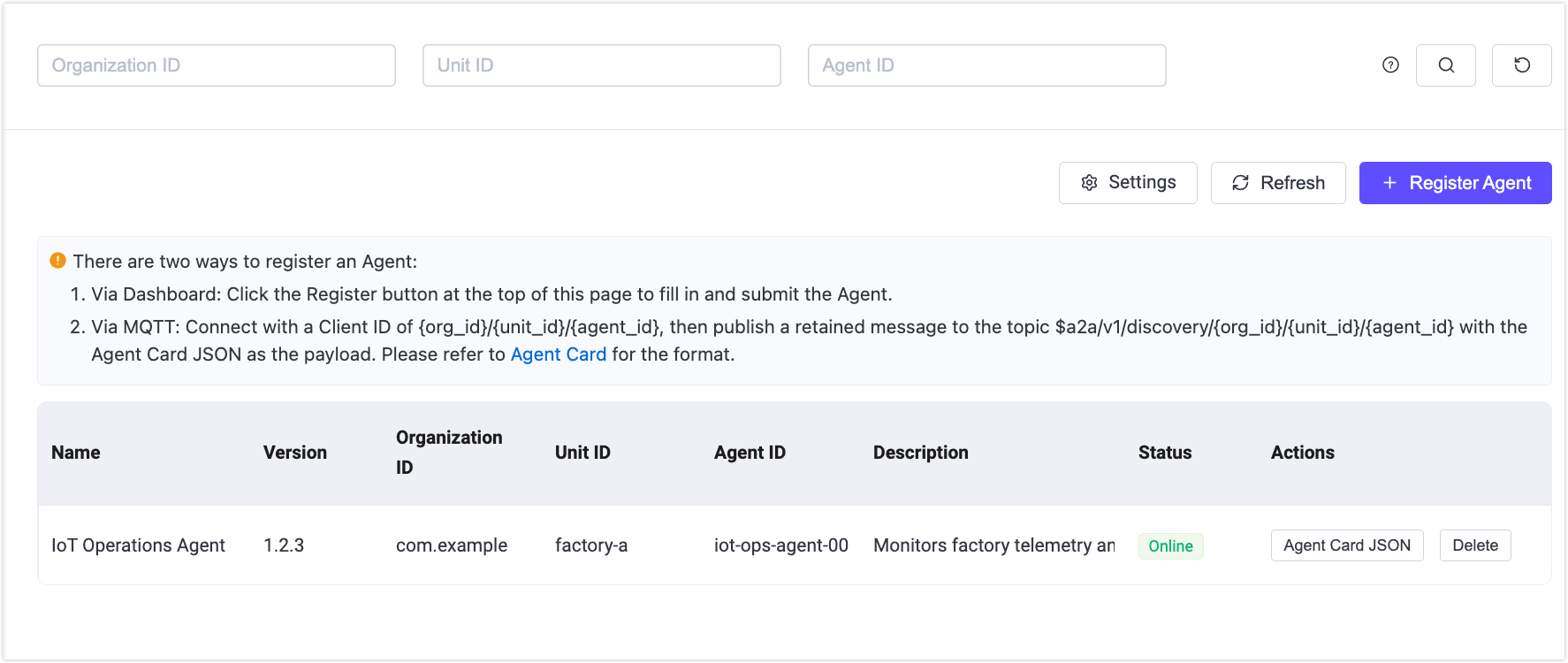
A2A Registry ページには登録されたすべてのエージェントが一覧表示されます。各行には Agent Card JSON と Delete の2つの操作ボタンがあります。
画面上部の Organization ID、Unit ID、Agent ID のフィルターでリストを絞り込めます。
任意の行の Agent Card JSON をクリックすると、エージェントカードの生JSONをコピー用ボタン付きで表示します。
CLIから
# すべてのエージェントを一覧表示
emqx ctl a2a-registry list

# 組織とステータスでフィルター
emqx ctl a2a-registry list --org com.example --status online

# 特定エージェントのAgent Cardを取得
emqx ctl a2a-registry get com.example factory-a iot-ops-agent-001

# レジストリ統計を表示
emqx ctl a2a-registry stats
エージェントの削除
エージェントを削除するとA2Aレジストリから登録解除され、保持されたAgent Cardがクリアされるため、検出されなくなります。
ダッシュボードから
エージェント一覧で削除したいエージェントの削除操作をクリックし、確認画面で完全な {org_id}/{unit_id}/{agent_id} を入力して確定します。
MQTTから
エージェントの発見用トピックに空の保持メッセージをパブリッシュします。これにより保持カードがクリアされ、レジストリからエージェントが削除されます。
MQTTX Desktopを使用:
- エージェントのクライアントID(
com.example/factory-a/iot-ops-agent-001)で接続します。 - トピックに
$a2a/v1/discovery/com.example/factory-a/iot-ops-agent-001、QoS1、Retain 有効、ペイロードは空のまま設定します。 - 送信ボタンをクリックします。
MQTTX CLIを使用:
mqttx pub \
  -h localhost -p 1883 \
  -V 5 \
  -i "com.example/factory-a/iot-ops-agent-001" \
  -t '$a2a/v1/discovery/com.example/factory-a/iot-ops-agent-001' \
  -m '' \
  -q 1 -r
CLIから
emqx ctl a2a-registry delete com.example factory-a iot-ops-agent-001MQTTを使ったエージェントの検出
クライアントエージェントはワイルドカードを使って発見用トピックをサブスクライブし、利用可能なエージェントを検出します。カードは保持されているため、サブスクライブ時に即座に配信されます。
MQTTX Desktopを使用:
- EMQXブローカーに接続します。
- + New Subscription をクリックし、ワイルドカードトピックを入力します。例:
$a2a/v1/discovery/com.example/+/+(組織内のすべてのエージェントを検出)。 - Confirm をクリックします。保持されたAgent Cardがメッセージペインに即座に表示されます。
MQTTX CLIを使用:
# 組織内のすべてのエージェント
mqttx sub -h localhost -p 1883 -V 5 -t '$a2a/v1/discovery/com.example/+/+' -v

# 特定ユニット内のすべてのエージェント
mqttx sub -h localhost -p 1883 -V 5 -t '$a2a/v1/discovery/com.example/factory-a/+' -v

# 特定エージェント
mqttx sub -h localhost -p 1883 -V 5 -t '$a2a/v1/discovery/com.example/factory-a/iot-ops-agent-001' -v
-v フラグは受信したペイロードの前にトピック名を表示します。
受信する各メッセージのペイロードはAgent CardのJSONです。EMQXはMQTT v5のユーザープロパティとして以下を付加し、エージェントの生存状態を示します:
| ユーザープロパティ | 値 | 意味 |
|---|---|---|
a2a-status | online | エージェントが現在接続中。 |
a2a-status | offline | エージェントが切断済み。 |
a2a-status-source | broker | EMQXが接続状態に基づき設定。 |
a2a-status-source | agent | エージェント自身が積極的に公開(例:正常なオフライン)。 |
a2a-status-source | lwt | Last Will and Testamentによる異常切断を反映。 |