Sparkplug B
Sparkplug is an open-source specification developed by the Eclipse Foundation's TAHU project, designed to provide a well-defined payload and state management system for MQTT. The primary aim is to achieve interoperability and consistency within the industrial IoT sector.
Sparkplug encoding scheme version B (Sparkplug B) defines the MQTT namespace for Supervisory Control and Data Acquisition (SCADA) systems, real-time control systems, and devices. It ensures standardized data transmission by encapsulating a structured data format that includes metrics, process variables, and device status information in a concise and easy-to-process format. By using Sparkplug B, organizations can improve their operational efficiency, avoid data silos, and enable seamless communication between devices within an MQTT network.
This page guides you through the implementation of Sparkplug B in EMQX, including data format, functions, and practical examples.
Sparkplug B Data Format
Sparkplug B utilizes a well-defined payload structure to standardize data communication. At its core, it employs Protocol Buffers (Protobuf) for structuring Sparkplug messages, resulting in lightweight, efficient, and flexible data interchange.
EMQX offers advanced support for Sparkplug B through the Schema Registry feature. With the Schema Registry, you can create custom encoders and decoders for various data formats, including Sparkplug B. By defining the appropriate Sparkplug B schema in the registry, you can use the schema_decode and schema_encode functions in EMQX's rule engine to access and manipulate data adhering to the specified format.
Additionally, EMQX offers built-in support for Sparkplug B, eliminating the need for the schema registry for this specific format. The spb_encode and spb_decode functions are readily available in EMQX, simplifying the encoding and decoding of Sparkplug B messages within the rule engine.
TIP
The previous sparkplug_encode and sparkplug_decode functions are deprecated because their handling of bytes_value was incompatible with the Sparkplug specification. Please use the updated spb_encode and spb_decode functions instead.
Sparkplug B Functions
EMQX provides two rule engine SQL functions for encoding and decoding Sparkplug B data: spb_encode and spb_decode. The practical examples helps you to understand how to use these functions in different scenarios.
The Sparkplug B encoding and decoding functions can be used to perform a wide variety of tasks due to the flexibility of the rule engine and its jq function. To learn more about the rule engine and its jq function, refer to the following pages:
- Create Rules
- Rule Engine SQL Language
- The Rule Engine JQ Function
- Full Description of the JQ Programming Language
spb_decode
The spb_decode function is used to decode Sparkplug B messages, for example, if you want forward a message to a specific topic based on the contents of a Sparkplug B encoded message or change the Sparkplug B message in some way. It converts the raw Sparkplug B encoded payload into a more user-friendly format that can be further processed or analyzed.
Example usage:
select
  spb_decode(payload) as decoded
from t
In the example above, payload refers to the raw Sparkplug B message that you wish to decode.
The Sparkplug B Protobuf schema can provide further insights into the structure of messages.
spb_encode
The spb_encode function is used to encode data into a Sparkplug B message. This is particularly useful when you need to send Sparkplug B messages to MQTT clients or other components of your system.
Example usage:
select
  spb_encode(json_decode(payload)) as encoded
from t
In the example above, payload refers to the data that you wish to encode into a Sparkplug B message.
Sparkplug B Alias Mapping
The Sparkplug B specification allows devices to assign a numeric alias to each metric when they come online (by sending NBIRTH / DBIRTH messages). For subsequent data updates (sent as NDATA / DDATA messages), devices may publish only the alias instead of the full metric name (name) to reduce message size and network overhead.
To interpret these alias-only updates correctly, the receiver must keep track of Sparkplug B session state so that each alias can be resolved back to its original metric name.
In practice, EMQX acts as a central processing and distribution hub for Sparkplug B data. Using the Rule Engine, EMQX forwards decoded data to non-Sparkplug B clients, including standard MQTT clients and data platforms. These downstream systems typically do not implement Sparkplug B state management, which makes alias-only data difficult to consume.
Starting with EMQX 6.0.2, the spb_decode function has been enhanced to support Sparkplug B alias mapping. This enhancement allows EMQX to automatically restore metric names during decoding, making the resulting data easier for downstream systems to consume.
How Sparkplug B Alias Mapping Works
When alias mapping is enabled, EMQX processes Sparkplug B messages as follows:
Process NBIRTH / DBIRTH messages
When a client publishes NBIRTH or DBIRTH messages, EMQX examines the metrics in the payload and records alias-to-name mappings for metrics that define both fields.
Maintain mappings per session
Alias mappings are maintained per MQTT client session and follow Sparkplug B semantics:
- Node-level metrics (NBIRTH / NDATA) and device-level metrics (DBIRTH / DDATA) are tracked separately.
- Mappings from different clients are fully isolated and do not interfere with each other.
Enhance
spb_decodeoutputWhen the Rule Engine invokes
spb_decodeon NDATA or DDATA messages, and a metric contains analiasbut noname, EMQX automatically restores the corresponding metric name using the previously recorded mapping.As a result, decoded messages always include clear and readable metric names, making them suitable for rule processing, transformation, and forwarding.
Clean up on session end
When a client disconnects, its associated alias mappings are removed. EMQX does not preserve or restore Sparkplug B state after the session ends.
Configure Alias Mapping
Alias mapping is enabled by default. If you do not want EMQX to track and restore Sparkplug B metric aliases, you can disable it in the configuration file:
schema_registry {
  sparkplugb {
    enable_alias_mapping = false
  }
}Note:
- Alias mappings are created only from NBIRTH / DBIRTH messages received while alias mapping is enabled.
- If a client has already sent its birth messages, it must reconnect and publish NBIRTH / DBIRTH again for alias mapping to apply.
Alias Mapping Example
This example demonstrates how to use EMQX Dashboard and MQTTX to convert alias-only DDATA messages into JSON data containing full metric names, and forward the result to non-Sparkplug B clients.
Objective
- Sparkplug B device: declares
name + aliasin DBIRTH and publishes onlyaliasin DDATA. - EMQX: uses
spb_decodeto automatically restore metric names. - Downstream subscribers: receive standard JSON messages without needing Sparkplug B knowledge.
Prerequisites
- EMQX 6.0.2 or later, with Sparkplug B alias mapping enabled (
enable_alias_mapping = true) - MQTTX
Step 1: Create a Rule in EMQX Dashboard
Click Integration -> Rules from the Dashboard left menu.
Click + Create to create a new rule.
In the SQL Editor, enter:
sqlSELECT spb_decode(payload) AS decoded FROM "spBv1.0/+/DDATA/+/+"Note:
- The rule matches all Sparkplug B DDATA messages.
spb_decode(payload)decodes the Sparkplug B payload and, when alias mapping is enabled, automatically restores metric names from aliases.
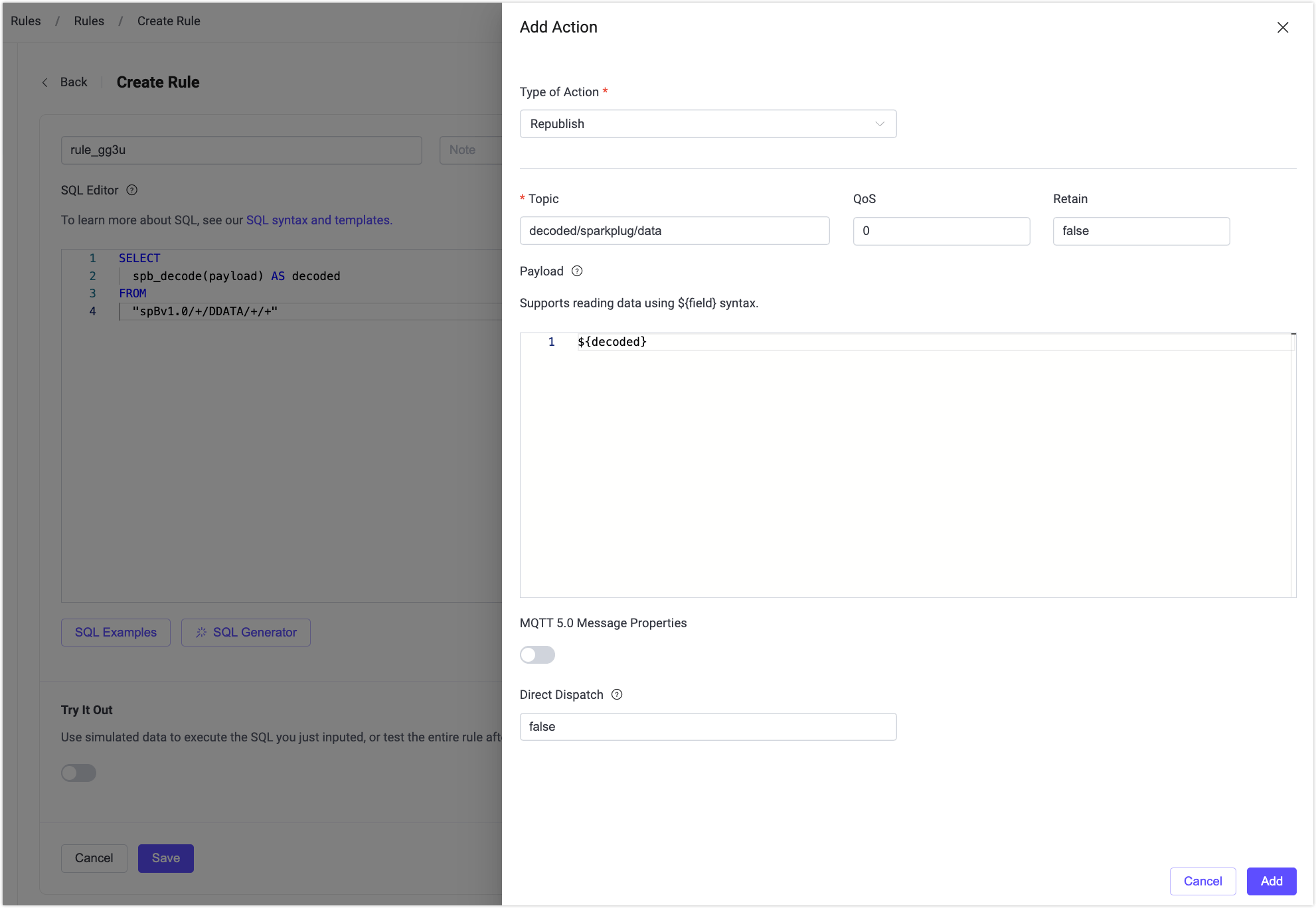
Click + Add Action to append an action to the rule.
Select Republish as the type of action.
Configure the action:
- Topic:
decoded/sparkplug/data - Payload:
${decoded}
- Topic:
Click Add.
Click Save to complete rule creation.
Step 2: Prepare a Subscriber with MQTTX
- Open MQTTX and create a new connection to the EMQX broker.
- Subscribe to the topic:
decoded/sparkplug/data.
This subscriber represents a non-Sparkplug B client that expects plain JSON data.
Step 3: Simulate a Sparkplug B Device with MQTTX
The payloads below are shown as logical JSON for readability. When publishing real messages, use Sparkplug B Protobuf encoding (Base64).
Send DBIRTH (declare aliases) to the topic:
spBv1.0/group1/DBIRTH/eon1/device1.Logical payload (example)
json{ "metrics": [ { "name": "Device/Temperature", "alias": 0, "datatype": 9, "value": 72.5 }, { "name": "Device/Pressure", "alias": 1, "datatype": 9, "value": 101.3 } ] }Notes:
- In Sparkplug B,
datatypeis defined as an unsigned integer. The value9represents the Float data type, as specified by the Sparkplug B specification. - EMQX records the alias-to-name mappings at this point.
- This step must be performed before sending DDATA.
- In Sparkplug B,
Send DDATA (alias only) to the topic:
spBv1.0/group1/DDATA/eon1/device1.Logical payload (example)
json{ "metrics": [ { "alias": 0, "value": 73.1 }, { "alias": 1, "value": 100.9 } ] }
Step 4: Verify the Decoded Result
In MQTTX, the subscriber to decoded/sparkplug/data will receive:
{
  "metrics": [
    {
      "alias": 0,
      "name": "Device/Temperature",
      "value": 73.1
    },
    {
      "alias": 1,
      "name": "Device/Pressure",
      "value": 100.9
    }
  ]
}
You can observe that:
- The original DDATA message did not include
name. spb_decodeautomatically restored:"Device/Temperature""Device/Pressure"
- Downstream subscribers do not need to maintain Sparkplug B state or interpret aliases.
Examples for Using spb_decode and spb_encode
This section provides practical examples for handling Sparkplug B messages using the spb_decode and spb_encode functions. Note that the examples given are just a small subset of what you can do.
Consider scenarios where you have a Sparkplug B encoded message with the following structure:
{
  "timestamp": 1678094561521,
  "seq": 88,
  "metrics": [
    {
      "timestamp": 1678094561525,
      "name": "counter_group1/counter1_1sec",
      "int_value": 424,
      "datatype": 2
    },
    {
      "timestamp": 1678094561525,
      "name": "counter_group1/counter1_5sec",
      "int_value": 84,
      "datatype": 2
    },
    {
      "timestamp": 1678094561525,
      "name": "counter_group1/counter1_10sec",
      "int_value": 42,
      "datatype": 2
    },
    {
      "timestamp": 1678094561525,
      "name": "counter_group1/counter1_run",
      "int_value": 1,
      "datatype": 5
    },
    {
      "timestamp": 1678094561525,
      "name": "counter_group1/counter1_reset",
      "int_value": 0,
      "datatype": 5
    }
  ]
}
Extract Data
Suppose you get messages from a device on the topic my/sparkplug/topic and want to forward just the counter_group1/counter1_run metric to another topic called intresting_counters/counter1_run_updates as a JSON formatted message. The instructions below demonstrate how to achieve this task by creating a rule in EMQX Dashboard and testing the rule using MQTTX client tool.
Create Rule in Dashboard
Go to EMQX Dashboard. Click Integration -> Rules from the left navigation menu. Click + Create to enter the Create Rule page.
Enter the following SQL statement in SQL Editor:
sqlFOREACH jq(' .metrics[] | select(.name == "counter_group1/counter1_run") ', spb_decode(payload)) AS item DO item FROM "my/sparkplug/topic"Here, the
jqfunction is used to iterate over the array of metrics and filter out the one with the name "counter_group1/counter1_run".TIP
The Sparkplug B specification recommends sending data only when it changes, leading to payloads where only a subset of metrics are present. If there is no item in the array with the specified name, this rule will not output anything.
Click + Add Action on the right side of the page. Select
Republishfrom the Action drop-down list. Enterinteresting_counters/counter1_run_updatesas the republish topic and enter${item}in the Payload field for the action. Click Add.Back on the Create Rule page, click Create. You can see that a rule is created in the Rule list.
Test the Rule
You can simulate an MQTT client using the MQTTX client tool to publish the Sparkplug B message to the topic my/sparkplug/topic. Then, you can verify that the message is transformed and forwarded to the topic interesting_counters/counter1_run_updates as a JSON-formatted message:
Open the MQTTX client desktop and connect to the EMQX broker. For detailed information on working with the MQTTX, refer to the MQTTX Client.
Create a new subscription and subscribe to the topic
interesting_counters/counter1_run_updates.In the message-sending area at the lower right corner, enter
my/sparkplug/topicas the topic. SelectBase64as the payload type.Copy the following Base64 encoded Sparkplug B message and paste it into the payload field. The message corresponds to the encoded Sparkplug message example given previously.
CPHh67HrMBIqChxjb3VudGVyX2dyb3VwMS9jb3VudGVyMV8xc2VjGPXh67HrMCACUKgDEikKHGNvdW50ZXJfZ3JvdXAxL2NvdW50ZXIxXzVzZWMY9eHrseswIAJQVBIqCh1jb3VudGVyX2dyb3VwMS9jb3VudGVyMV8xMHNlYxj14eux6zAgAlAqEigKG2NvdW50ZXJfZ3JvdXAxL2NvdW50ZXIxX3J1bhj14eux6zAgBVABEioKHWNvdW50ZXJfZ3JvdXAxL2NvdW50ZXIxX3Jlc2V0GPXh67HrMCAFUAAYWAClick the send button to send the message.
If everything has worked as expected, you should receive a message in JSON format like the following:
json{ "timestamp":1678094561525, "name":"counter_group1/counter1_run", "int_value":1, "datatype":5 }
Update Data
Consider a scenario where you discover an incorrect metric named counter_group1/counter1_run and want to remove it from the Sparkplug B encoded payload before forwarding the message.
Similar to the demonstration in Extract Data, you can create the following rule with a republish action in EMQX Dashboard.
FOREACH
jq('
   # Save payload
   . as $payload |
   # Save name of metric to delete
   "counter_group1/counter1_run" as $to_delete |
   # Filter out metric with name $to_delete
   [ .metrics[] | select(.name != $to_delete) ] as $updated_metrics |
   # Update payload with new metrics
   $payload | .metrics = $updated_metrics
   ',
   spb_decode(payload)) AS item
DO spb_encode(item) AS updated_payload
FROM "my/sparkplug/topic"
In this rule, spb_decode is used to decode the message and then jq is used to filter out the metric with the name counter_group1/counter1_run. Then, spb_encode in the DO clause is used to encode the message again.
In the republish action, use ${updated_payload} as the payload because it is the name assigned to the updated Sparkplug B encoded message.
Similarly, you can also use spb_decode and spb_encode to update the value of a metric. Consider a scenario where you want to update the value of the metric with the name counter_group1/counter1_run to 0. You can achieve this by using the following rule:
FOREACH
jq('
   # Save payload
   . as $payload |
   # Save name of metric to update
   "counter_group1/counter1_run" as $to_update |
   # Update value of metric with name $to_update
   [
     .metrics[] |
     if .name == $to_update
        then .int_value = 0
        else .
     end
   ] as $updated_metrics |
   # Update payload with new metrics
   $payload | .metrics = $updated_metrics
   ',
   spb_decode(payload)) AS item
DO spb_encode(item) AS item
FROM "my/sparkplug/topic"
Or consider a scenario where you want to add a new metric with the name counter_group1/counter1_new and value 42. You can achieve this by using the following rule:
FOREACH
jq('
   # Save payload
   . as $payload |
   # Save old metrics
   $payload | .metrics as $old_metrics |
   # New value
   {
     "name": "counter_group1/counter1_new",
     "int_value": 42,
     "datatype": 5
   } as $new_value |
   # Create new metrics array
   ($old_metrics + [ $new_value ]) as $updated_metrics |
   # Update payload with new metrics
   $payload | .metrics = $updated_metrics
   ',
   spb_decode(payload)) AS item
DO spb_encode(item) AS item
FROM "my/sparkplug/topic"
Filter Messages
Consider a scenario where you want to forward only the messages where the value of the metric with the name counter_group1/counter1_run is greater than 0. You can achieve this by using the following rule:
FOREACH
jq('
   # Save payload
   . as $payload |
   # Save name of metric to filter on
   "counter_group1/counter1_run" as $to_filter |
   .metrics[] | select(.name == $to_filter) | .int_value as $value |
   # Filter out messages where value of metric with name $to_filter is 0 or smaller
   if $value > 0 then $payload else empty end
   ',
   spb_decode(payload)) AS item
DO spb_encode(item) AS item
FROM "my/sparkplug/topic"
In the above rule, the jq function outputs an empty array if the value of the metric with the name counter_group1/counter1_run is 0 or smaller. This means that the message will not be forwarded to any of the actions connected to the rule if the value is 0 or smaller.
Split Messages
Consider a scenario where you want to split a Sparkplug B encoded message into multiple messages, with each metric in the metrics array being republished as a separate Sparkplug B encoded message. This can be accomplished with the following rule:
FOREACH
jq('
   # Save payload
   . as $payload |
   # Output one message for each metric
   .metrics[] |
        . as $metric |
        # Let the current metric be the only one in the metrics array
        $payload | .metrics = [ $metric ]
   ',
   spb_decode(payload)) AS item
DO spb_encode(item) AS output_payload
FROM "my/sparkplug/topic"
In the above rule, the jq function outputs an array with multiple items (given that there is more than one item in the metrics array). All the actions connected to the rule will be triggered for each item in the array. With the rule above, you need to set the payload in the republish action to ${output_payload} as output_payload is the name we assigned to the Sparkplug B encoded message in the DO clause.
Split Messages and Send to Topics Based on Content
Consider a scenario where you want to split a Sparkplug B encoded message, but you also want to send each message to a different topic based on, for example, the metrics name. Suppose that the output topic name should be constructed by concatenating the strings "my_metrics/" with the name of the metric contained in the message. You can accomplish this with the following slightly modified code:
FOREACH
jq('
   # Save payload
   . as $payload |
   # Output one message for each metric
   .metrics[] |
        . as $metric |
        # Let the current metric be the only one in the metrics array
        $payload | .metrics = [ $metric ]
   ',
   spb_decode(payload)) AS item
DO
spb_encode(item) AS output_payload,
first(jq('"my_metrics/" + .metrics[0].name', item)) AS output_topic
FROM "my/sparkplug/topic"
To configure the republish action, set the topic name to ${output_topic} as it is the name assigned in the DO clause to the output topic and set the payload to ${output_payload}.
The jq function call is wrapped in the DO clause using the first function to obtain the first and only output object.