Multi-Protocol Gateway
EMQX Multi-Protocol Gateway enables handling all non-MQTT protocol connections, authentication, and message sending and receiving. It provides a unified conceptual model for various protocols.
Before EMQX 5.0, non-MQTT protocol access was implemented by separate protocol plugins. These plugins had different designs and implementations, making it challenging to use them.
Starting from 5.0, EMQX offers the Multi-Protocol Gateway defines a unified conceptual and operational model to make it easier to use.
The Multi-Protocol Gateway supports protocols such as MQTT-SN, STOMP, CoAP, LwM2M, etc. It can be enabled and configured directly in the Dashboard or managed using the REST API or base.hocon. On how to enable these gateways and how to customize the settings to better suit your business needs, you can click the link below for details.
Important Notice
The ExProto Gateway was deprecated in EMQX 6.2.0 and has been removed in EMQX 6.3.0.
How the Multi-Protocol Gateway Works
EMQX Multi-Protocol Gateway defines a unified conceptual and operational model for several key components, including listeners, connections/sessions, publish/subscribe, authentication, and authorization.
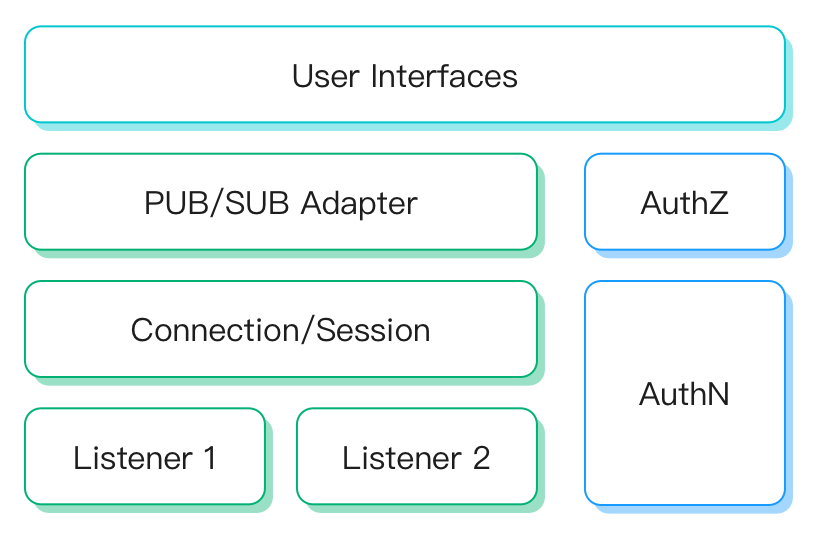
Here's a brief overview of each component:
Listener: Support listener types: TCP, SSL, UDP, DTLS. Each gateway can create multiple listeners.
Connection/Session: Gateway creates a session for each accepted client connection, which manages the subscription list, deliver/receive queue, and the retransmission logic of client messages.
Publish/Subscribe: Each type of gateway defines how to adapt to the MQTT protocol's PUB/SUB message model. Non-PUB/SUB protocols require configuring message topics and payloads, and each type of gateway may use a different message format.
Authentication: Each gateway can be configured with authenticators to use the client information for login authorization.
Gateway Listeners
Each gateway can have multiple listeners enabled, and different protocol gateways support the following listener types:
| TCP | UDP | SSL | DTLS | Websocket | Websocket over TLS | |
|---|---|---|---|---|---|---|
| MQTT-SN | ✔︎ | ✔︎ | ||||
| STOMP | ✔︎ | ✔︎ | ||||
| CoAP | ✔︎ | ✔︎ | ||||
| LwM2M | ✔︎ | ✔︎ | ||||
| OCPP | ✔︎ | ✔︎ | ||||
| GB/T 32960 | ✔︎ | ✔︎ | ||||
| JT/T 808 | ✔︎ | ✔︎ | ||||
| NATS | ✔︎ | ✔︎ | ✔︎ | ✔︎ |
Starting from EMQX 6.3.1, the name of a newly created gateway listener must be 1 to 64 bytes long, start with an ASCII letter or digit, and contain only ASCII letters, digits, hyphens (-), and underscores (_). If the name does not meet these requirements, the REST API returns an HTTP 400 response with the BAD_REQUEST error code. For gateway listeners that existed before the upgrade and have names longer than 64 bytes, you can still update their configurations or remove them, but you cannot rename them.
Bind Address
A gateway listener's bind setting specifies the local address and port used to receive client traffic. It accepts an explicit IP address and port, or a port alone.
Starting from EMQX 6.3.0, gateway listeners whose bind specifies only a port use node.default_listener_address, a node-level setting that selects the default bind address. An explicit IP address and port in bind takes precedence. If this setting is not configured, gateway listeners with port-only binds listen on all network interfaces under both the legacy and hardened security profiles.
To change the address used by gateway listeners with port-only binds, configure this setting in each node's emqx.conf or through EMQX_NODE__DEFAULT_LISTENER_ADDRESS, and restart the node after changing it. It also affects port-only binds for MQTT listeners and the Dashboard HTTP listener. See Default Listener Address for supported values and the official Docker image's default.
View Listener Address Information
To check gateway listener addresses, use GET /api/v5/gateways/:name/listeners, replacing :name with the gateway name, such as stomp. Starting from EMQX 6.3.0, each listener's node_status[].status includes resolved_address and resolved_address_from. Each node_status entry reports the values for its corresponding node; the cluster-wide status does not include these node-local fields.
In each node_status entry, check status.running together with status.resolved_address to determine whether the listener is running on that node. For help interpreting an empty resolved_address value, see View Listener Address Information. Use this gateway list endpoint rather than the MQTT emqx ctl listeners command or the gateway's single-listener configuration endpoint.
Message Format
To ensure compatibility with the PUB/SUB messaging model, each gateway type must adapt to the presence or absence of a PUB/SUB concept in its underlying protocol.
For protocols with a PUB/SUB concept, like MQTT-SN and Stomp, compatibility is achieved by using the client-sent topic and payload, and no message format conversion is needed.
For protocols without a PUB/SUB concept, such as CoAP and LwM2M, there are no definitions for topics, publishing, or subscribing. Here, the gateway must design the message content format, with each type potentially using a distinct format.
- CoAP: The CoAP gateway uses the URI path and methods defined in the Publish-Subscribe Broker for the CoAP standard. For details, see Message Publish, Topic Subscribe, Topic Unsubscribe.
- LwM2M: The messaging model of LwM2M protocol is based on the Resources Model and Operations. This is completely different from the Publish/Subscribe model of the MQTT protocol. For details, see LwM2M Gateway - Message Format.
Authentications
Authentication is the process of verifying the identity of a client attempting to connect to a system. Starting from version 5.0, the gateway supports authenticators for login authorization.
Different gateways may support different types of authenticators, but all gateways support HTTP-based authentication. HTTP-based authentication. See the table below for the authentication types supported:
| HTTP Server | Built-in Database | MySQL | MongoDB | PostgreSQL | Redis | JWT | LDAP | |
|---|---|---|---|---|---|---|---|---|
| MQTT-SN | ✔︎ | |||||||
| STOMP | ✔︎ | ✔︎ | ✔︎ | ✔︎ | ✔︎ | ✔︎ | ✔︎ | ✔︎ |
| CoAP | ✔︎ | ✔︎ | ✔︎ | ✔︎ | ✔︎ | ✔︎ | ✔︎ | ✔︎ |
| LwM2M | ✔︎ | |||||||
| OCPP | ✔︎ | ✔︎ | ✔︎ | ✔︎ | ✔︎ | ✔︎ | ✔︎ | ✔︎ |
| GB/T 32960 | ✔︎ | |||||||
| JT/T 808 | N/A | N/A | N/A | N/A | N/A | N/A | N/A | |
| NATS | ✔︎ | ✔︎ | ✔︎ | ✔︎ | ✔︎ | ✔︎ | ✔︎ | ✔︎ |
How Authentication Works on the Gateway
The EMQX Multi-Protocol Gateway creates a ClientInfo for each connection to authenticate clients. The ClientInfo includes generic fields such as Username and Password, which are commonly used for authentication. Each gateway can also add protocol-specific fields, such as Endpoint Name for LwM2M, for use during authentication.
When an authenticator is configured, the gateway uses the ClientInfo to verify the client according to the configured authentication mechanism and backend. For database-backed password authentication, the authenticator compares the client's Username and Password with the credentials stored in its database. If the credentials match, the client is authenticated and granted access to the gateway. If no authenticator is configured, any client can log in.
Starting from EMQX 6.3.1, EMQX applies gateway authentication results as follows:
- Gateway protocols always use the Client ID determined by the protocol. This prevents authentication results from changing the client's identity and keeps the identity consistent throughout the connection lifecycle. If an authenticator returns
clientid_override, EMQX ignores the field and logs a warning withgateway_authn_clientid_override_not_supported. - After authentication succeeds, EMQX evaluates gateway- and listener-level mountpoint templates using the combined client information and authentication result. A mountpoint template can therefore reference client attributes returned by the authenticator, for example,
${client_attrs.tenant}/.
Client ID and Session Behavior
Client IDs can be duplicated across different gateways. Within the same gateway, a client that connects with a duplicate Client ID terminates the existing session associated with that Client ID.
Integration with External Systems
For better integration with external systems, the gateway also supports hooks defined in the EMQX.
Due to the heterogeneity of semantics between gateways, only some of the core hooks are available.
Client connection-related hooks with the following supportability:
For improved interoperability with external systems, the gateway is designed to support hooks as defined in EMQX.
However, due to the differences in semantics among various gateways, only a subset of the core hooks can be utilized, see the table below for the client connection-related hooks supported:
| Name | Required or Not | Description | Supported Protocols |
|---|---|---|---|
client.connect | Optional | Number of client connection requests, including successful or failed connection requests | All gateways |
client.connack | Optional | Number of CONNACK messages received by the clients | All gateways |
client.authenticate | Required | Number of clients authenticated | |
client.connected | Required | Number of clients connected successfully | All gateways |
client.disconnected | Required | Number of clients disconnected, including active or abnormal disconnections | All gateways |
client.authorize | Required | Number of authorized clients publish/subscribe requests | All gateways |
client.subscribe | Optional | Number of client's attempts to subscribe to a topic | MQTT-SN STOMP |
client.unsubscribe | Optional | Number of client's attempts to unsubscribe from a topic | MQTT-SN STOMP |
Session and message-related hooks have no heterogeneity issues between protocols, so these hooks are fully supported for each type of gateway.
For a detailed explanation of hooks, see Hooks.