Use HTTP Service
TIP
Starting from EMQX v5.8.0, the HTTP authenticator supports including ACL rules in the response body to preset permissions for clients. You are recommended to use the new format for better performance. For details, see HTTP Authentication.
EMQX supports the authorization based on the HTTP service. The user needs to build an external HTTP application as a data source by themselves. EMQX makes requests to the HTTP service and determines the authorization result based on the data returned by the HTTP API, thus achieving complex authorization logic.
Tip
Knowledge about basic EMQX authorization concepts
HTTP Request and Response
When the client initiates a subscription or publishing operation, the HTTP Authorizer constructs and sends a request based on the configured request template. Users need to implement authorization logic in the authorization service and return the results according to the following requirements.
Request
The request can use JSON format, with the following placeholders in the URL and request body:
${clientid}: The client ID.${username}: The username used by the client on login.${client_attrs.NAME}: A client attribute.NAMEwill be replaced by an attribute name set based on predefined configurations at runtime. For details about the client attributes, see MQTT Client Attributes.${peerhost}: The source IP address of the client.${proto_name}: The protocol name used by the client, e.g.MQTT,CoAP.${mountpoint}: The mountpoint of the gateway listener (topic prefix).${action}: The action being requested, e.g.publish,subscribe.${topic}: The topic (or topic filter) to be published or subscribed in the current request.${qos}: The QoS of the message to be published or subscribed in the current request.${retain}: Whether the message to be published in the current request is a retained message.${zone}: The client's Zone at runtime. The Zone is a logical classification of the client, such as region or environment, that can be dynamically applied based on the client's configuration.
Response
After checking, the authorization service needs to return a response in the following format:
- Response
content-typemust beapplication/json. - If the HTTP Status Code is
200, the authorization result is granted by HTTP Body. It depends on the value of theresultfield:allow: Allow Publish or Subscribe.deny: Deny Publish or Subscribe.ignore: Ignore this request, it will be handed over to the next authorizer.
- If the HTTP Status Code is
204, it means that this Publish or Subscribe request is allowed. - HTTP Status Codes other than
200and204, mean "ignore", for example, this HTTP service not available.
Example response:
HTTP/1.1 200 OK
Headers: Content-Type: application/json
...
Body:
{
    "result": "allow" | "deny" | "ignore" // Default `"ignore"`
}
EMQX 4.x compatibility statement:
In version 4.x, EMQX only used the status code returned by the HTTP API, while the content is discarded. For example, 200 indicates allow, and 403 indicates deny. In order to provide more information to the user, we added the return of the request content in EMQX 5.0 version.
TIP
It is recommended to use the POST method. When using the GET method, some sensitive information may be exposed through HTTP server logs.
For untrusted environments, HTTPS should be used.
Configure Dynamic Hostname Resolution
By default, the HTTP authorizer resolves the hostname in url when the authorizer is created and uses a persistent connection pool. To resolve the hostname for every authorization request, set hostname_resolution to dynamic.
Dynamic hostname resolution also allows placeholders in the host part of url. For example, the following configuration routes authorization requests to different endpoints according to the client's tenant attribute:
{
    type = http
    method = post
    url = "https://${client_attrs.tenant}.auth.example.com/authz"
    hostname_resolution = dynamic
    allowed_hosts = ["*.auth.example.com"]
    pool_size = 8
    headers {
        "Content-Type" = "application/json"
    }
    body {
        username = "${username}"
        topic = "${topic}"
        action = "${action}"
    }
    ssl {
        enable = true
    }
}
When configuring dynamic hostname resolution, note the following:
hostname_resolutionacceptsstaticordynamic. The default value isstatic. You can also usedynamicwith a literal hostname to resolve that hostname for every request.- If the URL host contains placeholders,
hostname_resolutionmust bedynamicandallowed_hostsmust contain at least one entry. - Each
allowed_hostsentry must be an exact hostname, such asauth.example.com, or a wildcard pattern, such as*.auth.example.com. The wildcard matches hostnames under the specified suffix, but not the suffix itself.allowed_hostshas no effect when the URL uses a literal hostname. - Within the URL authority, only the host can contain placeholders. The scheme must be
httporhttps, and the port, if specified, must be a literal integer. URL userinfo and fragments are not supported. Placeholders in the URL path and query remain supported. - If EMQX cannot render a valid hostname or the rendered hostname does not match
allowed_hosts, EMQX does not send the HTTP request and the authorization check fails. - In
dynamicmode, requests to all rendered hosts share a connection pool.pool_sizelimits how many idle connections the pool can keep for reuse. Set it to0to disable connection reuse.enable_pipeliningandmax_inactivedo not apply in this mode. - For HTTPS requests in
dynamicmode, EMQX applies the configured TLS options to the rendered host. Unless Server Name Indication (SNI) is explicitly configured, EMQX derives it from the rendered hostname. - OAuth2 is not supported when
hostname_resolutionisdynamic.
Configure with Dashboard
On EMQX Dashboard, click Access Control -> Authorization on the left navigation tree to enter the Authorization page.
Click Create at the top right corner, select HTTP Server as Backend, and click Next to proceed to the Configuration step.
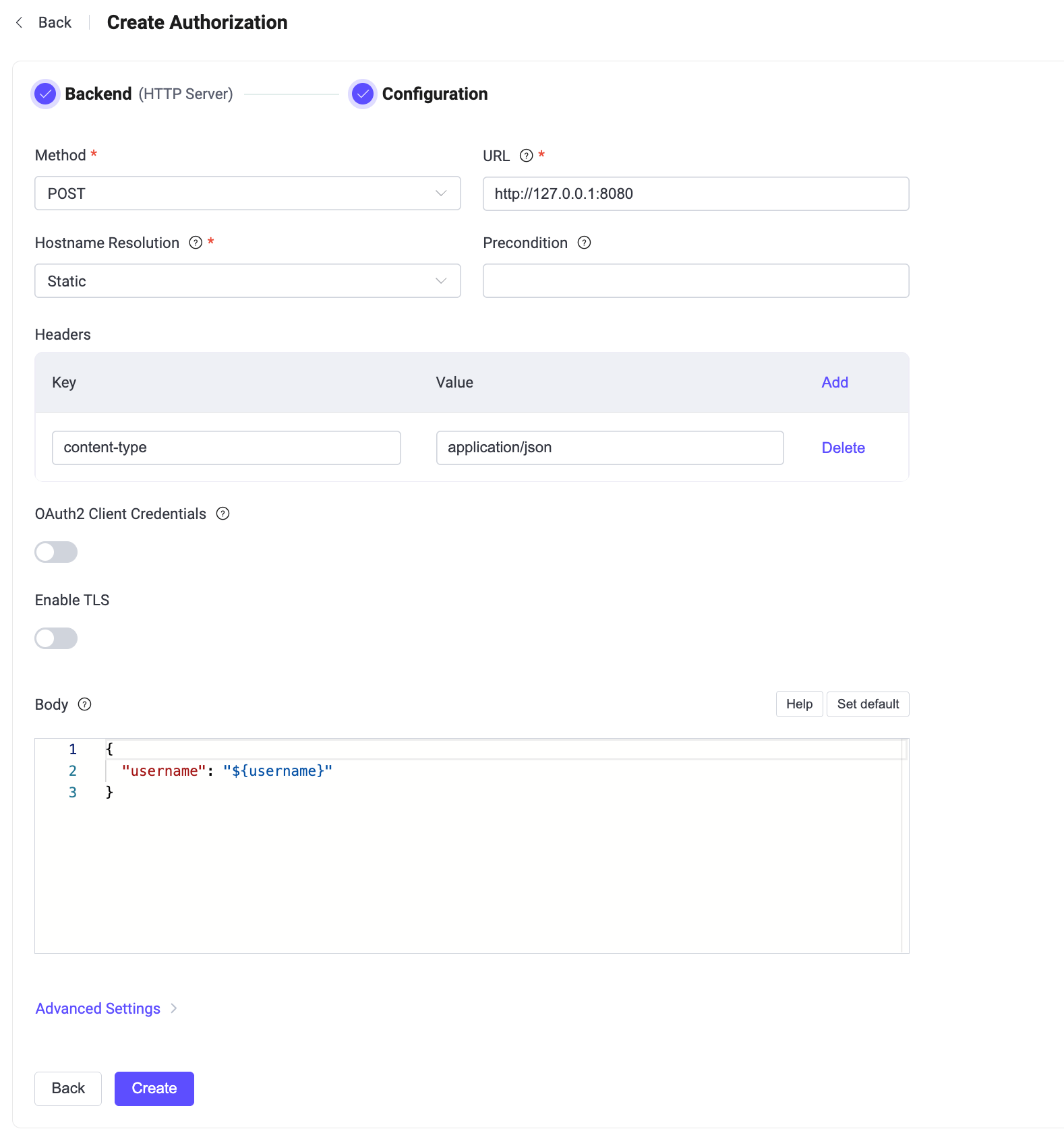
Follow the instructions below to do the configuration.
- Method: Select the HTTP request method, optional values:
GET,POST. - URL: Enter the URL of the HTTP application. The host part can include authorization placeholders when Hostname Resolution is set to
Dynamic. - Hostname Resolution: Select
Staticto resolve a fixed hostname when creating the authorizer, orDynamicto resolve the hostname for every request. The default option isStatic. For more information, see Configure Dynamic Hostname Resolution. - Allowed Hosts: When the URL host contains placeholders, enter the exact hostnames or wildcard patterns that the rendered hostname is allowed to match.
- Precondition: Enter an optional Variform expression. EMQX invokes this authorizer only when the expression evaluates to
true. For details, see Authorizer Preconditions. - Headers (optional): Configure the HTTP request headers. Keys and values support using placeholders.
- OAuth2 Client Credentials: Turn on the toggle switch to let EMQX obtain an access token and add it to requests sent to the external HTTP authorization service. For details, see Configure OAuth2 Client Credentials.
- Enable TLS: Turn on the toggle switch to enable TLS for connections to the external HTTP authorization service. This setting is independent of the TLS setting for the OAuth2 token endpoint.
- Body: Configure the HTTP request body. Keys and values support using placeholders.
- Advanced Settings: Configure concurrent connections, connection timeout, maximum HTTP requests, and request timeout.
- Pool size (optional): In
Staticmode, specify the persistent connection pool size. The value must be at least1. InDynamicmode, specify the number of connections that can be reused across requests, or set it to0to disable connection reuse. The default value is8. - Connection Timeout (optional): Enter the duration to wait for a connection timeout, with optional units: hours, minutes, seconds, milliseconds.
- HTTP Pipelining (optional): Positive integer, specifies the maximum number of HTTP requests that can be sent without waiting for a response; default value:
100. This setting does not apply when Hostname Resolution is set toDynamic. - Request Timeout (optional): Enter the duration to wait for a request timeout, with optional units: hours, minutes, seconds, milliseconds.
- Pool size (optional): In
- Method: Select the HTTP request method, optional values:
Click Create to finish the setting.
Configure OAuth2 Client Credentials
Starting from EMQX 6.0.4, an HTTP authorizer supports the OAuth 2.0 Client Credentials Grant. When OAuth2 is enabled, EMQX obtains, caches, and automatically refreshes an access token from the configured token endpoint. When EMQX calls the external HTTP authorization service, it sends the token in the Authorization: Bearer <access_token> request header so that the external service can authenticate EMQX.
Turn on OAuth2 Client Credentials, and then configure the following settings:
| Dashboard Setting | Description |
|---|---|
| Token Endpoint | Required. OAuth2 authorization server endpoint used to request an access token. The URL must use HTTP or HTTPS and must not contain user information. |
| Client ID | Required. OAuth2 client ID used to request an access token. |
| Client Secret | Required. OAuth2 client secret used to request an access token. |
| Scope | Optional OAuth2 scope requested for the access token. |
| Token Request Timeout | Timeout for the HTTP request to the token endpoint. The default is 5 seconds. |
| Enable TLS | Turn on the toggle switch to enable TLS for the token endpoint. This setting is independent of the Enable TLS setting for the external HTTP authorization service. |
EMQX sends a POST request with the application/x-www-form-urlencoded content type to the token endpoint. The request body contains grant_type, client_id, client_secret, and the optional scope. The token endpoint must return a 200 response with a JSON body containing an access_token. It can also return token_type and expires_in. If present, token_type must be Bearer, and expires_in must be a positive integer.
Important Notice
- Do not configure an
Authorizationheader for the HTTP authorizer when OAuth2 is enabled. EMQX rejects the configuration because it conflicts with the automatically generated Bearer authorization header. - The token endpoint must accept the client ID and client secret as form fields in the request body. Authenticating to the token endpoint with an HTTP Basic
Authorizationheader is not supported.
Configure with Configuration Items
The HTTP authorization requires configuration with type=http.
The optional precondition configuration item accepts a Variform expression. EMQX invokes this authorizer only when the expression evaluates to true. If precondition is omitted or empty, no precondition is applied. For details, see Authorizer Preconditions.
HTTP POST and GET requests are supported. Each of them has some specific options.
Example of an HTTP authorizer configured with POST request:
{
    type = http

    method = post
    url = "http://127.0.0.1:32333/authz/${peercert}?clientid=${clientid}"
    body {
        username = "${username}"
        topic = "${topic}"
        action = "${action}"
    }
    headers {
        "Content-Type" = "application/json"
        "X-Request-Source" = "EMQX"
    }
}
Example of an HTTP authorizer configured with GET request:
{
    type = http

    method = get
    url = "http://127.0.0.1:32333/authz"
    body {
        username = "${username}"
        topic = "${topic}"
        action = "${action}"
    }
    headers {
        "X-Request-Source" = "EMQX"
    }
}
OAuth2 Client Credentials Configuration
Starting from EMQX 6.0.4, you can enable OAuth2 Client Credentials by adding an oauth2 block to the HTTP authorizer configuration. Place the block at the same level as method, url, body, and headers:
oauth2 {
    enable = true
    grant_type = client_credentials
    token_endpoint = "https://auth.example.com/oauth/token"
    client_id = "emqx-client"
    client_secret = "emqx-client-secret"
    scope = "authorization.check"
    timeout = 5s
    ssl {
        enable = true
    }
}
Omit scope if the authorization server does not require it. For the request format and restrictions, see Configure OAuth2 Client Credentials.