Message Queue
The Message Queue feature introduced in EMQX 6.0 extends the MQTT subscribe/publish pattern with durable queue semantics, enabling reliable, asynchronous message delivery. It enhances native MQTT capabilities with features commonly found in enterprise-grade message queues, such as RabbitMQ, without requiring additional infrastructure.
This page provides a complete overview of the Message Queue feature in EMQX, covering its design motivation, key concepts, internal architecture, message flow, and real-world application scenarios.
What is a Message Queue?
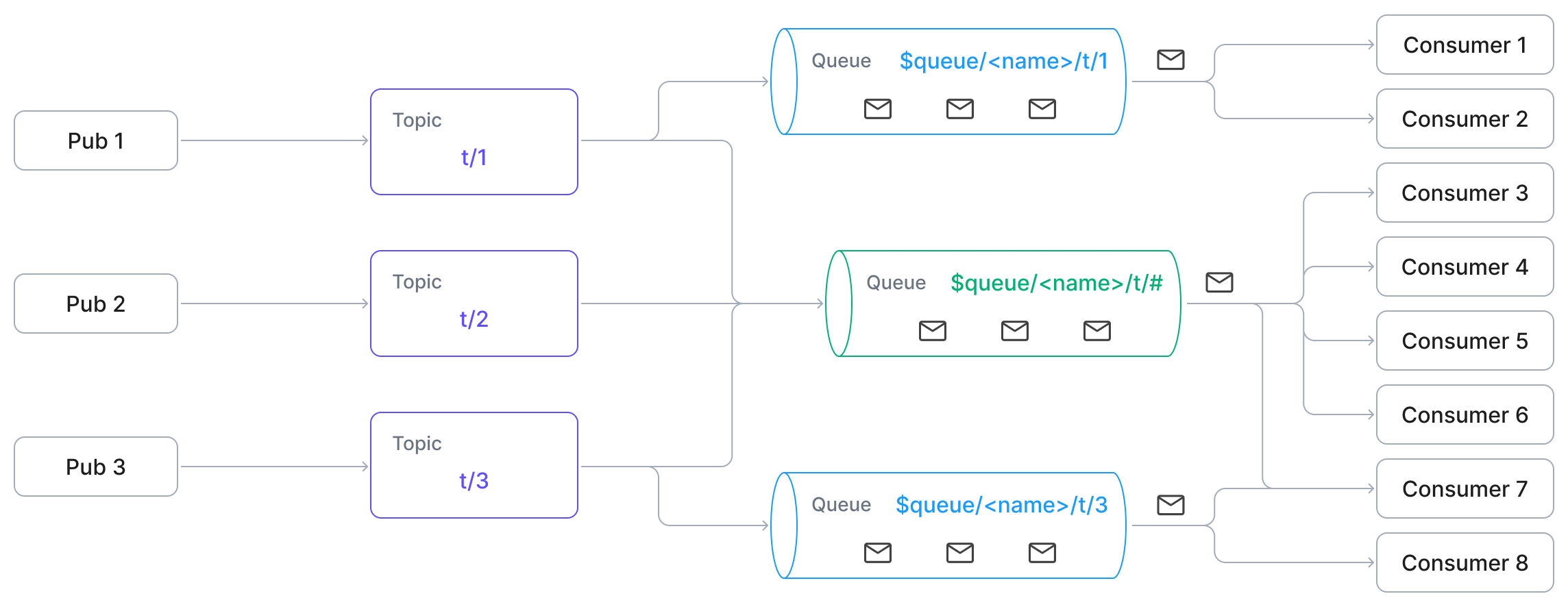
A Message Queue in EMQX is a named, durable server-side buffer that stores MQTT messages independently of subscriber availability. Each queue is identified by a unique queue name, while its topic filter defines which published messages are enqueued (but does not serve as the queue’s identity). Messages matching the configured topic filter are automatically persisted according to the queue’s retention and dispatch policies.
Unlike traditional MQTT behavior, Message Queues persist messages even when no clients are online. Clients can consume these messages by subscribing to the special $queue/<name> or $queue/<name>/topic_filter> format.
Message Queue uses embedded Durable Storage. Before enabling Message Queue, ensure that the EMQX data directory uses a local filesystem. Embedded Durable Storage backends do not support network filesystems such as NFS and SMB/CIFS.
Incompatible with Listener Mountpoint
Message Queue does not work for clients connected through a listener with a mountpoint configured. EMQX applies the mountpoint before it matches the $queue/ prefix, so the subscription is treated as an ordinary subscription to the mounted literal topic. No error is reported to the client.
Why Use Message Queue?
MQTT is a lightweight and widely adopted publish/subscribe protocol. However, its default behavior tightly couples message delivery to subscriber availability, which can be limiting for asynchronous or delayed-consumption scenarios.
Limitations of MQTT
While MQTT supports some queue-like features through shared subscriptions ($share/{group}/topic), it has limitations:
- Messages are not retained if no subscribers are online.
- No built-in support for Time to Live (TTL), queue size limits, or overflow control.
- No message deduplication, such as keeping only the latest value per key.
- No explicit lifecycle management for queues.
These limitations make it difficult to implement patterns like:
- Sending commands to devices before they come online.
- Submitting tasks to workers who are not always connected.
- Retaining only the latest state or configuration update.
Extend MQTT with Message Queue
Message Queue extends the MQTT protocol in EMQX. It allows messages to be persisted regardless of the subscribers' online status for further processing. It offers:
- Persistent message storage (even when clients are offline): While queues are not strictly ordered, they are designed for reliable and asynchronous delivery, bridging the gap between lightweight MQTT communication and more advanced enterprise messaging needs.
- Explicit queue declaration and property configuration: Each queue has a configurable lifecycle, with support for TTL, size limits, and dispatch strategies, allowing fine-grained control over how messages are retained and delivered.
- Optional Last-Value Semantics: Messages with the same key overwrite previous ones, ideal for retaining only the latest state or configuration update.
Message Queue Concepts
Queue Name
A unique identifier that explicitly identifies a Message Queue.
Queue names may contain only:
- Alphanumeric characters (
A–Z,a–z,0–9) - Underscores (
_) - Hyphens (
-) - Dots (
.)
TIP
Starting from EMQX 6.1.1, queues are addressed by name, not by topic filter. The topic filter is part of the queue’s configuration, but does not define its identity.
- Alphanumeric characters (
Topic Filter
An MQTT topic filter, such as
devices/+/command, that determines which published messages are written into a queue. Only messages whose topics match the configured filter are enqueued. A single published message may match multiple queues and therefore be written into multiple queues.TIP
The topic filter is the configuration metadata of a named queue and cannot be modified after the queue creation.
Queue Subscription
A special MQTT subscription used to consume messages from a queue. Clients subscribe using one of the following formats:
SUBSCRIBE $queue/<name>
SUBSCRIBE $queue/<name>/<topic_filter>
Where:
<name>is the queue name (required).<topic_filter>is optional when subscribing to an existing queue.- When auto-creation is enabled,
$queue/<name>/<topic_filter>allows EMQX to create the queue using the provided topic filter if it does not already exist.
Queue subscriptions operate independently of regular MQTT subscriptions and are handled by the Message Queue consumer mechanism.
Last-Value Semantics
An optional feature enabled by setting a Queue Key Expression during queue declaration. When enabled, EMQX will extract the
queue keyfrom each message as it enters the queue. A new message with the same key will overwrite any existing unconsumed message in the queue with that key. This behavior is ideal for stateful messaging or configuration updates, where only the latest value matters and older messages can be safely discarded.See the Queue Key Expression section for more details about how to use this feature.
Queue Declaration
The process of creating a durable queue and defining its behavior through configurable properties such as topic filter, dispatch strategy, retention limits, and optional key expression.
Queue Deletion
The removal of a queue along with all its stored messages and associated state.
Queue Properties
Customizable settings that control queue behavior, such as message retention time and dispatch strategy.
Quality of Service (QoS)
All messages in Message Queues are delivered with QoS 1 (at-least-once), regardless of the QoS level used when publishing or subscribing. This ensures reliable message delivery and unifies the queue's delivery behavior.
Message Persistence
Messages are retained even when no subscribers are connected. By default, queues apply last-value semantics. For regular queues (without a key expression), messages are stored in the order received.
How Message Queue Works
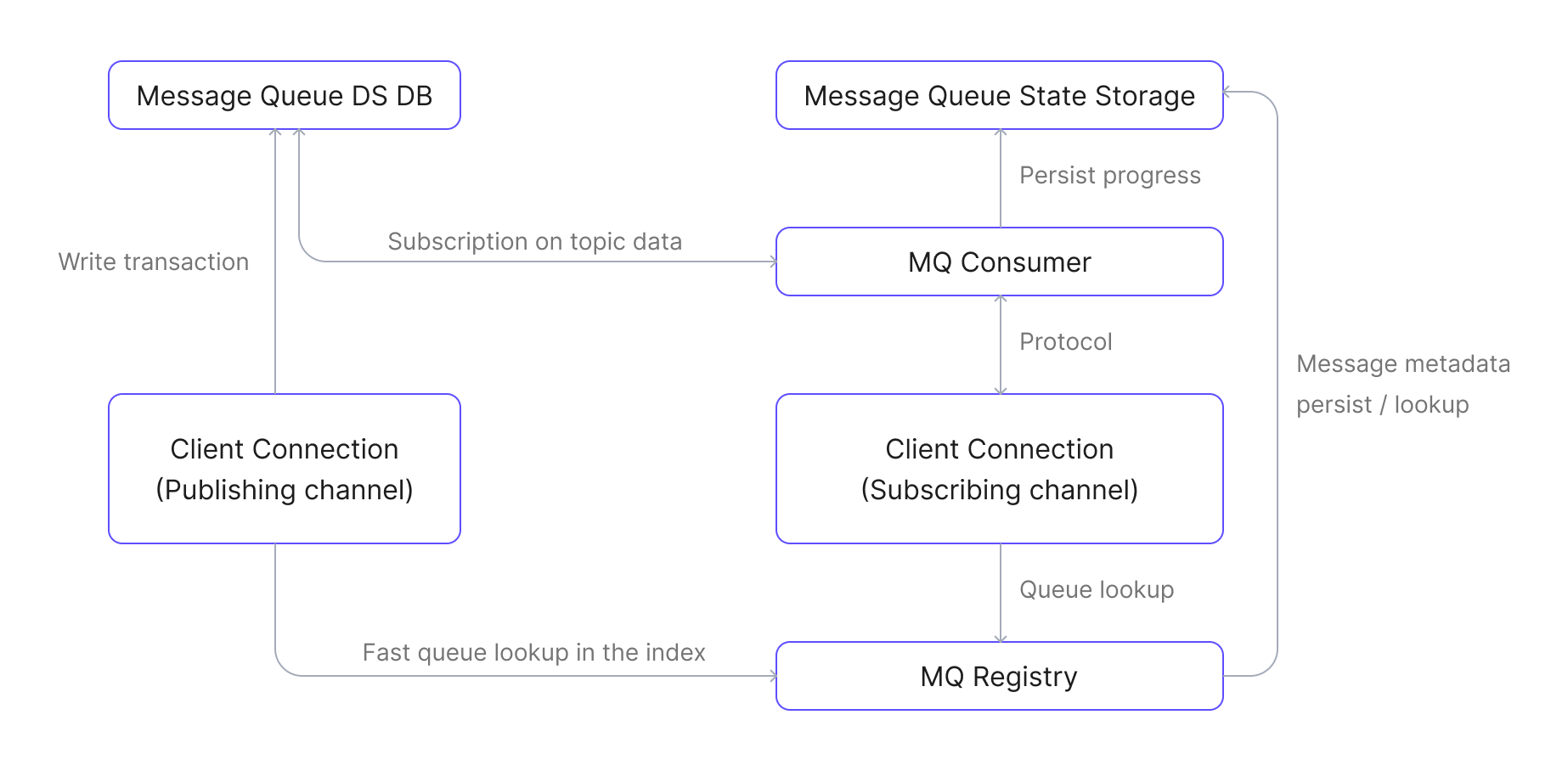
The Message Queue feature in EMQX is implemented as a loosely coupled extension and intercepts publish and subscribe operations using internal hooks. These hooks interact with a registry and storage layer to persist and deliver messages reliably.
Main Components
The following main components are involved:
- Message Queue Registry: Manages the lifecycle of all message queues. Responsible for creating, deleting, and looking up queues.
- Message Queue Message DB: Stores the actual messages published to queues and is built on EMQX’s Durable Storage.
- Message Queue State Storage: Persists consumption progress and queue metadata (e.g., TTL, properties).
- Message Queue Consumer: Retrieves messages from the queue and dispatches them to connected subscribers based on the dispatch strategy.
- Message Queue Subscription Registry: Tracks which channels (clients) are subscribed to which queues. Stores subscription state in each channel’s context.
- Message Queue Hooks: Hook into publish and subscribe events to intercept messages and route them to queues or consumers.
Message Queue Data Flow Diagram
The diagram below shows the data flow between major Message Queue components:
Publishing Workflow
- A client publishes a message to a regular topic, such as
some/topic. - An internal MQ hook is triggered to process the message.
- The hook checks the Message Queue Registry for any queues whose topic filter matches the published topic.
- If a matching queue is found, the message is written to the queue’s message database.
Subscribing and Consuming Workflow
- A client subscribes to a queue using
$queue/<name>or$queue/<name>/<topic_filter>. - An MQ hook is triggered to handle the subscription.
- The hook resolves the queue by its name, initializes the subscription within the client session context, and establishes a connection to the Message Queue Consumer.
- If no consumer process exists for the queue, a new Message Queue Consumer is started.
- The consumer restores the message consumption progress and begins fetching data from the message database.
- The consumer dispatches received messages to the subscriber client sessions according to the configured dispatch strategy.
- The subscriber client sessions deliver the messages to the clients via standard MQTT mechanisms.
Message Queue Core Features
The Message Queue feature in EMQX provides a set of core capabilities that enable reliable, decoupled, and configurable message delivery.
Enqueueing Messages
Messages published to topics matching a queue's configured topic filter are automatically enqueued.
If the queue is configured with a Queue Key Expression (for last-value semantics), the EMQX evaluates the expression against each message:
- If a key is derived, it replaces any unconsumed message with the same key.
- If a key fails to evaluate for a last-value queue, the message is discarded.
Dequeueing Messages
Subscribed clients receive messages from the queue according to the configured dispatch strategy. All messages in Message Queues are delivered with QoS 1 (at-least-once) to ensure reliable message delivery. When a client acknowledges a message, it is removed from the queue.
Dispatch Strategies
You can define how messages are distributed across subscribers:
random: Distribute randomly.round_robin: Rotate among available subscribers.least_inflight: Prefer subscribers with fewer in-progress messages.
Queue Management
Full queue lifecycle operations (create, update, delete, query) are available via REST APIs.
Use Cases
Message Queue enables reliable, asynchronous messaging patterns that are critical in many IoT and event-driven application scenarios, especially where devices or consumers may not always be online.
- Device Command Queuing: Cloud applications queue commands for IoT devices, ensuring commands will not be lost when devices are offline.
- Batch Processing: Break large datasets or workloads into smaller tasks and distribute them to worker clients for parallel or delayed processing.
- Sensor Data Processing: Temporarily queue high-frequency sensor data for batch processing, aggregation, or analysis at a later time.
- Latest Configuration Dispatch: Ensure devices always attempt to fetch and process the latest configuration command; older, unhandled commands (for the same config item/key) are superseded or marked obsolete in the queue.
Related Features Reference
Message Queue builds upon MQTT and complements other messaging features in EMQX:
- Shared Subscriptions: Distributes messages among multiple subscribers, but does not retain messages when no clients are online.
- Retained Messages: Stores the last known message for a topic, but only delivers one retained message per topic to new subscribers.
- MQTT Durable Sessions: Preserves session state (subscriptions and QoS 1/2 messages) for individual clients across reconnects.
- Rule Engine: Enables the filtering and processing of queued messages using SQL-like rules for further transformation or forwarding.
Security Considerations
EMQX authorizes a queue subscription against the complete subscription topic filter, including the $queue/ prefix and the queue name. Write authorization rules for that complete filter. A queue subscription also delivers messages that the queue stored before the subscription was created.
Queue Subscriptions Need Their Own Rules
Rules written for a plain topic space do not cover the corresponding queue subscriptions:
- A rule for
t/#does not apply to$queue/orders/t/#. EMQX treats the two as different topics. - An authorization topic filter that starts with
#or+does not match a subscription topic filter that starts with$. A rule that denies#, including the{eq, "#"}rule in the defaultacl.conf, does not deny$queue/orders/#.
A client that is denied # can therefore still subscribe to $queue/orders/# and receive every message the queue holds. Add explicit rules for the $queue/ namespace, and keep them at least as strict as the authorization rules for the ordinary topics covered by the queue's topic filter:
%% Allow one consumer to read the pre-created "orders" queue without granting auto-creation.
{allow, {username, "order_worker"}, subscribe, ["$queue/orders"]}.

%% Deny all other queue subscriptions, including the deprecated prefix.
{deny, all, subscribe, ["$queue/#", "$q/#"]}.
Keep the deprecated $q/ prefix in the rules while any client still uses it. See Deprecated Prefix.
This behavior differs from shared subscriptions. For $share/<group>/t/#, EMQX removes the prefix and authorizes t/#. For $queue/<name>/t/#, EMQX authorizes the complete subscription topic filter.
Auto-Creation Allows Client-Specified Topic Filters
When queue auto-creation is enabled, the subscribing client determines the new queue's topic filter. EMQX uses <topic_filter> from $queue/<name>/<topic_filter> to create the queue. It does not separately check whether the client is authorized to subscribe to <topic_filter> directly.
For example, a client allowed to subscribe to $queue/+/# can subscribe to $queue/orders/#. If the orders queue does not exist, EMQX creates it with # as its topic filter. The queue then stores messages published to all non-$ topics. The client might therefore receive messages from topics that it is not authorized to subscribe to directly.
Auto-creation is enabled by default for last-value queues and disabled for regular queues, but it takes effect only while the Message Queue feature is active. With the default mq.enable = auto, EMQX activates Message Queue only after at least one queue exists, so a subscription cannot create the first queue. On deployments that accept untrusted clients, allow access only to specific pre-created queues, such as $queue/orders, and deny all other subscriptions that match $queue/# or $q/#. Alternatively, disable auto-creation and create queues from the Dashboard or the REST API. See Automatically Create Queues via Dashboard.
Namespace Topic Isolation Is Separate
A namespace does not partition the topic space on its own. Topic isolation requires a mountpoint. Without one, clients in different namespaces share a single topic space, and a queue created in one namespace captures messages published in another. For more information, see Namespace Overview.
Compatibility Notes
This section summarizes compatibility considerations introduced in EMQX 6.1.1.
Named Queues
Starting from EMQX 6.1.1, all queues are explicitly named resources. Queue identity is based on a unique name, not a topic filter.
Legacy Queues
Previously created unnamed queues are automatically assigned names derived from their topic filters.
Derived name format:
/<topic_filter>This derived name preserves backward compatibility with existing
$q/<topic_filter>subscriptions.
Deprecated Prefix
The $q prefix remains supported for legacy subscriptions but is deprecated.
New deployments should use:
$queue/<name>Shared Subscription Restriction
If Message Queue is enabled, the $queue/ prefix is reserved for queue subscriptions and cannot be used for shared subscriptions.
Next Steps
Now that you understand the Message Queue fundamentals, explore how to put them into practice:
- Create and Configure a Queue: Learn how to declare queues via Dashboard or REST API, define dispatch strategies, and set retention policies.
- Quick Start Tutorial: Follow a step-by-step guide using MQTTX to simulate real-world publisher and subscriber scenarios.