Global Namespace Settings
In EMQX 6.1, in addition to configuring individual namespace instances, a set of global namespace settings is available to control how namespaces are identified, how isolation behaviors are applied, and how topics and authorization are handled.
These settings apply cluster-wide and affect all namespaces and client connections. They are typically configured before enabling and using namespace-related features.
Global namespace settings can be managed through the Dashboard at: Management -> Namespaces -> Settings.
Note
To preserve backward compatibility, most global namespace settings in EMQX 6.1, such as Client ID Isolation, Namespace as Mountpoint, and Mount Prefix for Authorization, are disabled by default.
To enable the corresponding isolation capabilities, you must explicitly turn them on under Namespace Related Configurations.
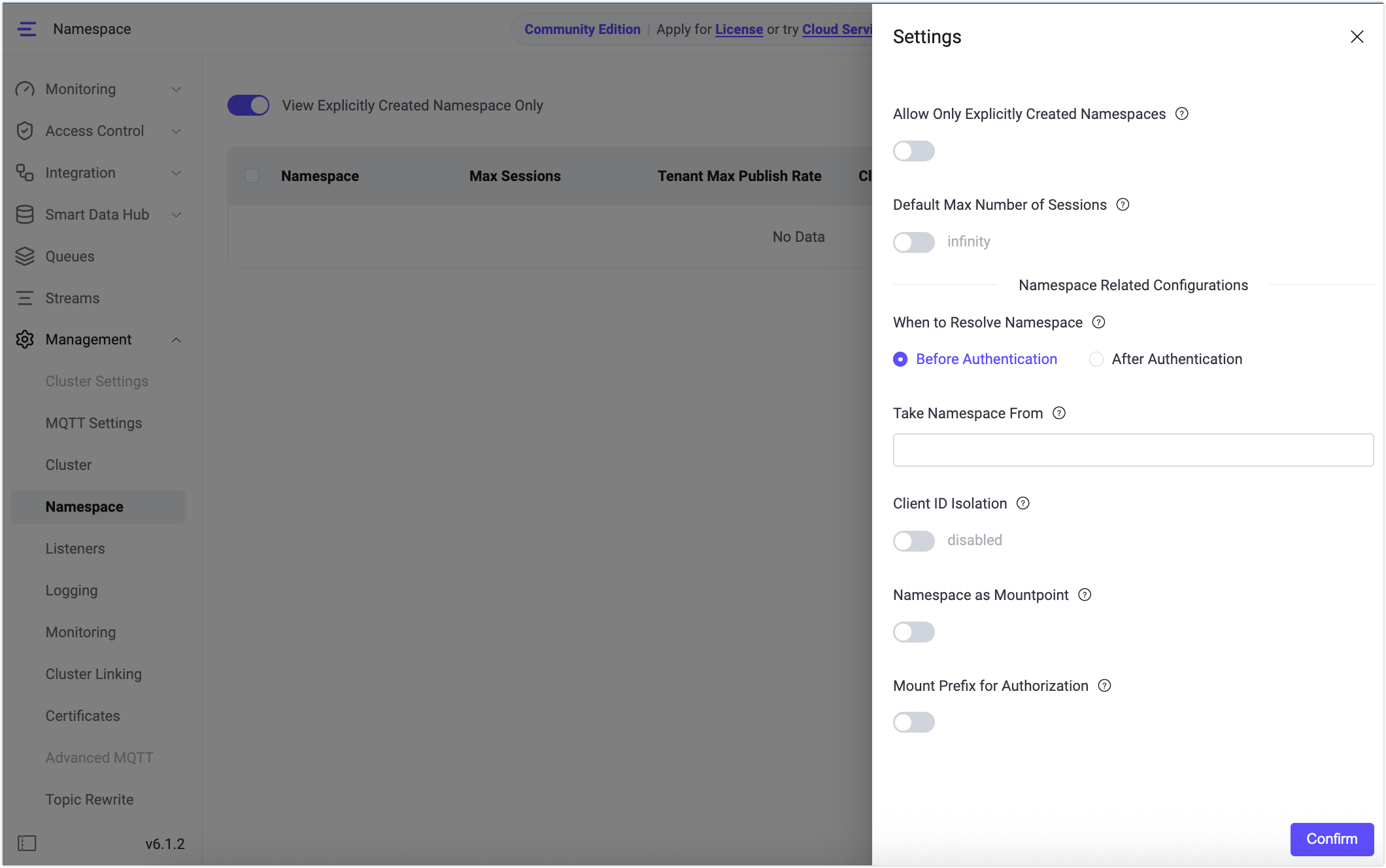
Allow Only Explicitly Created Namespaces
This setting controls whether clients are allowed to connect only to namespaces that have been explicitly created.
When this setting is enabled, EMQX validates the client’s namespace during the connection process and decides whether to allow or reject the connection.
- Enabled:
- Clients whose resolved namespace has not been explicitly created via the Dashboard or REST API will be denied connection.
- Clients whose namespace cannot be resolved (for example, when the namespace source is not configured or does not produce a valid value) will also be denied connection.
- Disabled:
- Clients are allowed to connect to namespaces that have not been explicitly created.
- If a namespace source is configured, EMQX may automatically create namespaces as needed.
Note
Before disabling this setting, ensure that Take Namespace From is properly configured and that all valid clients can successfully resolve a namespace. Otherwise, clients may be rejected because their namespace cannot be resolved.
When After Authentication mode is selected under When to Resolve Namespace, pre-authentication namespace checks are skipped. The check against explicitly created namespaces runs after authentication completes instead.
Default Max Number of Sessions
This setting defines the default maximum number of concurrent sessions for newly created namespaces.
- Enabled:
- Newly created namespaces automatically inherit this maximum session limit.
- Disabled:
- Newly created namespaces have no session limit (
infinity) by default.
- Newly created namespaces have no session limit (
This setting applies only to namespaces created after the configuration takes effect. Existing namespaces are not affected and must be updated individually if needed.
When to Resolve Namespace
This setting controls at which point in the connection lifecycle EMQX resolves the client’s namespace identifier.
EMQX supports two modes, selectable via the When to Resolve Namespace radio button in the Dashboard:
- Before Authentication (default): The namespace expression is evaluated before the authentication chain runs, using only connection metadata available at that point (such as
username,clientid, orcert_common_name). This corresponds to configuringtnsviamqtt.client_attrs_initin the configuration file. - After Authentication: The namespace expression is evaluated after the full authentication chain completes. In addition to the standard connection metadata,
client_attrs.*values are available, including any attributes returned by the authentication backend (for example, atagfield from an HTTP auth response). This corresponds to configuringmulti_tenancy.post_auth_tns_expressionin the configuration file.
TIP
These two modes are mutually exclusive. If After Authentication is configured, it takes precedence and overrides any pre-authentication tns value derived from mqtt.client_attrs_init.
Interaction with Allow Only Explicitly Created Namespaces
When After Authentication mode is selected, pre-authentication namespace checks are skipped entirely, even if Allow Only Explicitly Created Namespaces is enabled. All enforcement (whether the resolved namespace exists, quota checks) is deferred until after authentication completes and the final namespace value is known.
Take Namespace From
This setting specifies the Variform expression EMQX uses to derive the client’s namespace identifier (client_attrs.tns).
The expression is evaluated at the point in the connection lifecycle determined by the When to Resolve Namespace setting:
- In Before Authentication mode, only standard connection metadata is available:
username,clientid,cert_common_name, and other pre-auth attributes. - In After Authentication mode,
client_attrs.*is also available, including attributes merged in from the authentication result.
TIP
The Take Namespace From expression uses Variform syntax. For details on available functions, see Variform Expressions.
This configuration is a prerequisite for the following features:
- Automatic namespace creation
- Namespace-based topic isolation
- Namespace-based Client ID isolation
- Namespace-level session limits and rate limits
If Take Namespace From is not configured, no tns attribute will be generated. In this case, clients will not be associated with any namespace, and all namespace-related isolation and control features will remain inactive.
Examples
Before Authentication
Extract the namespace from the username:
nth(1, tokens(username, '-'))With this configuration, a client connecting with the username tenantA-user1 has tenantA assigned as its namespace identifier before authentication runs.
After Authentication
Use a tag attribute returned by an HTTP auth backend:
client_attrs.tagWith a fallback in case the auth backend does not return a tag:
coalesce(client_attrs.tag, username)With this configuration, EMQX waits for the authentication chain to complete, then reads the tag value from the merged client_attrs and assigns it as the namespace identifier.
TIP
If the expression renders to an empty string, the existing tns value (if any) is kept. If the expression produces an error, a warning is logged, and the client is treated as having no namespace.
Client ID Isolation
Client ID isolation prevents conflicts when clients in different namespaces use the same Client ID.
When enabled, EMQX internally prefixes the Client ID with the client’s namespace, while the original Client ID provided by the client remains unchanged.
When Client ID Isolation is enabled, the Dashboard automatically populates a recommended default expression:
concat([client_attrs.tns, '-', clientid])With this configuration:
- Clients in different namespaces can safely use the same Client ID.
- The internally used Client ID always includes the namespace prefix.
This expression is provided as an example. You may customize it to suit your business requirements, as long as the resulting Client ID remains globally unique.
Example Behavior
Assume a namespace source has been configured to extract the namespace from the username:
nth(1, tokens(username, '-'))Client ID isolation is enabled using the default expression:
concat([client_attrs.tns, '-', clientid])Client Connection Details
| Client | Username | Client ID |
|---|---|---|
| A | tenantA-user1 | client1 |
| B | tenantB-user2 | client1 |
Internally Used Client IDs
| Namespace | Original Client ID | Actual Client ID |
|---|---|---|
| tenantA | client1 | tenantA-client1 |
| tenantB | client1 | tenantB-client1 |
Namespace as Mountpoint
When enabled, EMQX uses the client’s namespace as a topic mountpoint after the namespace has been successfully resolved. This enables namespace-level topic isolation.
If a listener already has a mountpoint configured, this setting is ignored and the listener-level configuration takes precedence.
Behavior
After Namespace as Mountpoint is enabled, EMQX isolates topics as follows:
- During
PUBLISH,SUBSCRIBE,UNSUBSCRIBE, and Will message processing:- EMQX automatically prepends
{namespace}/to topics internally.
- EMQX automatically prepends
- When delivering messages to clients:
- The namespace prefix is automatically stripped.
- From the client’s perspective:
- Published and subscribed topic names remain unchanged.
- Clients are not aware of the namespace prefix.
Example
Assume the client belongs to namespace n1 and Namespace as Mountpoint is enabled.
Client-side Behavior
- Client subscribes to:
sensors/# - Client publishes to:
sensors/data
Internal Processing in EMQX
- Broker registers the subscription as:
n1/sensors/# - Broker routes messages using:
n1/sensors/data - Message is delivered to the client as:
sensors/data
As a result:
- Namespace prefixes are used only internally.
- Clients always interact with original topic names.
- Clients in different namespaces using the same topics do not receive each other’s messages.
Mount Prefix for Authorization
This setting controls whether the topic mountpoint prefix is added to target topics and topic filters before authorization (ACL) checks are performed.
The mountpoint prefix typically comes from the namespace when Namespace as Mountpoint is enabled, and follows the format:
{namespace}/Behavior
When Mount Prefix for Authorization is enabled:
- EMQX prepends the topic mountpoint to the target topic or topic filter before matching ACL rules or authorization backends.
- Authorization checks are performed using the prefixed topic.
This behavior applies to the following operations:
PUBLISHSUBSCRIBEUNSUBSCRIBE- Will messages
Example
Assume the following configuration is enabled:
- Namespace as Mountpoint
- Mount Prefix for Authorization
- Client namespace:
n1
Client Action
The client attempts to subscribe to:
sensors/#Topic Used for Authorization
During authorization, EMQX evaluates n1/sensors/#. Therefore, the corresponding ACL rule must be defined as n1/sensors/# rather than sensors/#.
Recommendation
When Namespace as Mountpoint is enabled for topic isolation, it is recommended to enable Mount Prefix for Authorization as well. This ensures that authorization checks are performed against the same topic names used internally by the broker, avoiding inconsistencies between authorization results and actual message routing.