Integrate with PostgreSQL
This authorizer implements authorization checks through matching publish/subscription requests against lists of rules stored in the PostgreSQL database.
Prerequisite
Knowledge about basic EMQX authorization concepts
Data Schema and Query Statement
PostgreSQL authorizer supports almost any storage schema. It is up to the user to decide how to store acl rules and access them: using one or multiple tables, views, etc.
Users need to provide a query statement template and ensure the following fields are included:
permissionvalue specifies the applied action if the rule matches. Should be one ofdenyorallow.actionvalue specifies the request for which the rule is relevant. Should be one ofpublish,subscribe, orall.topicvalue specifies the topic filter for topics relevant to the rule. Should be a string that supports wildcards and topic placeholders.qos(Optional) value specifies the QoS levels that the rule applies to. Value options are0,1,2. It can also be a string separated by,to specify multiple QoS levels, e.g.0,1. The default is all QoS levels.retain(Optional) value specifies whether the current rule supports retained messages. Value options are0and1. The default is to allow retained messages.
Example table structure for storing credentials:
CREATE TABLE mqtt_acl(
  id serial PRIMARY KEY,
  username text NOT NULL,
  permission text NOT NULL,
  action text NOT NULL,
  topic text NOT NULL,
  qos smallint,
  retain smallint
);
CREATE INDEX mqtt_acl_username_idx ON mqtt_acl(username);
In this table, MQTT users are identified by username.
For example, if you want to add an authorization rule for a user user123 who is allowed to publish topics data/user123/#, the query statement should be:
postgres=# INSERT INTO mqtt_acl(username, permission, action, topic, ipaddress) VALUES ('user123', 'allow', 'publish', 'data/user123/#', '127.0.0.1');
INSERT 0 1
The corresponding config parameters are:
query = "SELECT permission, action, topic, ipaddress, qos, retain FROM mqtt_acl WHERE username = ${username} and ipaddress = ${peerhost}"Configure with Dashboard
You can use EMQX Dashboard to configure how to use PostgreSQL for user authorization.
On EMQX Dashboard, click Access Control -> Authorization on the left navigation tree to enter the Authorization page.
Click Create at the top right corner, then click to select PostgreSQL as Backend. Click Next. The Configuration tab is shown as below.
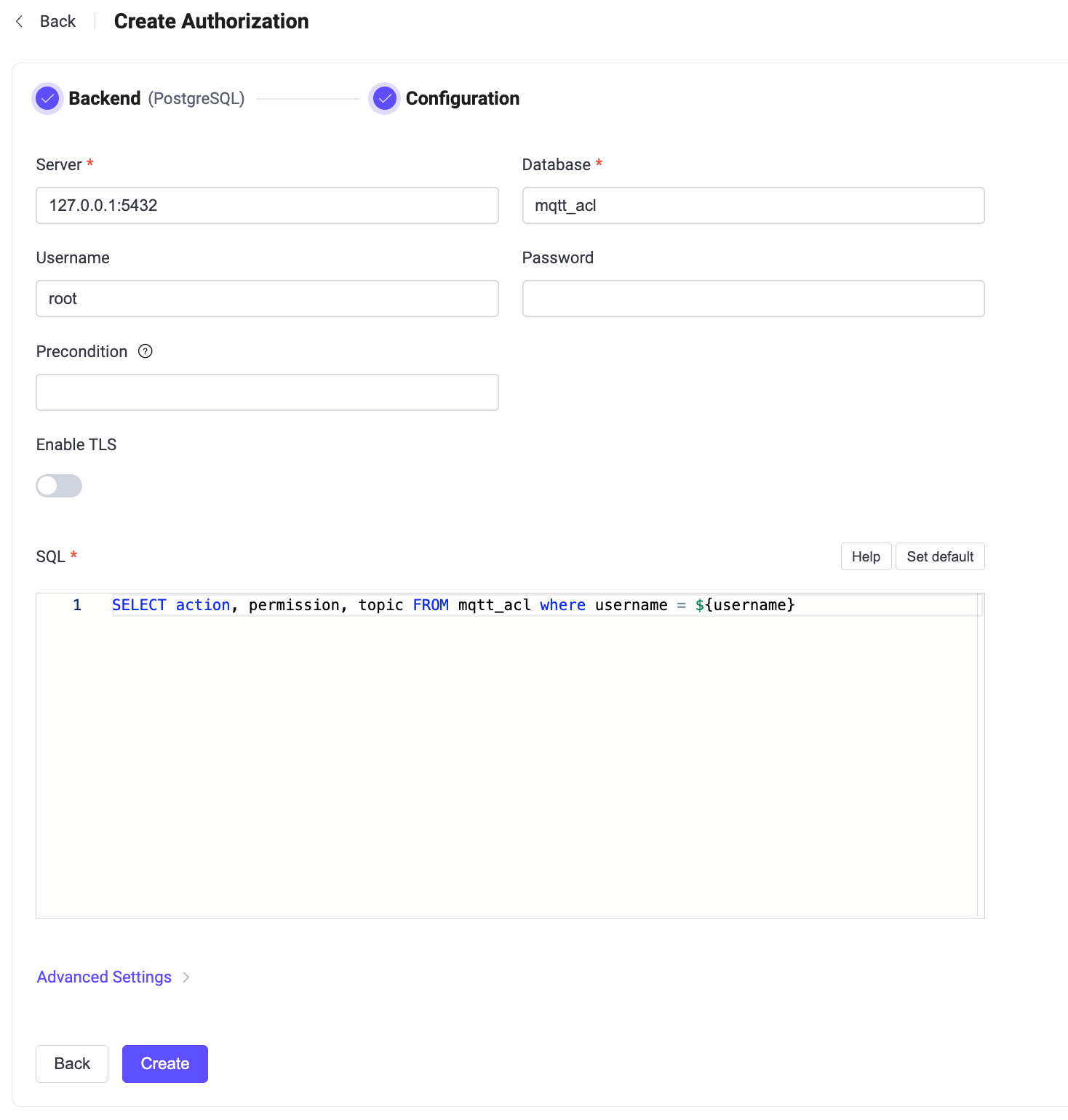
Follow the instructions below to configure the authorization backend:
Enter the information for connecting to PostgreSQL.
- Server: Specify the server address that EMQX is to connect (
host:port). - Database: PostgreSQL database name.
- Username: Specify user name.
- Password: Specify user password.
- Server: Specify the server address that EMQX is to connect (
Precondition: Enter an optional Variform expression. EMQX invokes this authorizer only when the expression evaluates to
true. For details, see Authorizer Preconditions.Enable TLS: Turn on the toggle switch if you want to enable TLS. For more information on enabling TLS, see Network and TLS.
SQL: Fill in the query statement according to the data schema. For more information, see Data Schema and Query Statement.
Advanced Settings: Configure connection pool, timeout, and prepared statement behavior.
- Connection Pool Size (optional): Input an integer value to define the number of concurrent connections from an EMQX node to PostgreSQL. Default:
8. - Connect Timeout (optional): Specify the waiting period before EMQX assumes the connection attempt has timed out. Units supported include milliseconds, second, minute, and hour. Default:
15seconds. - Disable Prepared Statements (optional): Disable the use of prepared statements for database queries. Enable this option if your PostgreSQL proxy or middleware (for example, PGBouncer or Supabase in Transaction mode) does not support session-level features such as prepared statements. Default: disabled.
- Connection Pool Size (optional): Input an integer value to define the number of concurrent connections from an EMQX node to PostgreSQL. Default:
Click Create to finish the settings.
Configure with Configuration Items
You can configure the EMQX PostgreSQL authorizer with EMQX configuration items.
The PostgreSQL authorizer is identified by type postgresql. For a full list of configuration parameters, see the EMQX Enterprise Configuration Manual.
The optional precondition configuration item accepts a Variform expression. EMQX invokes this authorizer only when the expression evaluates to true. If precondition is omitted or empty, no precondition is applied. For details, see Authorizer Preconditions.
Sample configuration:
{
  type = postgresql

  database = "mqtt"
  username = "postgres"
  password = "public"
  server = "127.0.0.1:5432"
  query = "SELECT permission, action, topic FROM mqtt_acl WHERE username = ${username}"
  connect_timeout = "15s"
  disable_prepared_statements = false
}