Connect to S7-1200 PLC
This article will use the Siemens S7 ISOTCP driver to connect to a Siemens S7-1200 PLC and read/write the tag values in the PLC.
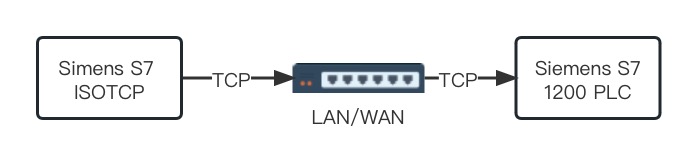
The Siemens S7 ISOTCP driver can connect to the PLC via the local network or the Internet, but note that if the PLC and the EMQX Neuron server are not on the same local network, you need to configure port mapping in the PLC.
S7-1200 PLC Tags
This article assumes that you can connect to the PLC using the TIA Portal software. On how to set up the connection, see Tailor S7 1200/1500 PLC for Effective ISOTCP Driver Use
- Use the TIA Portal software to open the PLC project, click the PLC project name to enter the PLC project configuration page.
- In the left menu, select the global data block tag table Device -> Program Blocks -> Any Global Data Block (DB) as shown in the following figure.
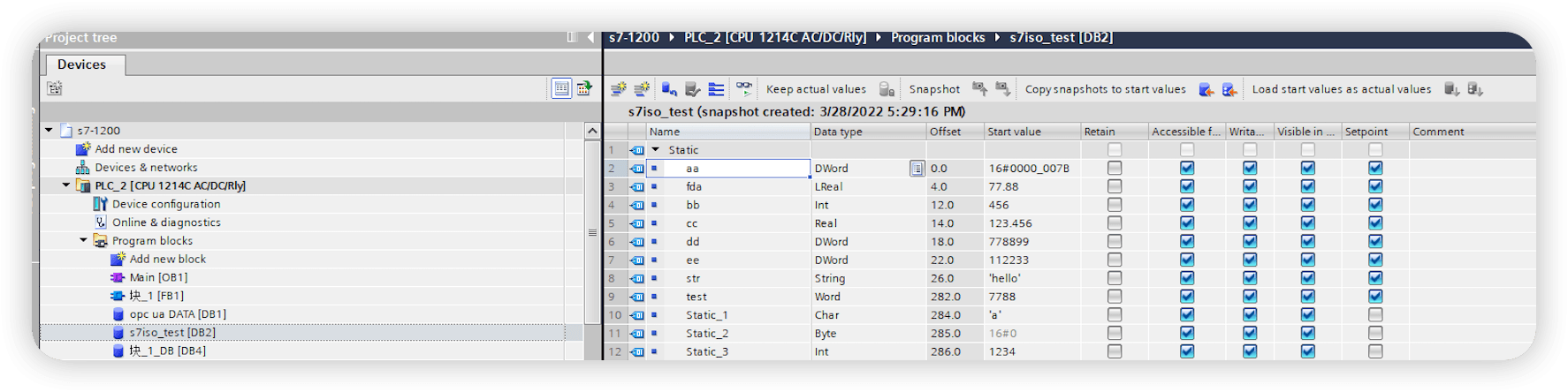
Configure EMQX Neuron
- In EMQX Neuron, click Data Collection -> South Devices, click Add Device to create a node that connects to the 1200 PLC by selecting the Siemens S7 ISOTCP driver.
- After creating the node, click Device Configuration to enter the device configuration page and configure the node information according to the actual situation,
- PLC IP Address: PLC IP address.
- PLC Port: PLC port, the default is 102.
- CPU Rack Number: PLC CPU Rack number, the default is 0.
- CPU Slot Number: PLC CPU Slot number, the default is 1.
- In the created southbound device node, create a group, and create tags under the group.