Siemens S7 Driver
Test Purpose
In the scenario where Siemens S7 driver connects to devices for large-scale data collection and device control, verify the resource usage of EMQX Neuron, and continuously monitor: CPU, memory, network IO, and device control delay.
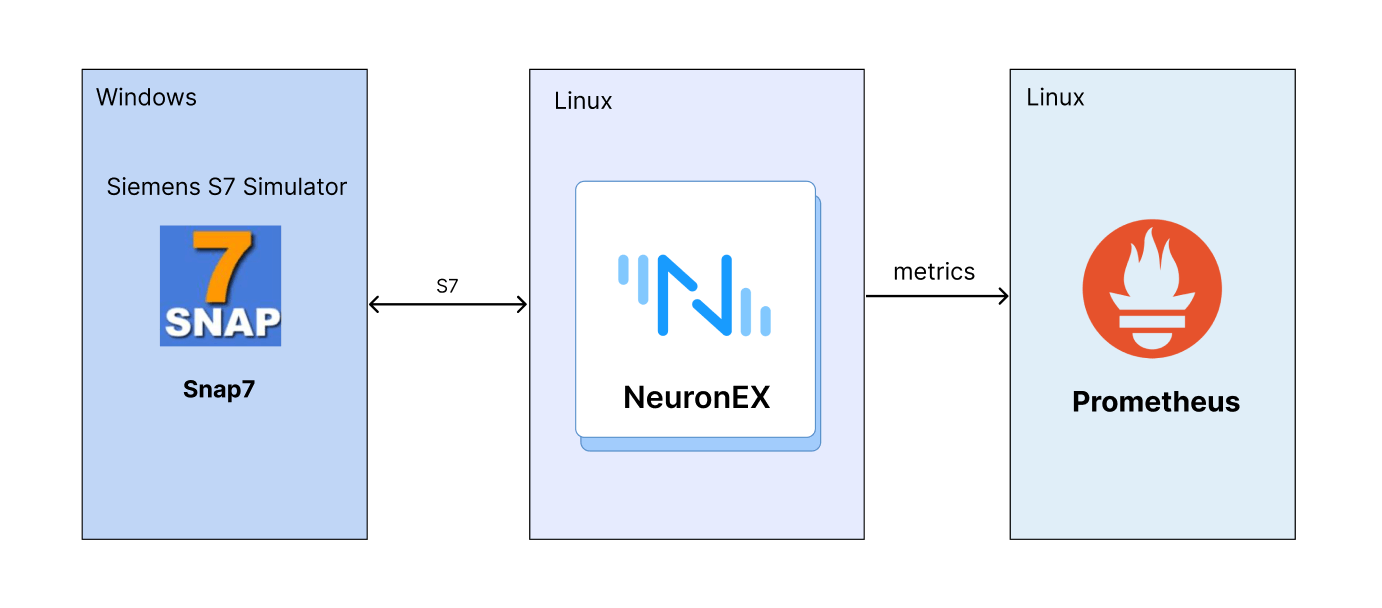
Test Architecture
Test Environment and Testing Tools
Snap7 is an open-source, cross-platform communication library designed for interfacing with Siemens S7 series PLCs (Programmable Logic Controllers). It enables users to exchange data with S7-200, S7-300, S7-400, S7-1200, and S7-1500 models of PLCs over Ethernet. Snap7 offers a simple yet powerful interface, making it easy for developers to read from and write to PLC data blocks, memory, and flags.
Hardware resources of the Linux machine deployed with EMQX Neuron:
| EMQX Neuron Version | Operating System | CPU | Memory | CPU Model |
|---|---|---|---|---|
| EMQX Neuron 3.2.1 | Debian GNU/Linux 12 | 4 cores | 30Gi | Intel(R) Xeon(R) Platinum 8269CY CPU T 3.10GHz |
- Monitoring the usage of CPU, memory, network IO, and other resources of EMQX Neuron software on the Linux machine through Prometheus.
Test Scenarios
Data Collection Scenarios
- Scenario 1
EMQX Neuron is configured with 1 Siemens S7 driver, which includes 10 collection groups, each group collecting 1,000 Float type data points per second, totaling 10,000 data points.
- Scenario 2
EMQX Neuron is configured with 5 Siemens S7 drivers, each driver including 10 collection groups, each group collecting 1,000 Float type data points per second, totaling 50,000 data points.
- Scenario 3
EMQX Neuron is configured with 10 Siemens S7 drivers, each driver including 10 collection groups, each group collecting 1,000 Float type data points per second, totaling 100,000 data points.
- Scenario 4
EMQX Neuron is configured with 1 Siemens S7 driver, each driver including 1 collection group, each group collecting 1,000 Float type data points every 100 milliseconds, totaling 1,000 data points.
- Scenario 5
EMQX Neuron is configured with 5 Siemens S7 drivers, each driver including 1 collection group, each group collecting 1,000 Float type data points every 100 milliseconds, totaling 5,000 data points.
- Scenario 6
EMQX Neuron is configured with 10 Siemens S7 drivers, each driver including 1 collection group, each group collecting 1,000 Float type data points every 100 milliseconds, totaling 10,000 data points.
Device Control Scenarios
- Scenario 7
In EMQX Neuron configured with 10 Siemens S7 drivers, each driver including 10 collection groups, each group collecting 1,000 Float type data points per second, totaling 100,000 data points, dispatch 100 data points.
Overview of Results
Data Collection Performance Test
| Scenario | Number of Drivers | Number of Groups per Driver | Number of Points per Group | Collection Interval | Total Points | Point Type | Memory Usage | CPU Usage | Network IO |
|---|---|---|---|---|---|---|---|---|---|
| Scenario 1 | 1 | 10 | 1000 | 1 second | 10,000 | Float | 175MB | 6% | receive: 15kb/s transmit: 6kb/s |
| Scenario 2 | 5 | 10 | 1000 | 1 second | 50,000 | Float | 355MB | 25% | receive: 78kb/s transmit: 31kb/s |
| Scenario 3 | 10 | 10 | 1000 | 1 second | 100,000 | Float | 512MB | 57% | receive: 155kb/s transmit: 62kb/s |
| Scenario 4 | 1 | 1 | 1000 | 100 ms | 1,000 | Float | 143MB | 3% | receive: 15kb/s transmit: 6kb/s |
| Scenario 5 | 5 | 1 | 1000 | 100 ms | 5,000 | Float | 167MB | 16% | receive: 78kb/s transmit: 31kb/s |
| Scenario 6 | 10 | 1 | 1000 | 100 ms | 10,000 | Float | 199MB | 37% | receive: 156kb/s transmit: 63kb/s |
Device Control Latency Test
| Scenario | Dispatch Method | Number of Points Dispatched | Test Count | Minimum Response Time | Maximum Response Time | Average Response Time |
|---|---|---|---|---|---|---|
| Configured 10 Siemens S7 drivers in EMQX Neuron, each driver containing 10 collection groups, each group collecting 1,000 Float type data points per second, totaling 100,000 data points under normal collection conditions. | API Dispatch | 100 | 100 times | 15ms | 47ms | 30ms |
TIP
This test used simulator devices, and the data point addresses were all continuous segments, so the system resource usage when EMQX Neuron collects data from real devices will be higher than the results of this test.
If using EMQX Neuron data processing functions for data cleaning and filtering, edge computing, and algorithm integration, additional CPU and memory will be consumed.
Detailed Test Results
Scenario 1
EMQX Neuron is configured with 1 Siemens S7 driver, which includes 10 collection groups, each group collecting 1,000 Float type data points per second, totaling 10,000 data points.
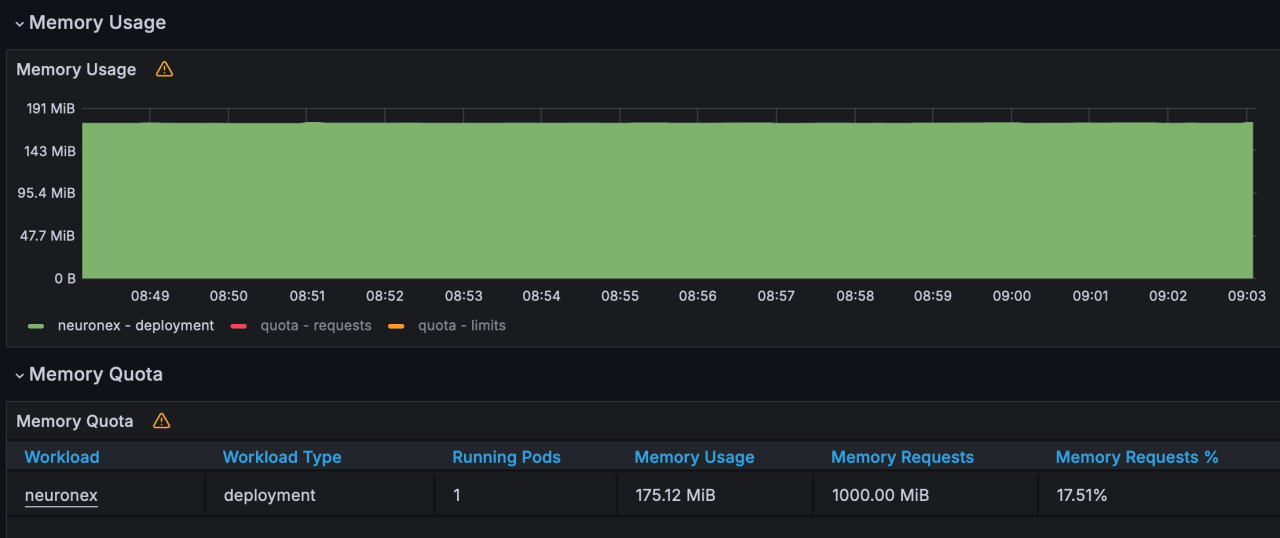
- Memory Usage: 175MB
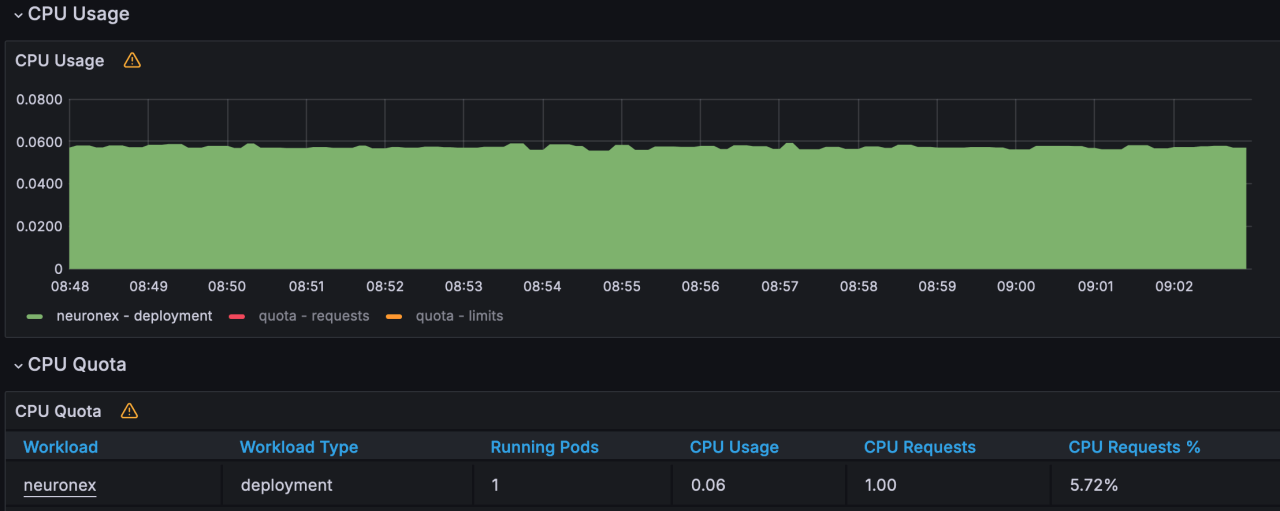
- CPU Usage: 6%
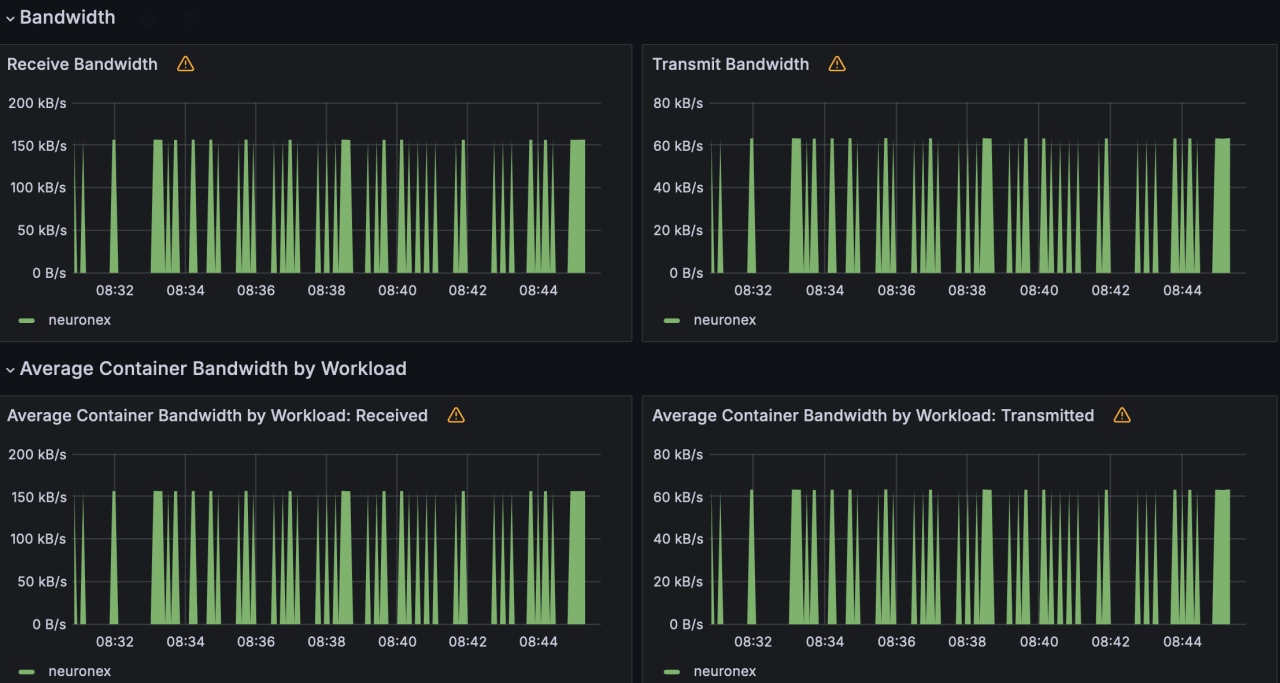
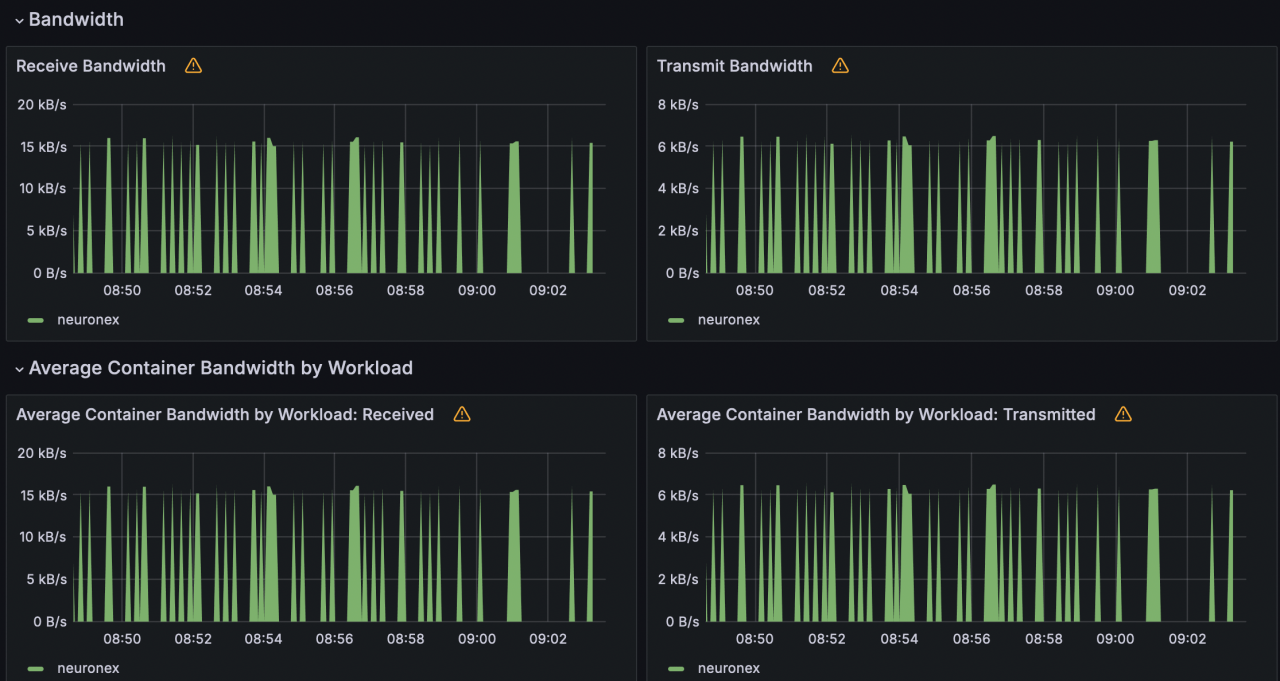
- Network IO: receive:15KB/s; transmit:6KB/s

Scenario 2
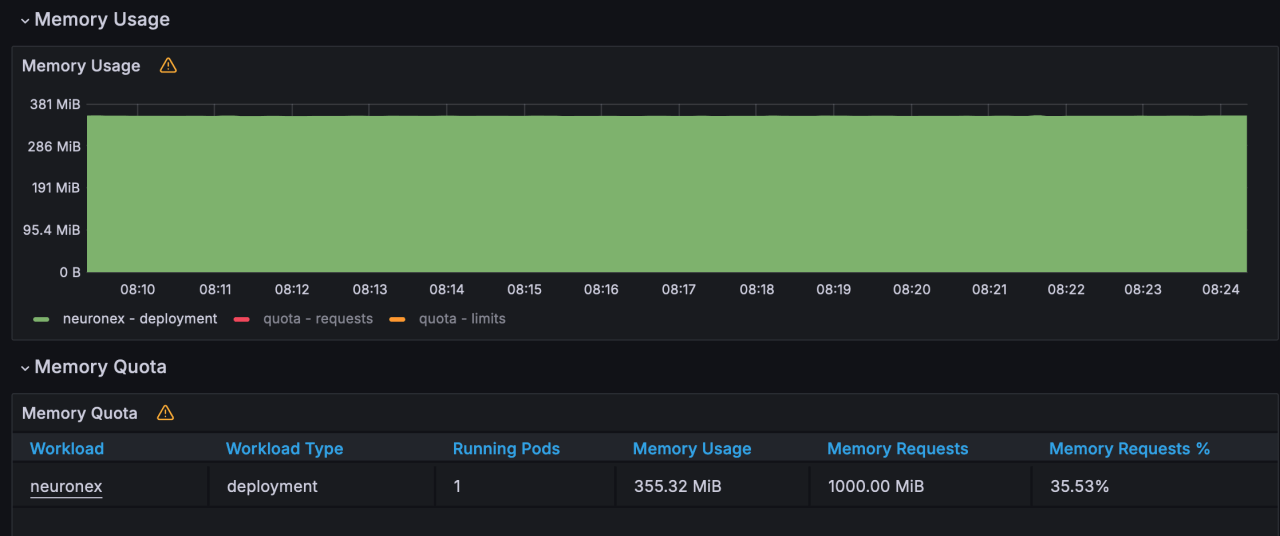
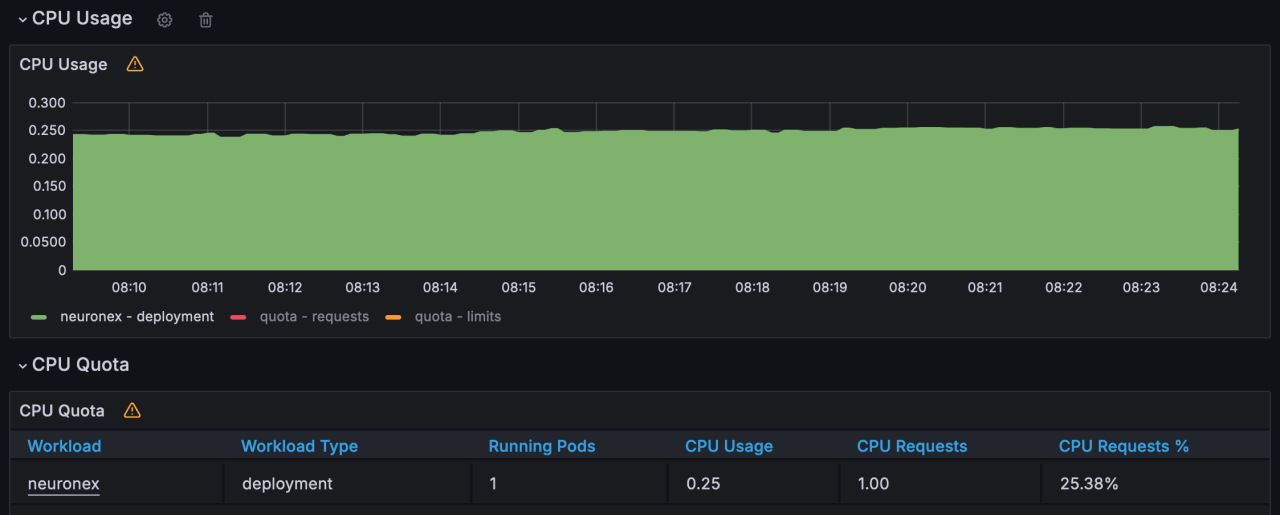
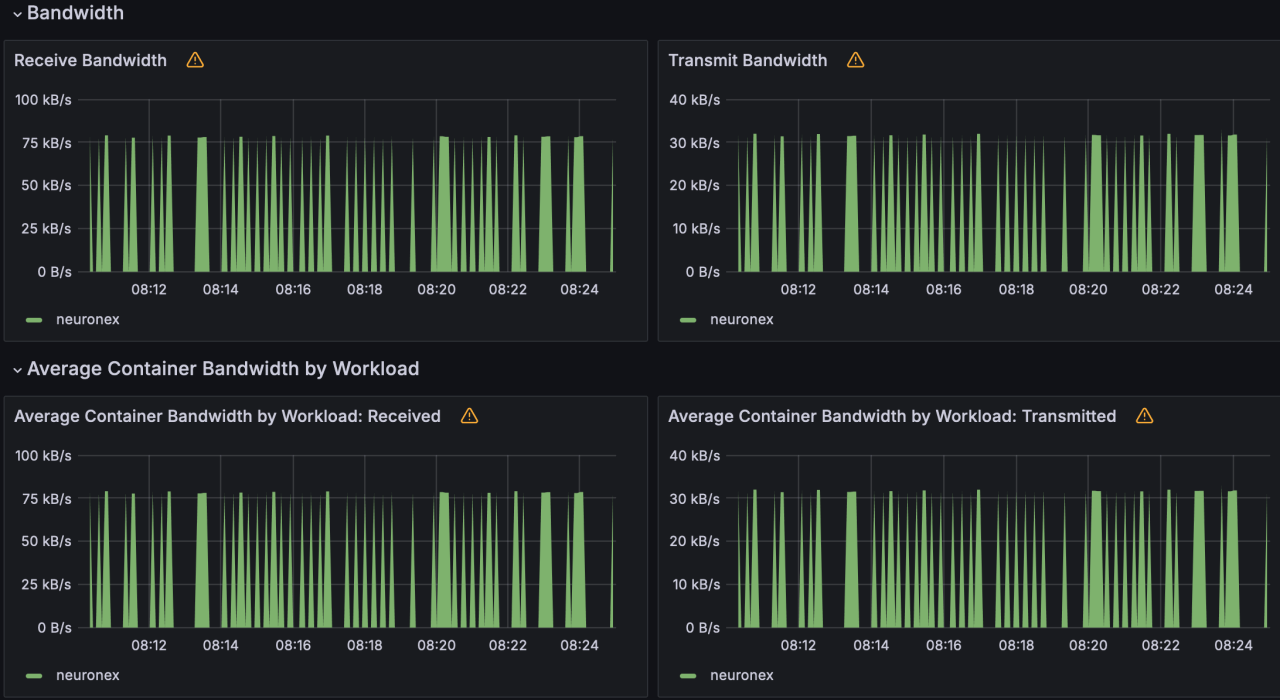
EMQX Neuron is configured with 5 Siemens S7 drivers, each driver including 10 collection groups, each group collecting 1,000 Float type data points per second, totaling 50,000 data points.
- Memory Usage: 355MB
- CPU Usage: 25%
- Network IO: receive:78KB/s; transmit:31KB/s

Scenario 3
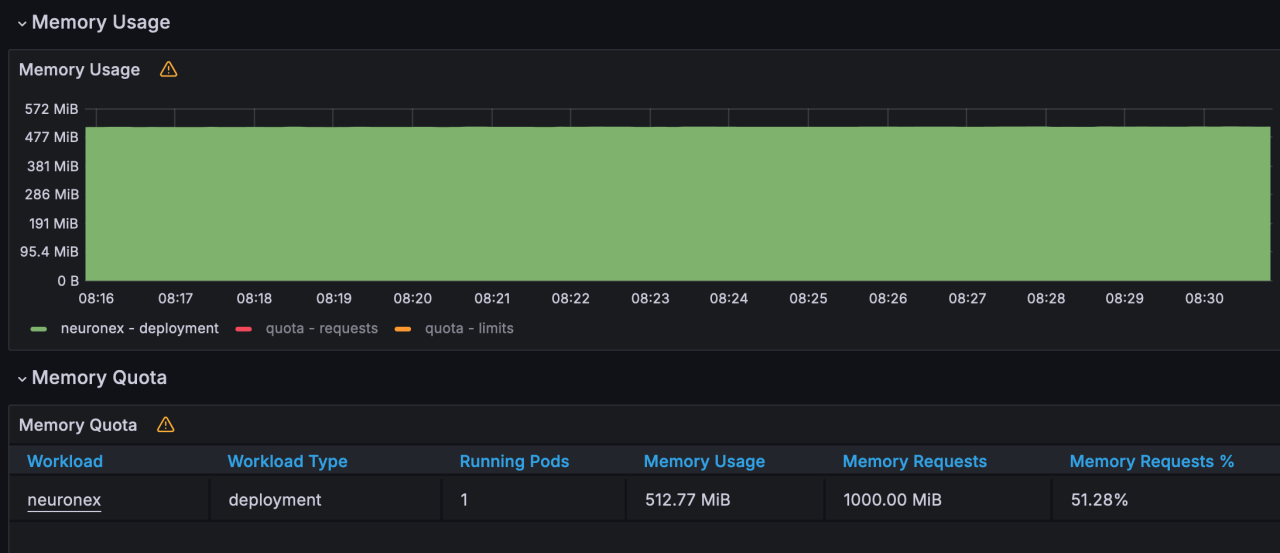
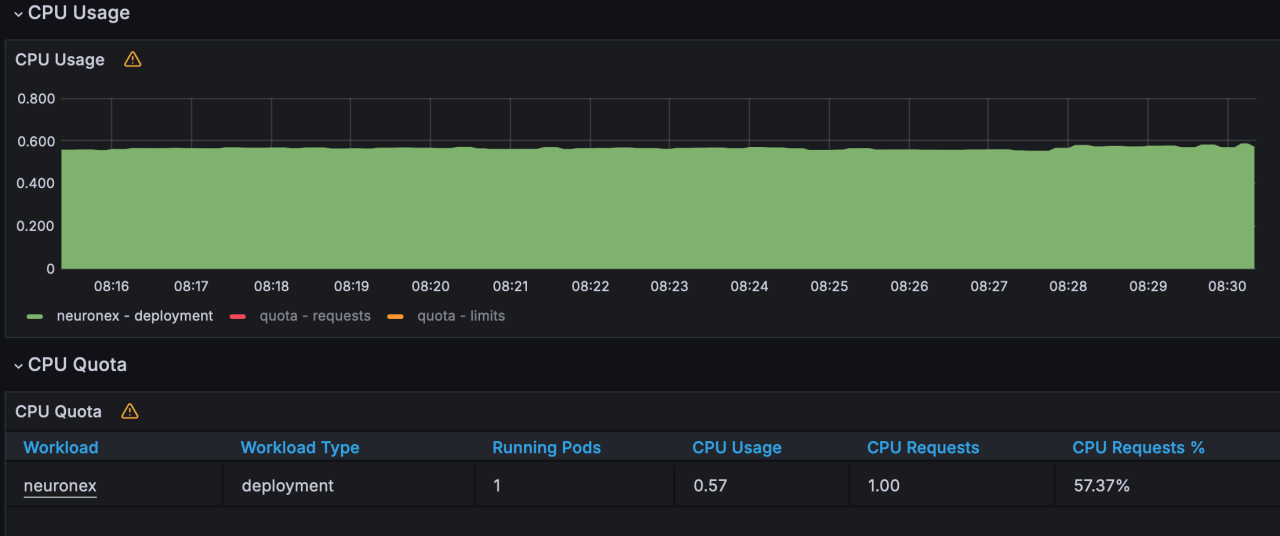
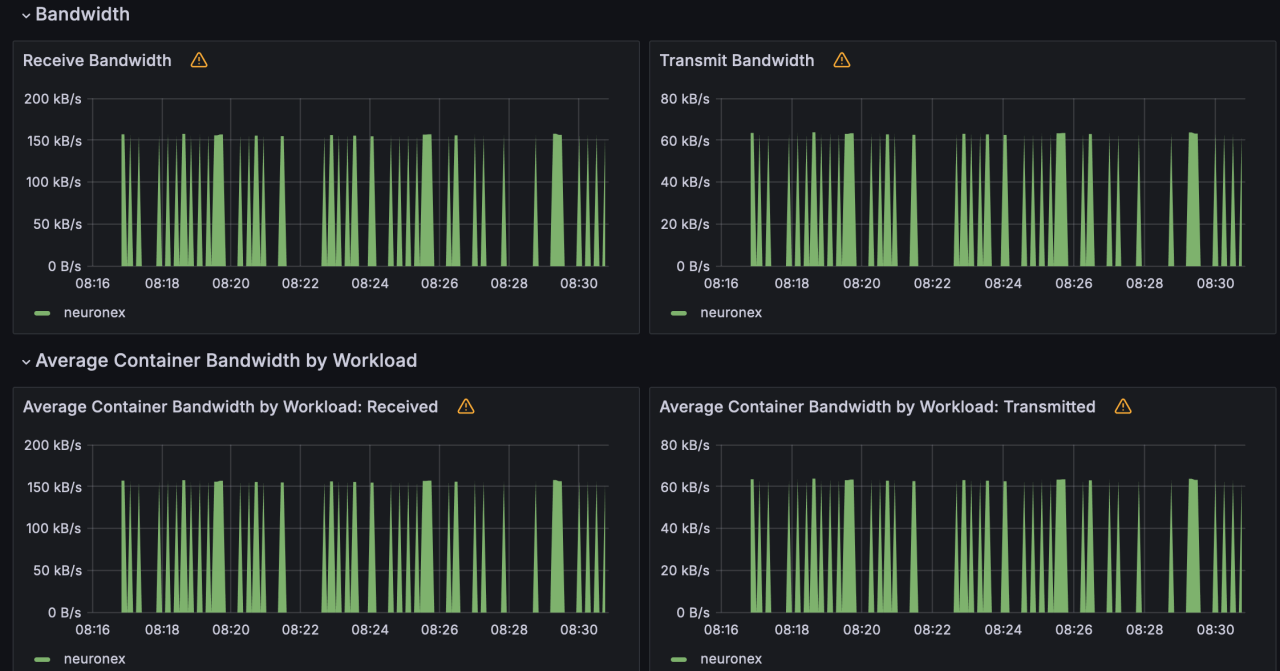
EMQX Neuron is configured with 10 Siemens S7 drivers, each driver including 10 collection groups, each group collecting 1,000 Float type data points per second, totaling 100,000 data points.
- Memory Usage: 512MB
- CPU Usage: 57%
- Network IO: receive:155KB/s; transmit:62KB/s

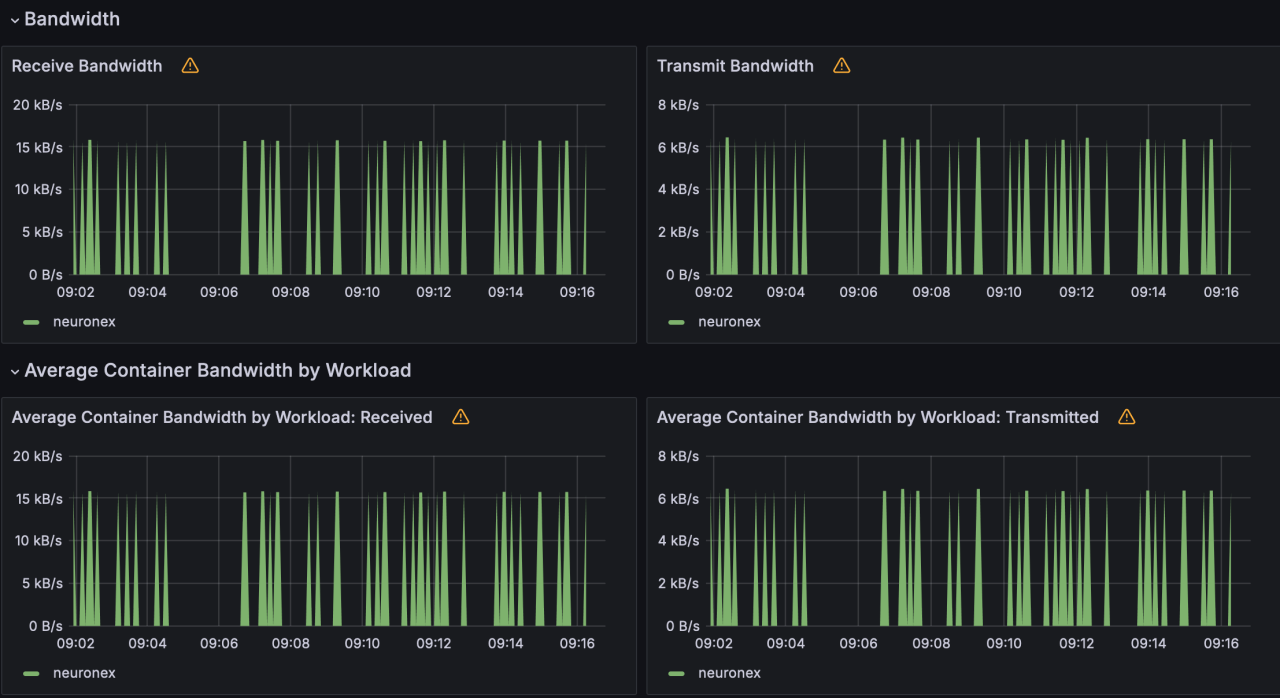
Scenario 4
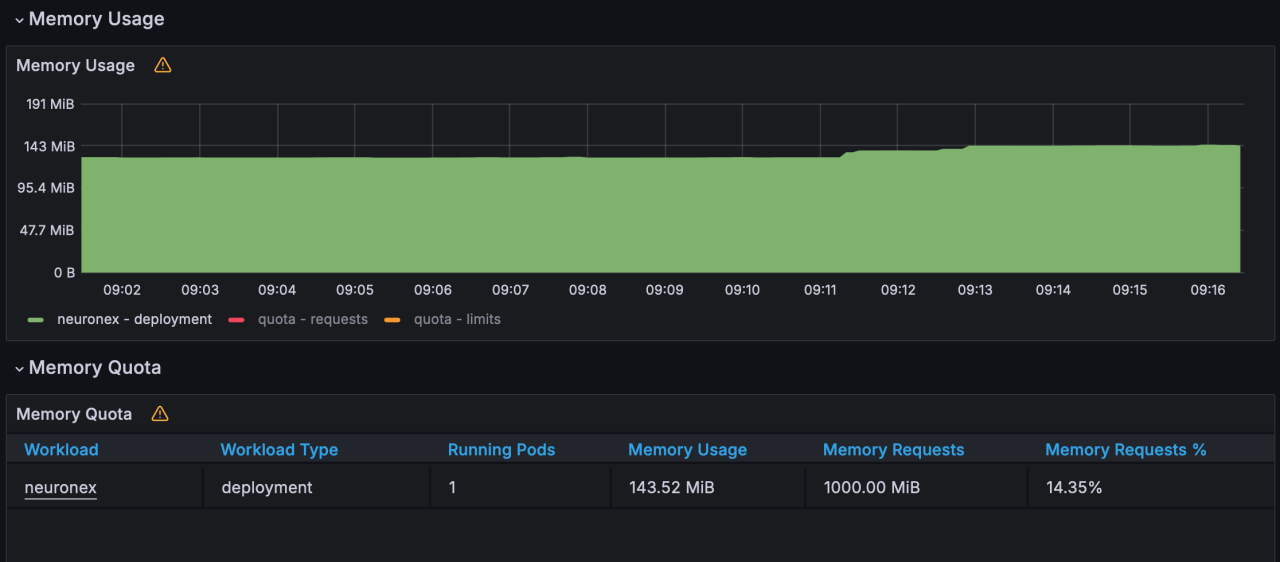
EMQX Neuron is configured with 1 Siemens S7 driver, each driver including 1 collection group, each group collecting 1,000 Float type data points every 100 milliseconds, totaling 1,000 data points.
- Memory Usage: 143MB
- CPU Usage: 3%
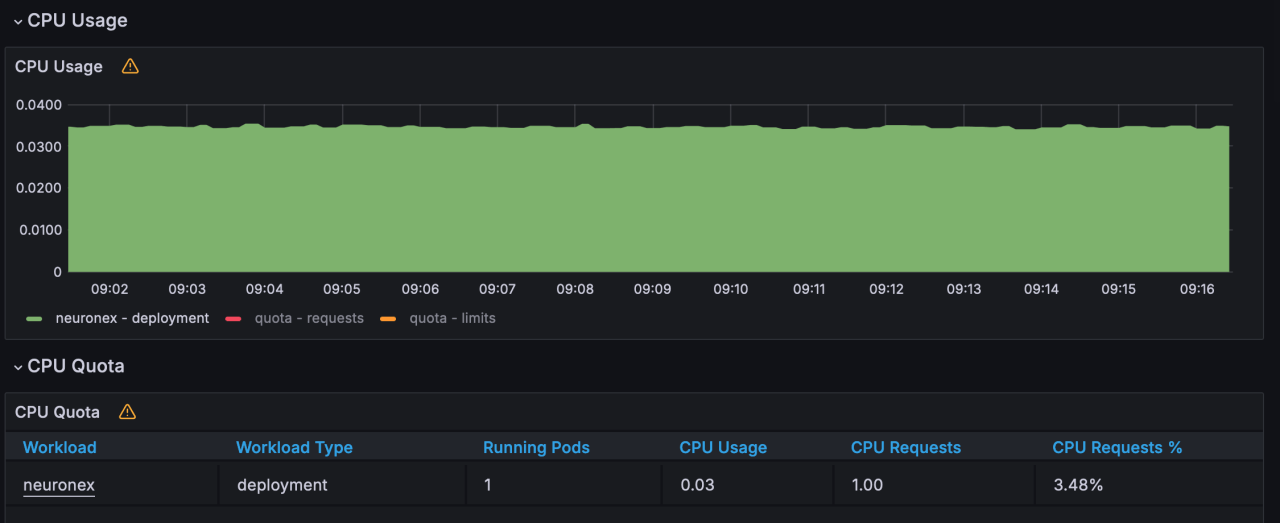
- Network IO: receive:15KB/s; transmit:6KB/s

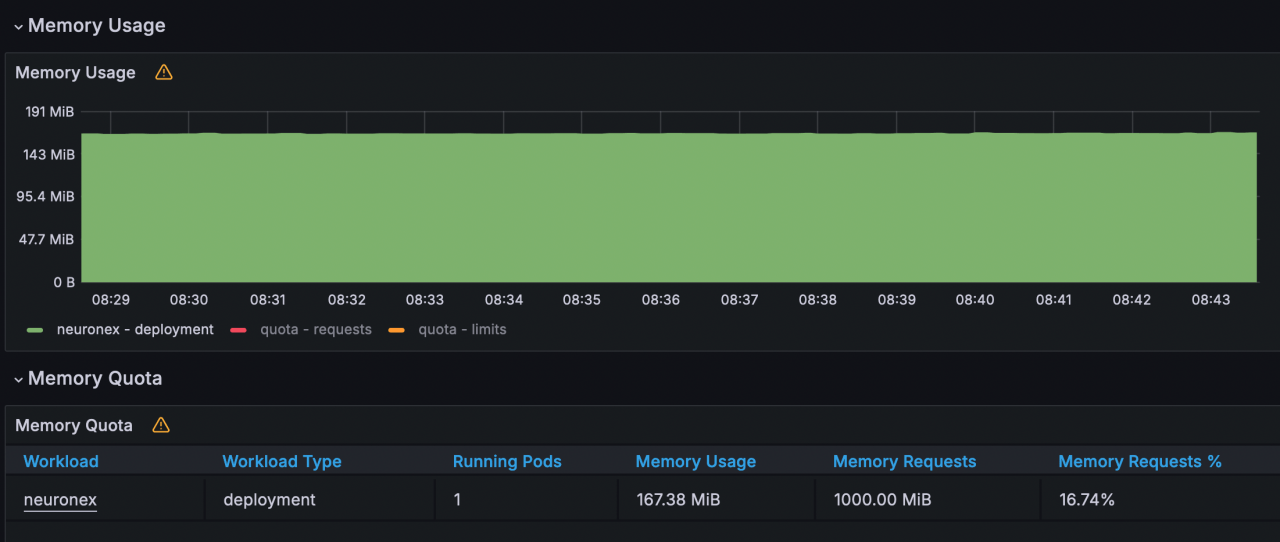
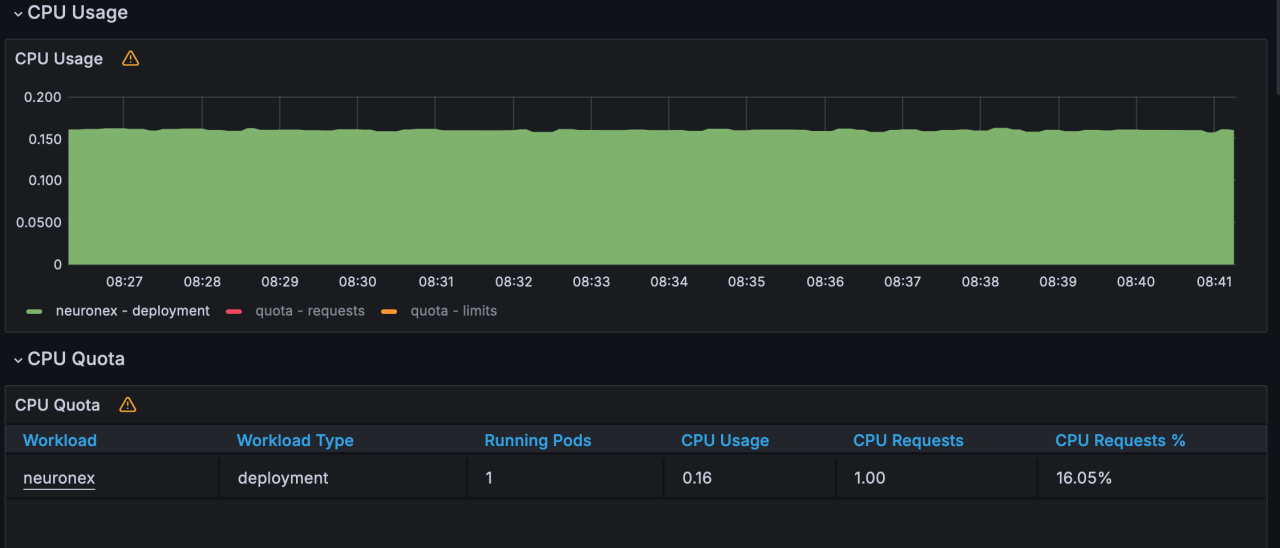
Scenario 5
EMQX Neuron is configured with 5 Siemens S7 drivers, each driver including 1 collection group, each group collecting 1,000 Float type data points every 100 milliseconds, totaling 5,000 data points.
- Memory Usage: 167MB
- CPU Usage: 16%
- Network IO: receive:78KB/s; transmit:31KB/s

Scenario 6
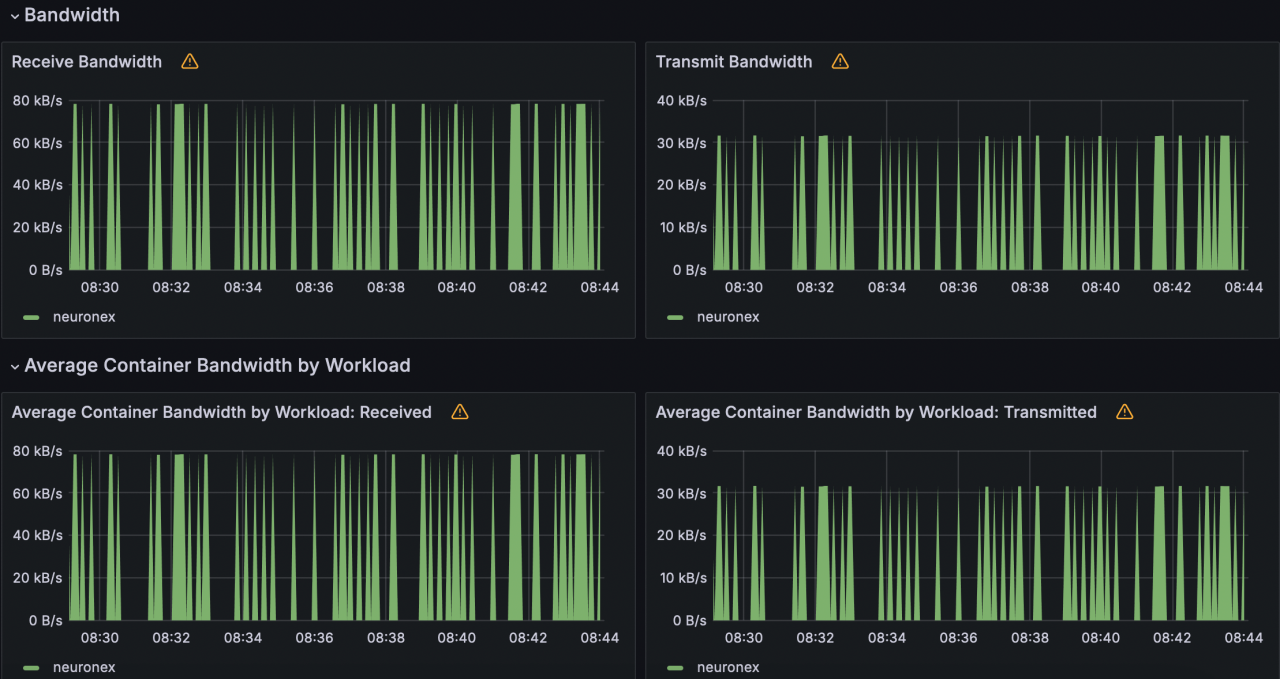
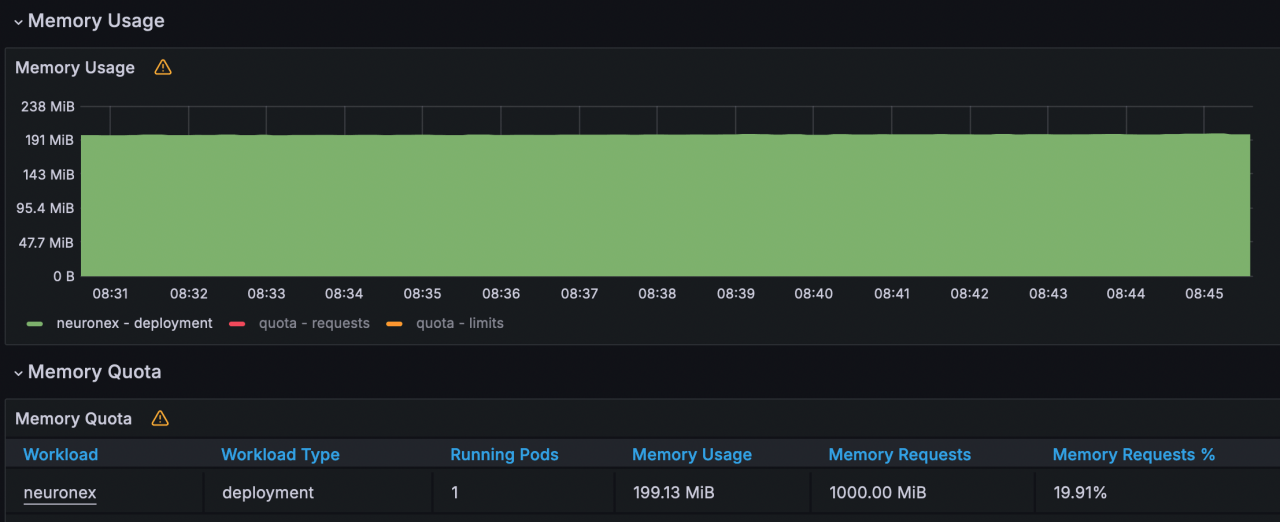
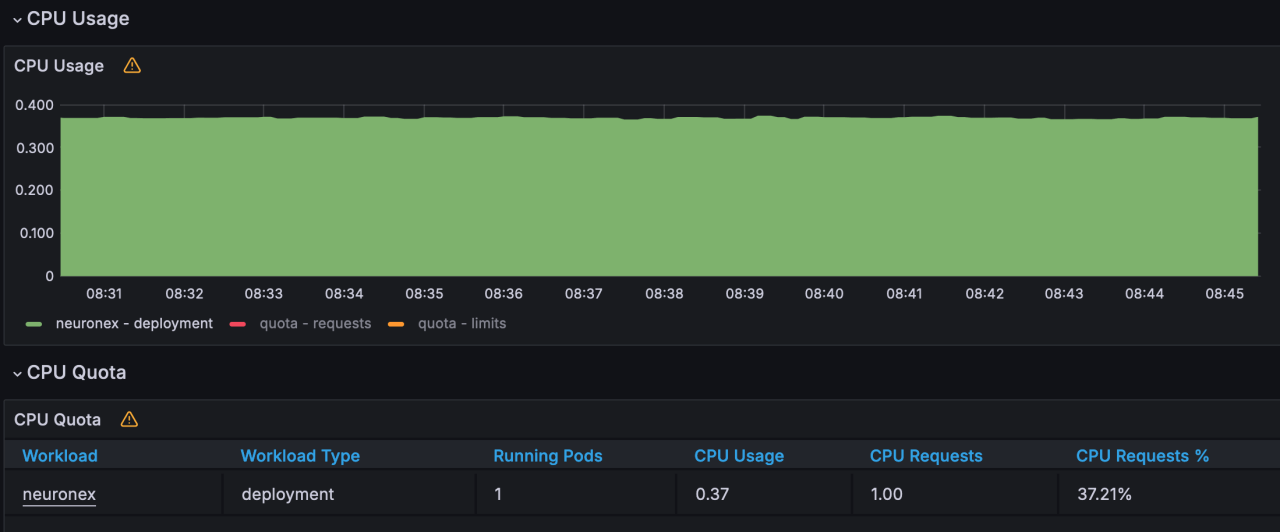
EMQX Neuron is configured with 10 Siemens S7 drivers, each driver including 1 collection group, each group collecting 1,000 Float type data points every 100 milliseconds, totaling 10,000 data points.
- Memory Usage: 199MB
- CPU Usage: 37%
- Network IO: receive:156KB/s; transmit:63KB/s