Litmus Edge to EMQX Neuron Migration Guide
Overview
Migration goal: Convert acquisition configuration from Litmus Edge (V4.0 and above) into a configuration that EMQX Neuron can import.
Conversion method: Use the online configuration conversion tool provided on the EMQ website.
Supported protocols for conversion
| Litmus Edge protocol | Supported | Notes |
|---|---|---|
| Modbus RTU over TCP | Yes | |
| Modbus RTU | Yes | |
| Modbus ASCII | Yes | |
| OPC UA Client (Gen1) | Yes | |
| OPC UA Client Poll (Gen2) | Yes | |
| Allen-Bradley DF1 | Yes | |
| Omron FINS TCP | Yes | |
| Omron FINS UDP | Yes | |
| Omron Hostlink C-Mode | Yes | |
| Siemens S7 / S7 Advanced | Yes | |
| BACnet/IP | Yes |
TIP
Protocols not listed are not supported for conversion for now.
How to export configuration from Litmus Edge
Follow these steps to export configuration in Litmus Edge.
Log in to the Litmus Edge admin UI and open System/Device Management
Under Devices, select the device to migrate
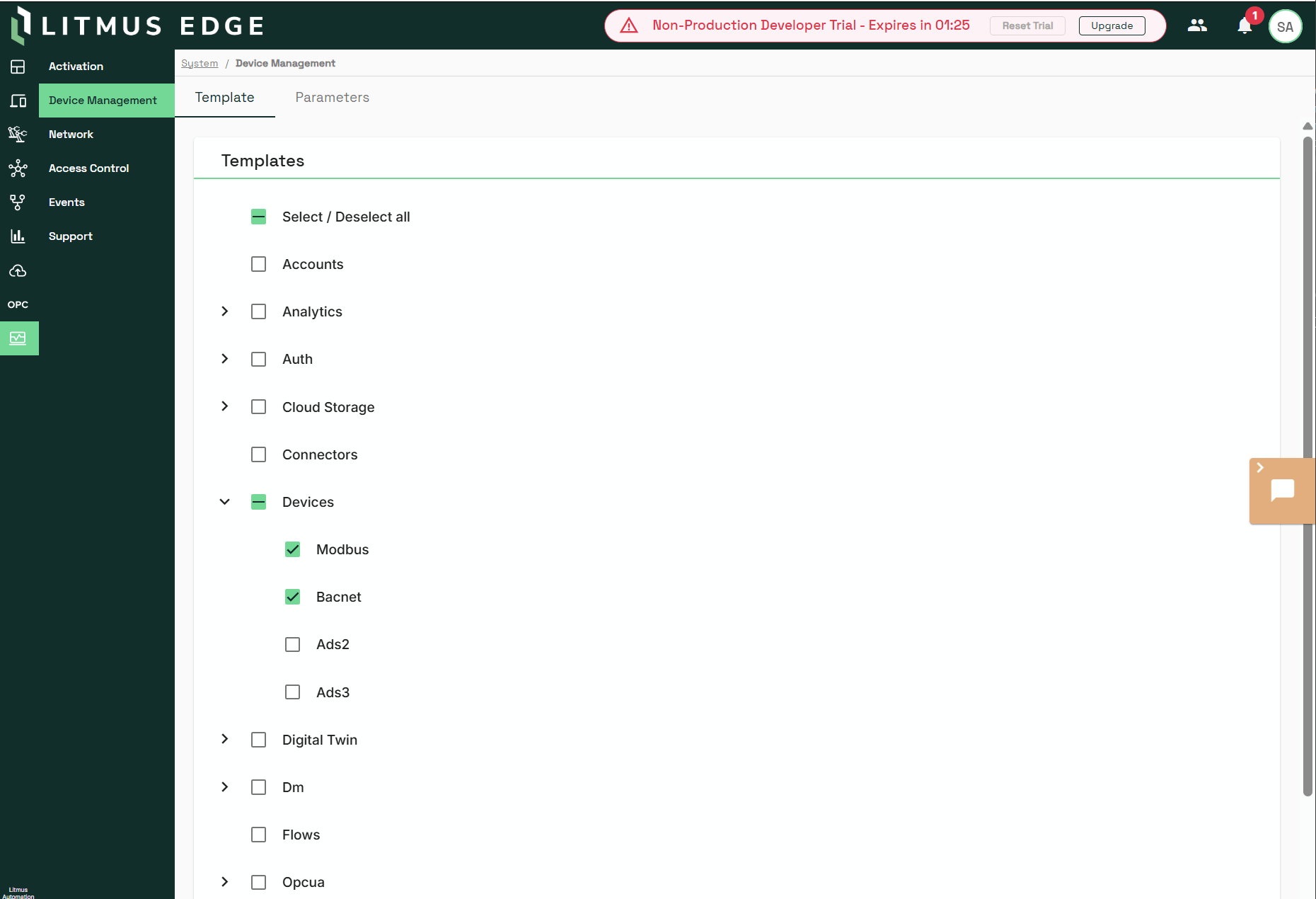
- Download the template and choose Plain Text as the format
The export must include structures that can be mapped, such as device (Device), registers/tags (Register), and so on; the exact fields follow what Litmus Edge exports.
Official conversion tool
Upload and convert
Open the official migration tool page. Set the source to Litmus Edge.
Upload the export file obtained in How to export configuration from Litmus Edge.
Wait for the server to finish conversion and review the summary (device count, tag success/failure statistics, etc.).
Click Download EMQX Neuron configuration JSON to download the converted configuration file.
Conversion failure scenarios
When you download the EMQX Neuron configuration JSON, devices and tags that were not converted successfully (e.g. unsupported drivers) are automatically excluded; the file only contains successfully converted devices and their tags.
After expanding a device, you can see the detailed reasons for conversion failures:
| Tag name | Type | Address | Status | Failure reason |
|---|---|---|---|---|
| outputuint64 | uint64 | H:0 | OK | - |
| inputstring | string | I:0 | Failed | String length exceeded |
Import and verify on the EMQX Neuron side
Ensure EMQX Neuron and Litmus Edge are on the same network so that EMQX Neuron can reach the devices that Litmus Edge was collecting from.
Log in to the EMQX Neuron Dashboard.
On the South Devices page under the data acquisition module, click Import.
Check the connection status of the imported drivers and ensure connections succeed.
On the Data Monitoring page, verify that acquisition data looks normal.
Detailed description of conversion protocols
Grouping strategy
EMQX Neuron supports multiple acquisition groups under a single driver; each group can have its own acquisition interval. Tags under a group cannot have individual acquisition intervals.
On the Litmus Edge side there is no group concept that fully matches EMQX Neuron; registers under a device are a flat list. This conversion tool: puts all tags under each device into one group named default; that group’s acquisition interval is the minimum pollingInterval among all tags on that device. If you need multiple groups in production, manually adjust groups and acquisition rates in EMQX Neuron.
Special notes on supported conversion protocols
1. Protocol name: Modbus TCP
- Device mapping
| Litmus Edge field | EMQX Neuron field | Description |
|---|---|---|
Dev.name | name | Device node name |
| Fixed value | plugin: "Modbus TCP" | Driver name |
settings.networkAddress | params.host | IP address |
settings.networkPort | params.port | Port |
settings.stationId | slave_id in tag address | Slave ID |
settings["Zero-Based Addressing"] | params.address_base | "1" → base_0(0); "0" → base_1(1) |
| Fixed value | params.connection_mode: 0 | Client mode |
| Fixed value | params.timeout: 3000 | Connection timeout (ms, subject to product) |
| Fixed value | params.interval: 20 | Send interval (subject to product) |
- Register area mapping (Litmus Edge
Register.nameprefix → EMQX Neuron area code)
Litmus Edge name prefix | EMQX Neuron area code | Meaning |
|---|---|---|
C | 0 | Coil |
D | 1 | Discrete Input |
I, I_bit, I_String | 3 | Input Register |
H, H_bit, H_String | 4 | Hold Register |
- Data type mapping (Litmus Edge
value_type→ EMQX Neuron type)
Litmus Edge value_type | EMQX Neuron type | Value |
|---|---|---|
| bit | NEU_TYPE_BIT | 11 |
| int16 | NEU_TYPE_INT16 | 3 |
| uint16 | NEU_TYPE_UINT16 | 4 |
| int32 | NEU_TYPE_INT32 | 5 |
| uint32 | NEU_TYPE_UINT32 | 6 |
| int64 | NEU_TYPE_INT64 | 7 |
| uint64 | NEU_TYPE_UINT64 | 8 |
| float32 | NEU_TYPE_FLOAT | 9 |
| float64 | NEU_TYPE_DOUBLE | 10 |
| word | NEU_TYPE_UINT16 | 4 |
| string | NEU_TYPE_STRING | 13 |
- Read/write attributes (area → EMQX Neuron attribute)
| Litmus Edge area | EMQX Neuron attribute | Description |
|---|---|---|
| Coil (C) | 3 (Read+Write) | Read/write |
| Discrete Input (D) | 1 (Read) | Read-only |
| Hold Register (H) | 3 (Read+Write) | Read/write |
| Input Register (I) | 1 (Read) | Read-only |
| Hold Register Bit (H_bit) | 1 (Read) | EMQX Neuron does not support register bit writes |
| Input Register Bit (I_bit) | 1 (Read) | Read-only |
- Byte order (4-byte)
Litmus Edge endianness | EMQX Neuron 4-byte (endianess) | EMQX Neuron address suffix |
|---|---|---|
"AB CD" | ABCD (1) | #BB / no suffix |
"BA DC" | BADC (2) | #LB |
"CD AB" | CDAB (4) | #BL |
"DC BA" | DCBA (3) | #LL |
- Byte order (8-byte)
Litmus Edge endianness | EMQX Neuron 8-byte |
|---|---|
"AB CD" | LL (1) |
"BA DC" | LB (2) |
"DC BA" | BB (3) |
"CD AB" | BL (4) |
- Tag address format and addressing rules
EMQX Neuron Modbus TCP address format: {slave_id}!{area_code}{address}
Ordinary numeric values:
1!40000(slave_id=1, Hold Register, address=0)String:
1!40000.55H(example: 55-byte string at address 0)Register bit:
1!40000.0(bit 0 of Hold Register at address 0)
Relationship to Litmus Edge settings["Zero-Based Addressing"]:
"1"(zero-based) → EMQX Neuronaddress_base= 0; use the address as-is"0"(one-based) → EMQX Neuronaddress_base= 1; add 1 to the address
Mapping to Litmus Edge fields: The tables above are what the migration tool uses; if Litmus Edge export fields change, follow the tool release notes.