Send Data to the Cloud
Publish tags collected by southbound drivers to a cloud platform or an MQTT broker. Protocol conversion happens at the edge, so the cloud receives JSON with a uniform structure.
Selecting an application
Application | Target | Authentication |
|---|---|---|
| MQTT | Any MQTT broker: EMQX or self-hosted | Username and password, TLS with one-way or mutual authentication |
| EMQX Cloud | The managed MQTT service from EMQ, through the MQTT application | Username and password over TLS |
| AWS IoT | AWS IoT Core | Device certificate and private key |
| Azure IoT | Azure IoT Hub | SAS token or X.509 certificate |
All three are built on MQTT and share most configuration parameters. AWS IoT and Azure IoT embed the topic rules and certificate scheme of their platform, so only the platform credentials have to be supplied.
TIP
Running several MQTT application nodes in one EMQX Neuron instance is not recommended, as it may cause reduced throughput and resource contention. To publish to several destinations, add multiple subscriptions under one node, or use different northbound application types.
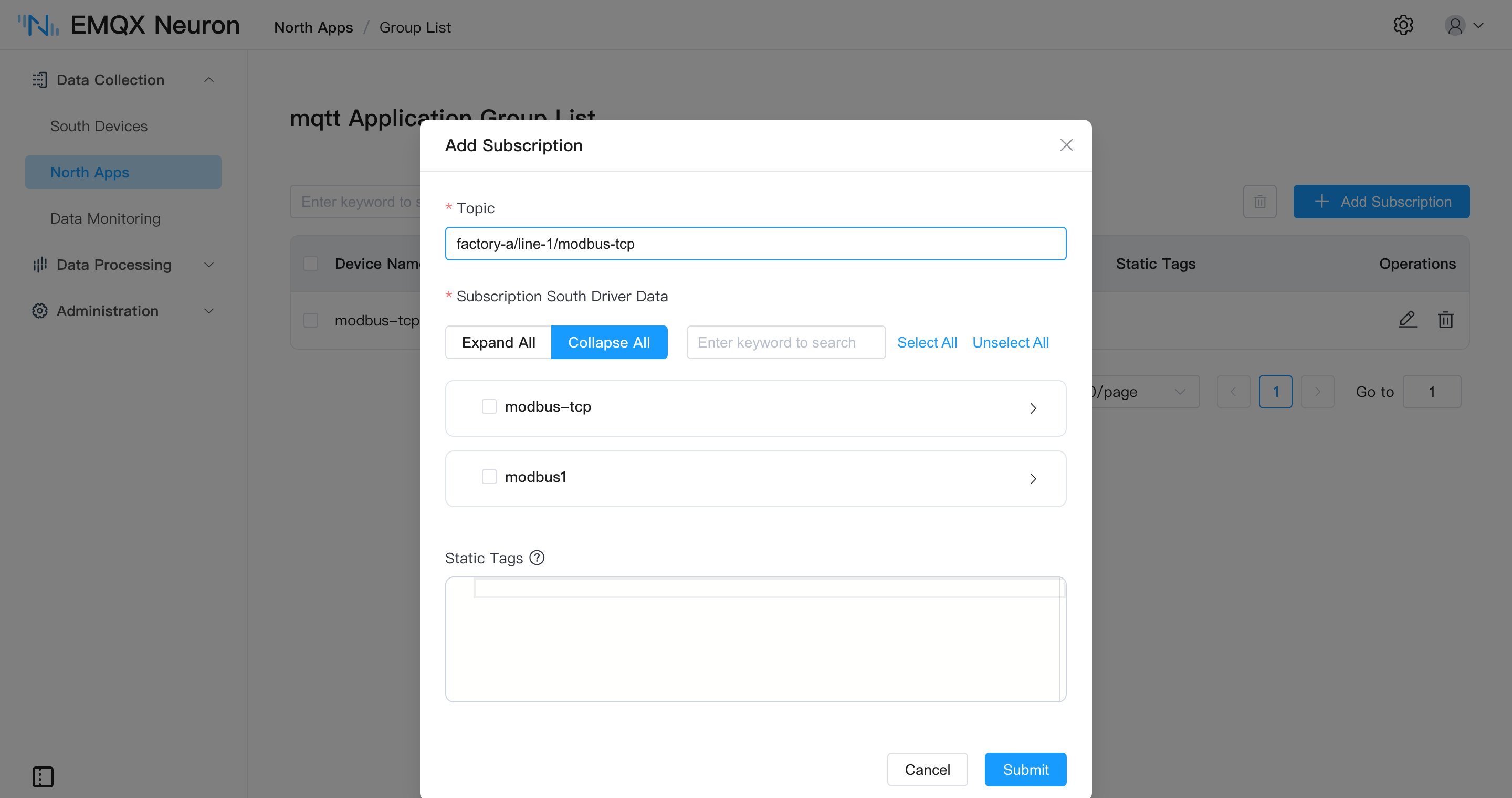
Upload topic
The upload topic is set per subscription. When it is left blank, the default topic applies:
/neuron/{application name}/{driver name}/{group name}For an application named mqtt, a southbound driver modbus-tcp-1, and a group group-1, the default topic is /neuron/mqtt/modbus-tcp-1/group-1.
Across multiple plants or production lines, define topics that carry the hierarchy — factory-a/line-1/modbus-tcp-1, for example — so the cloud can subscribe with topic wildcards.
Upload format
The structure of the published payload is controlled by the Upload Format parameter. Five formats are available:
Format | Structure |
|---|---|
values-format | Tags collected successfully go into values, tags that failed into errors |
tags-format | All tags go into a single array, each element carrying a tag name and value |
ECP-format | tags-format with an added data type field |
Custom | A user-defined template; fields and nesting are composed with built-in variables |
protobuf | Binary, encoded as the Protocol Buffers DataReport message rather than JSON |
The first four are JSON. protobuf suits bandwidth-constrained links; the cloud side decodes it against the same .proto definition.
A values-format payload:
{
    "timestamp": 1650006388943,
    "node": "modbus",
    "group": "grp",
    "values": { "tag0": 123 },
    "errors": { "tag1": 2014 },
    "metas": {}
}
When a tag fails to collect, an error code is published instead of a value. Setting the Upload Tag Error Code parameter to False filters failed tags out of the payload entirely.
For the other formats and full field descriptions, see Upstream/Downstream Data Format.
Static tags
Each collection group can carry a set of static tags — JSON key/value pairs published alongside the collected data — for attributes that do not change with collection, such as a line number, device serial, or installation location:
{ "location": "sh", "sn_number": "123456" }Boolean, integer, float, and string types are supported; arrays and structures are published as strings. A static tag must not share a name with a collected tag, or it will override the collected value under values-format.
Offline caching
When communication is interrupted, messages are written to the memory cache first and moved to the disk cache once memory fills. They are replayed in first-in, first-out order after the connection is restored.
| Parameter | Range | Default |
|---|---|---|
| Offline Data Caching | On / Off | Off |
| Cache Memory Size | 1 – 1024 MB | Empty |
| Cache Disk Size | 1 – 10240 MB | Empty |
| Cache Sync Interval | 10 – 120000 ms | 100 |
When the disk cache size is nonzero, the memory cache size must also be nonzero, and the memory cache size must not exceed the disk cache size. For measured disk usage at different tag counts, see Offline Data Caching.
MQTT, AWS IoT, Azure IoT, and Sparkplug B all support these parameters; Kafka and WebSocket do not.
Writing back to devices
The cloud publishes a JSON write request to the write request topic. EMQX Neuron writes the value to the device through the southbound driver and publishes the result to the write response topic.
| Application | Write request topic |
|---|---|
| MQTT, AWS IoT | Configurable, default neuron/${random_str}/write/req |
| Azure IoT | Fixed at devices/{device ID}/messages/devicebound/#, with the result published to devices/{device ID}/messages/events/ |
The target tag must have the write attribute configured in the southbound driver — see Groups and Tags · Tag attributes. For the request body and multi-tag writes, see Upstream/Downstream Data Format · Write Tag.
Processing before upload
With a large number of tags or a high polling rate, publishing raw data consumes considerable uplink bandwidth and cloud storage. Southbound data can first be routed into the data processing engine and filtered, downsampled, or aggregated with SQL before publishing. Both paths can coexist; for selection guidance, see Feed Analytics and Edge Computing.
Next steps
- Create a northbound application → Subscribe to southbound data
- Southbound driver states can be published to a dedicated topic for monitoring gateway health from the cloud — see MQTT · Driver status reporting