TLS Certificate Expiration Alert
The TLS Certificate Expiration alert indicates that the TLS certificate used by an EMQX Dedicated deployment is about to expire or has already expired.
Notifications are sent 30, 15, 7, 3, and 1 day before expiration, and again after the certificate expires.
Update the TLS Certificate
You can update the TLS certificate in either of the following ways:
- Update the certificate in the EMQX Cloud Console.
- Update the certificate for a specified deployment through the Deployment API.
Update the Certificate in the EMQX Cloud Console
On the deployment Overview page, open TLS/SSL Configuration. Hot-update the certificate by uploading new certificate files or entering the new certificate content manually.
Update the Certificate Through the Deployment API
Use PUT /deployments/{deployment_id}/tls to update the TLS certificate for a specified deployment. For request parameters and examples, see Update TLS Certificates for Specified Deployment.
Monitoring and Statistics
On the deployment Overview page, open TLS/SSL Configuration to view the current certificate expiration date.
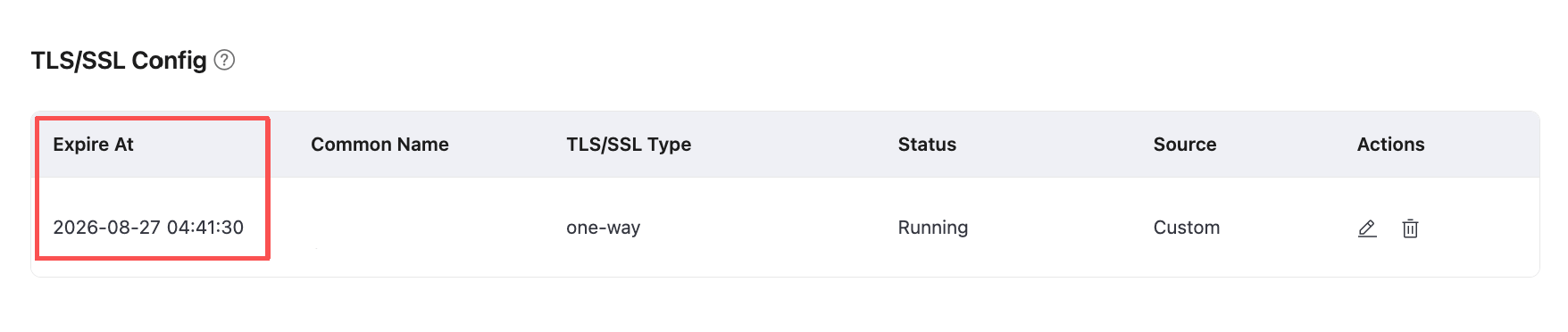
You can also query the TLS certificate status through the Deployment API. The
expirefield in the response shows the certificate expiration date.URI:
GET /deployments/{deployment_id}/tls
Impact
Existing clients connected through a TLS-enabled port remain connected after the certificate expires. However, new clients cannot establish secure connections through that port. Update the certificate before it expires to keep the deployment securely available.