Device Shadow
Device Shadow is the mechanism EMQX Fleets uses to keep cloud intent and device reality in sync. It provides a persistent, versioned representation of a device's state that is always available, even when the device is offline.
The Three-State Model
Each Thing has one shadow document containing three states:
| State | Owner | Meaning |
|---|---|---|
| Reported | Device | The actual current state of the device, as last reported by the device itself |
| Desired | Cloud | The target state the cloud wants the device to reach |
| Delta | Computed by Fleets | The difference between desired and reported — what the device still needs to apply |
When the cloud writes a desired state, Fleets computes the delta and pushes it to the device. The device applies the delta and reports its new state. Fleets updates the shadow and recomputes the delta (which becomes empty when desired and reported match).
Cloud writes desired  →  Fleets computes delta  →  Device receives delta
                                                            ↓
Cloud reads reported  ←  Fleets stores reported  ←  Device reports state
Shadow Versioning
Each shadow document has a monotonically increasing version number. The version increments every time the desired or reported state changes. Devices can use the version to detect stale updates and avoid applying out-of-order changes.
View the Shadow in the Console
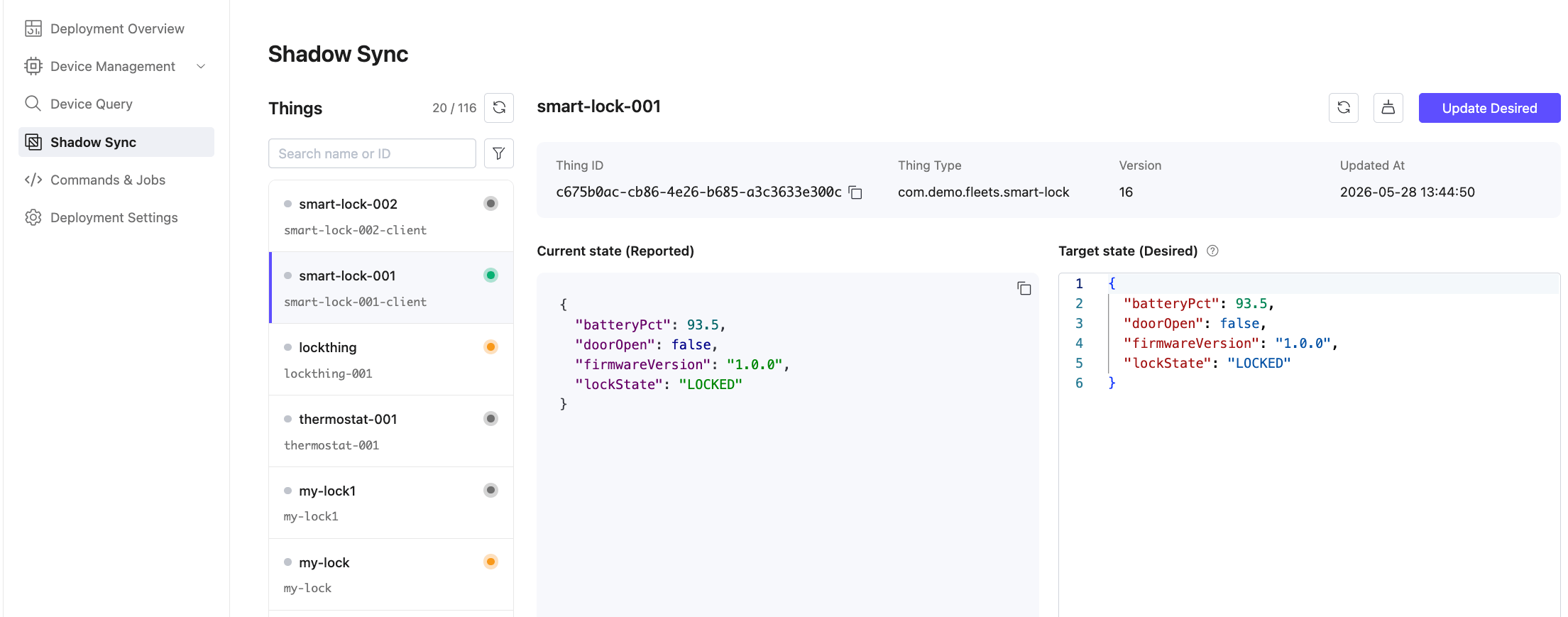
- In your Fleets deployment, go to Shadow Sync in the left menu.
- Select a Thing from the list on the left. Each entry shows the Thing name and its MQTT Client ID.
- The right panel shows:
- Thing ID, Thing Type, current Version, and Updated At timestamp
- Current state (Reported): the last state reported by the device
- Target state (Desired): the state the cloud wants the device to reach
If the device has not yet reported any state, the reported panel shows "Device has not reported any state yet."
Click Refresh (the refresh icon) to reload the latest shadow data.
Update the Desired State
To push a desired state change to a device:
- Go to Shadow Sync and select a Thing.
- In the Target state (Desired) panel, enter the desired state as a JSON object:json
{ "targetTemperature": 22, "mode": "cooling" } - Click Update Desired.
Fleets stores the desired state, computes the delta, and publishes it to the device via MQTT.
You can also update the desired state programmatically using the REST API:
PATCH /api/v1/things/{id}/shadowHow the Device Receives State Changes
When the cloud updates the desired state, Fleets publishes to two MQTT topics:
| Topic | Content |
|---|---|
$emqx/things/{thingName}/shadow/update | Full desired state payload |
$emqx/things/{thingName}/shadow/update/delta | Only the fields that differ from reported |
Devices should subscribe to the delta topic and apply only the fields that differ, then report their updated state.
If the device is offline when the desired state is updated, the delta is delivered the next time the device subscribes to the topic after reconnecting (using a persistent MQTT session).
How the Device Reports State
Devices report their current state by publishing to:
$emqx/things/{thingName}/shadow/updatePayload:
{
  "state": {
    "reported": {
      "temperature": 21.5,
      "targetTemperature": 22,
      "mode": "cooling"
    }
  },
  "clientToken": "optional-correlation-id",
  "version": 3
}
EMQX routes this message to Fleets, which:
- Stores the reported state in GreptimeDB (time-series history) and PostgreSQL (latest copy)
- Recomputes the delta
- Updates the shadow version
Alternatively, devices can report state over HTTPS using:
POST /api/v1/thing-datas/shadow/reportedFor the full protocol details, see MQTT Integration or HTTPS Integration.
Clear the Desired State
To remove the desired state (for example, after the device has converged):
- Go to Shadow Sync, select a Thing.
- Click Clear Desired (the icon next to the Refresh button).
Alternatively, use the REST API:
DELETE /api/v1/things/{id}/shadowShadow History
Reported state is stored as a time series in GreptimeDB. Historical shadow values can be queried using the Device Query time-series filter with tsFrom, tsTo, and tsFieldName parameters.